Building a Self-Learning Layer for AI Coding Assistants
An experiment in declarative coding: infrastructure that captures conversations, prevents mistakes, and builds collective intelligence — built without writing code by hand.
The experiment
What happens if you let AI coding assistants build their own support infrastructure, without writing a line of code yourself — only describing what you want?
The answer turned out to be surprisingly functional, robust software.
The claim that matters
Declarative coding shifts the focus from syntax to architecture. Instead of "how do I express this", you think about system structure, data flow and component boundaries. The cognitive load moves to the bigger picture.
But architectural understanding becomes more essential, not less. When you describe systems at a high level you have to know what good architecture looks like. The AI supplies the syntax; you supply the vision — and the more seasoned the developer, the better the result.
What it is not
Not polished product software. A working experiment, and a foundation to fork and adapt.
The wider bet
As assistants become more capable, useful fragments may be worth more than monolithic applications. Fork it, point your assistant at it, shape it into what you need.
The premise
This project began as a question rather than a plan: could an AI coding assistant build the infrastructure that supports its own work, driven only by description rather than by hand-written code?
The result is running daily, which is the only claim being made for it. Some parts work well; others need refinement. The interesting output is not the software but what building it this way taught.
What changes, and what does not
The change is where effort goes. Expressing an idea in a particular language stops being the bottleneck, and the bottleneck becomes knowing which idea to express — how the system should be structured, where the boundaries are, how data should flow.
What does not change is the need to know what good architecture looks like. A high-level description is only as good as the judgement behind it, and vague intent produces plausible-looking structure that does not survive contact with the next requirement. Domain expertise and architectural intuition translate directly into better output.
That is the honest version of the "AI writes the code" story: it removes a skill that was often mistaken for the whole job, and leaves the harder one exposed.
What the layer does
The infrastructure described here captures conversations, prevents known mistakes before they happen, and accumulates knowledge across sessions — the systems documented throughout the rest of this site. The article's interest is in how such a thing gets built this way, and what that process demands of the person directing it.
The wider argument
If assistants keep improving, the unit of reusable value may shift. A monolithic application solves someone else's problem in someone else's shape; a useful fragment plus a capable assistant can be reshaped into yours.
That is why this exists as something to fork rather than something to install.
An experiment in declarative coding: creating infrastructure that captures conversations, prevents mistakes, and builds collective intelligence for development teams.
This project started as an experiment. A question, really: what happens if you let AI coding assistants build their own support infrastructure, without writing a single line of code yourself - only describing what you want?
The answer, it turns out, is surprisingly functional, robust and performant software.
Coding is an infrastructure layer built entirely through "vibe coding" - a form of declarative programming where I describe intentions and let AI assistants handle the implementation. Some parts work beautifully. Others need refinement. But the core is solid enough that I'm using it daily, and I think the patterns here might be useful to others building in this space.
What I've learned: vibe coding fundamentally shifts the focus from syntax to architecture and design. Instead of wrestling with "how do I express this in a programming language," you're thinking about solutions - system structure, data flow, component boundaries. The cognitive load moves from implementation details to the bigger picture.
But here's the thing: a sound understanding of software architecture is still essential. Perhaps more essential than ever. When you're describing systems at a high level, you need to know what good architecture looks like. The AI handles the syntax; you need to provide the vision. In my experience, the more seasoned the developer, the better the vibed code. Domain expertise and architectural intuition translate directly into better outcomes.
This isn't polished product software. It's a working experiment - a foundation that can be forked, adapted, and evolved. With AI coding assistants becoming increasingly capable, we're entering an era where "useful fragments" might be more valuable than monolithic applications. Fork it, point your AI assistant at it, and shape it into what you need.
The age of custom-made software is approaching.
The Problems We're Solving
AI coding assistants are everywhere now. Claude Code, GitHub Copilot, OpenCode, Codex, Gemini CLI - pick your favorite.
But two things keep bothering me:
First, the amnesia problem. Every time I start a new session, my assistant has forgotten everything. That bug we debugged together last week? Gone. The architectural decision we made yesterday? Vanished. The pattern we established for handling errors in this codebase? It needs to rediscover it from scratch.
We've essentially built incredibly smart assistants with permanent amnesia.
Second, the scalability problem. What if you could have a team of senior developers who all share the same deep knowledge - not just of the codebase, but of every discussion, every decision, every pattern that's ever been established? A collective brain that grows smarter with every interaction?
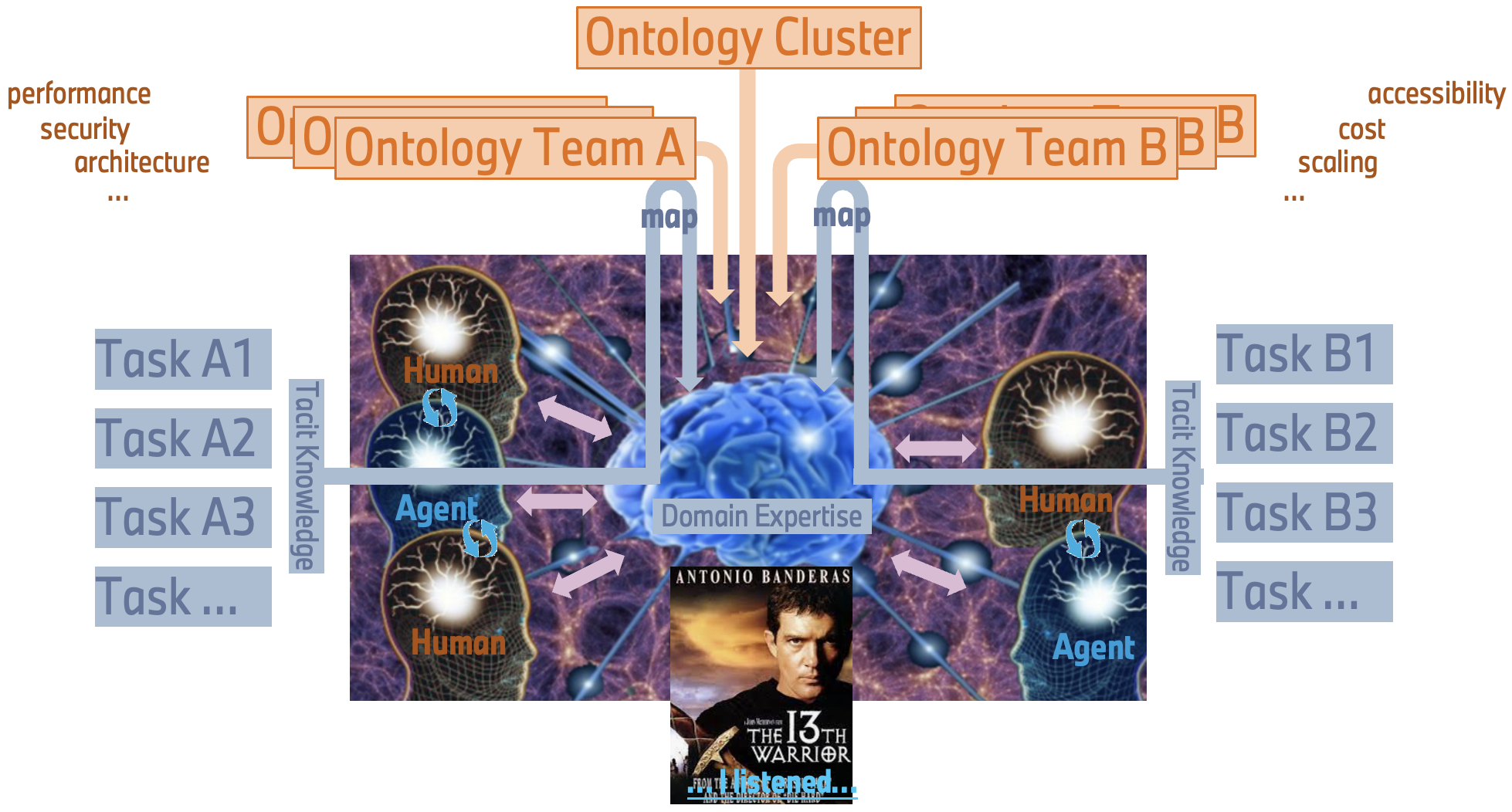 The vision: humans and AI agents sharing domain expertise through a collective knowledge system, with team-specific ontologies feeding into shared understanding.
That's the bigger vision here. Not just memory for one assistant, but shared intelligence across agents and team members. Every conversation feeds a knowledge graph. Every pattern gets captured. Every new team member (human or AI) can tap into the accumulated wisdom of everyone who came before.
What Coding Does
The system has four main layers:
- Live Session Logging - Multi-layer intelligent classificationv
- Knowledge Extraction - Multi-agent AI system building a collective brain
- Constraint Enforcement - Blocks mistakes before execution
- Health Monitoring - 3-layer supervision architecture
Let me walk you through each.
Live Session Logging: Capturing Everything
The foundation is a real-time monitoring system called LSL (Live Session Logging).
It captures every prompt, every tool call, every response - but here's where it gets interesting: it uses a 5-layer classification system to intelligently route content.
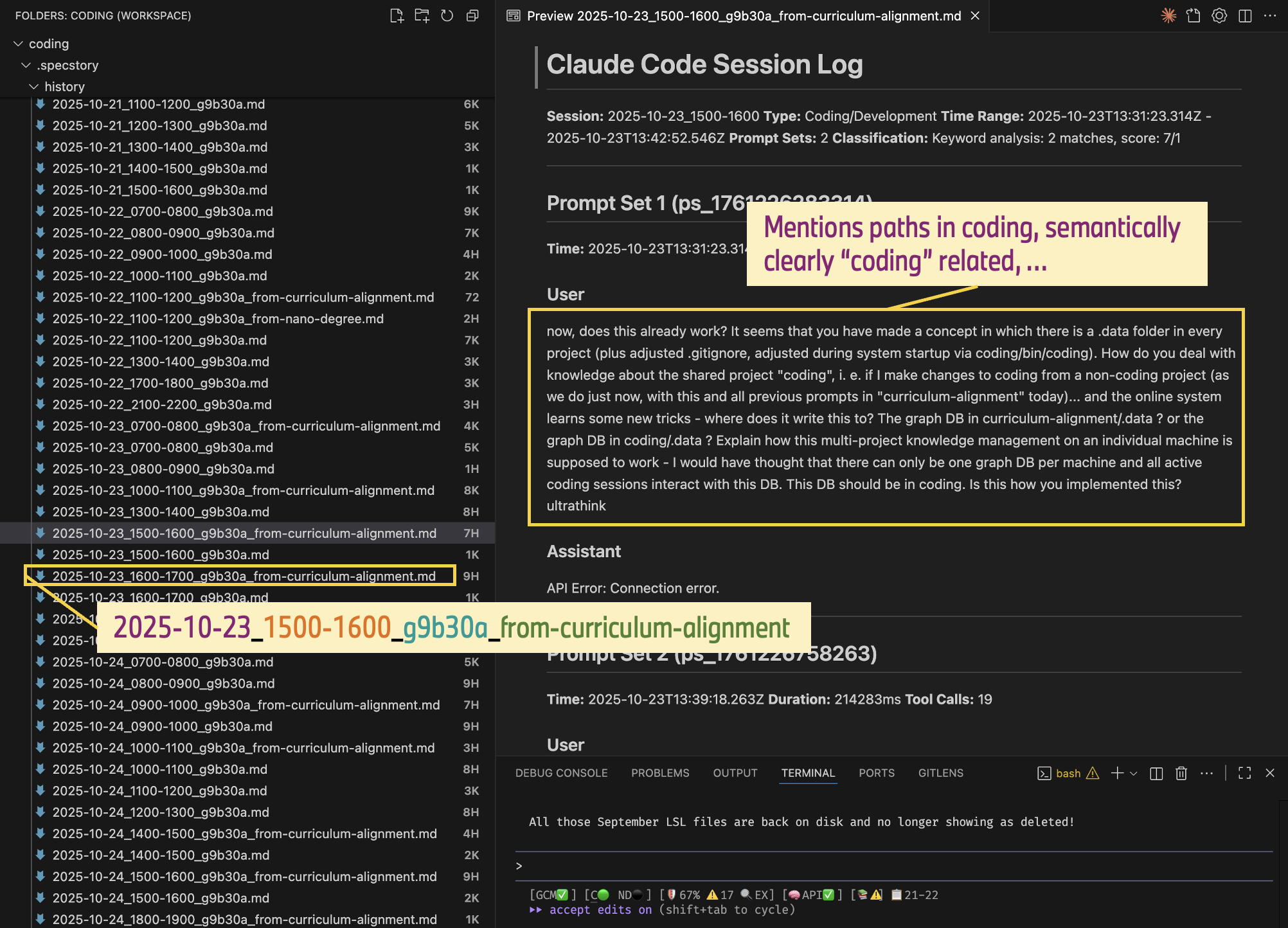 Session logs organized by time slots, with intelligent routing - notice how "from-curriculum-alignment" files are automatically routed (to project Coding) based on semantic classification.
Why layers? Because not everything needs deep analysis. A simple file read can be classified in under a millisecond. Complex discussions about architecture might need the semantic analyzer. The system short-circuits at the first confident decision.
| Layer | What It Does | Speed |
|---|---|---|
| Session Filter | Tracks conversation context | Instant |
| Path Analyzer | Pattern-matches file operations | Less than 1ms |
| Keyword Matcher | Fast keyword classification | Less than 10ms |
| Embedding Classifier | Semantic vector similarity | Around 50ms |
| Semantic Analyzer | LLM-powered understanding | From 10ms (cached) up to 500-800ms |
The classification determines routing. Content about the Coding infrastructure itself goes to one log. Content about your actual project goes to another. Multiple projects, multiple developers - the system keeps everything organized automatically.
Privacy is baked in. Before anything gets stored, a configurable redactor strips sensitive data - API keys, tokens, passwords, email addresses, corporate identifiers. At present: 13 pattern types, low millisecond overhead per exchange.
Knowledge Extraction: Building the Collective Brain
Capturing conversations is just the start. The real value comes from extracting actionable knowledge that any team member or AI agent can access.
The system aims to learn a programmer's ways by quietly observing - watching how we approach specific problems and what solutions we arrive at. Think of Antonio Banderas in the 1999 film The 13th Warrior, where he plays a captured Arab poet who learns to speak "Viking" (Old Norse) simply by listening to his captors' conversations around the campfire. Given a certain cultural overlap - both parties are human, they eat, they drink, they make jokes - a shared ontology, if you like - he manages to extract enough meaning to finally begin communicating. In his case, flawlessly. It's Hollywood, after all.
That's the idea here. The system observes conversations, git commits, debugging sessions. It looks for patterns in how problems are framed and solved. Over time, it builds understanding - not through explicit teaching, but through quiet observation of the shared "ontology" between developer and codebase.
A multi-agent (currently 14 agents) AI system analyzes git history and conversation logs, extracting patterns and insights into a searchable knowledge graph.
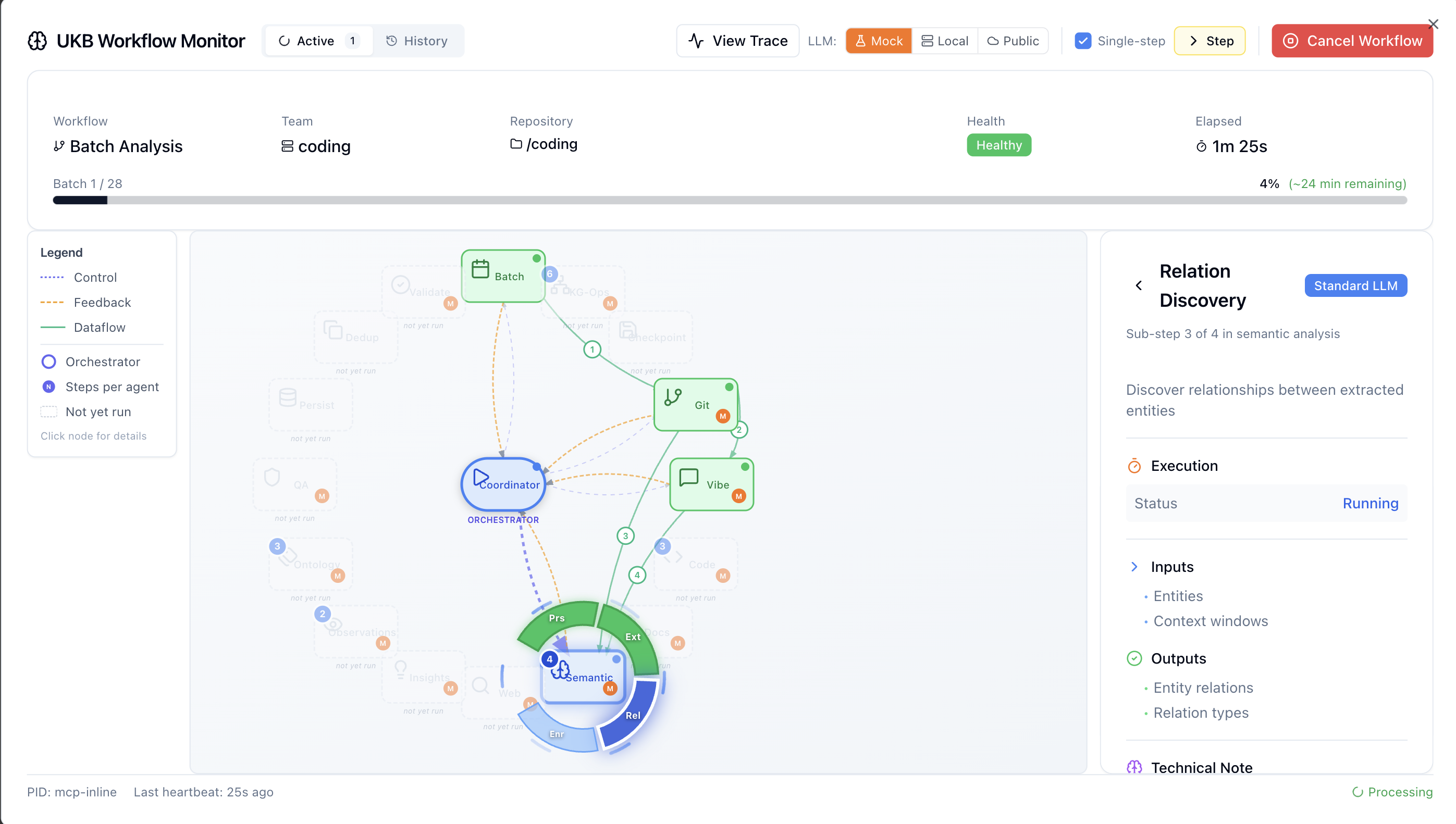 The WF modal in the health monitor dashboard can be used to visualize the flow of information through the multi-agent system which is called when demanding an update of the knowledge base (ukb).
A visualization of the (configurable) multi-agent system has been added to the health board to better understand what is going on inside the multi-agent system used for semantic analysis of repositories.
Exposed as MCP server, the updating of the knowledge base can be done from within the coding agent: ask for an update of the knowledge-base (ukb) for an incremental update - since the last time we ran 'ukb'. Use 'ukb full' and 'ukb full debug' to run a full analysis of the entire repo - from the very first commit until today. In "debug" mode you can single-step through the agentic workflow, switch from publicly hosted LLMs to locally run LLMs (Docker Model Runner with llama.cpp) or use mocked LLM calls.
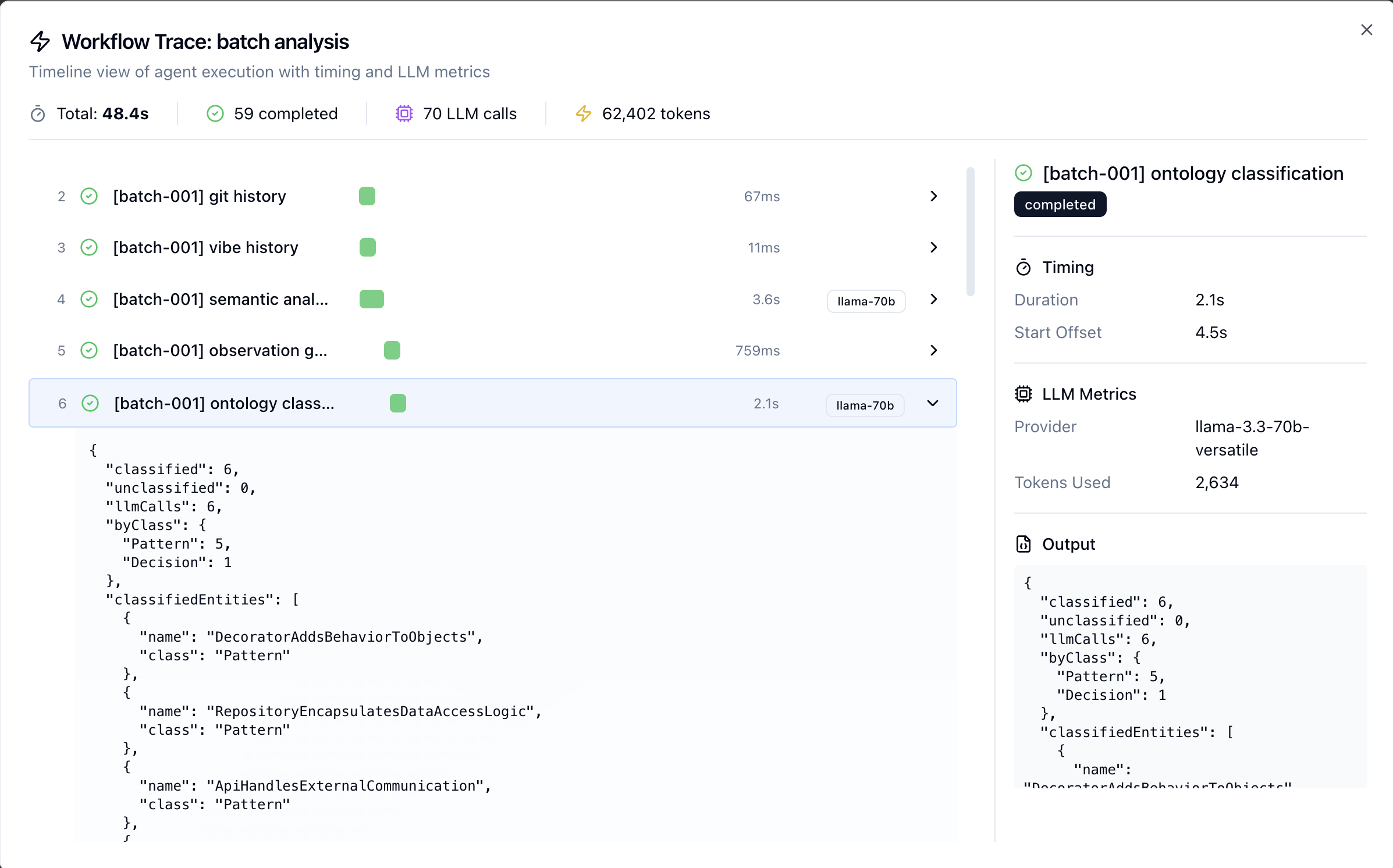 Use the tracing tool to inspect what goes into each agent, what comes back from the LLM, number of tokens, latencies, etc.
The integrated tracing tool can be used to inspect each step of the workflow, allowing the spotting of bottlenecks and misbehaving agents. The result of an updated knowledge-base can be viewed using the 'vkb' viewer:
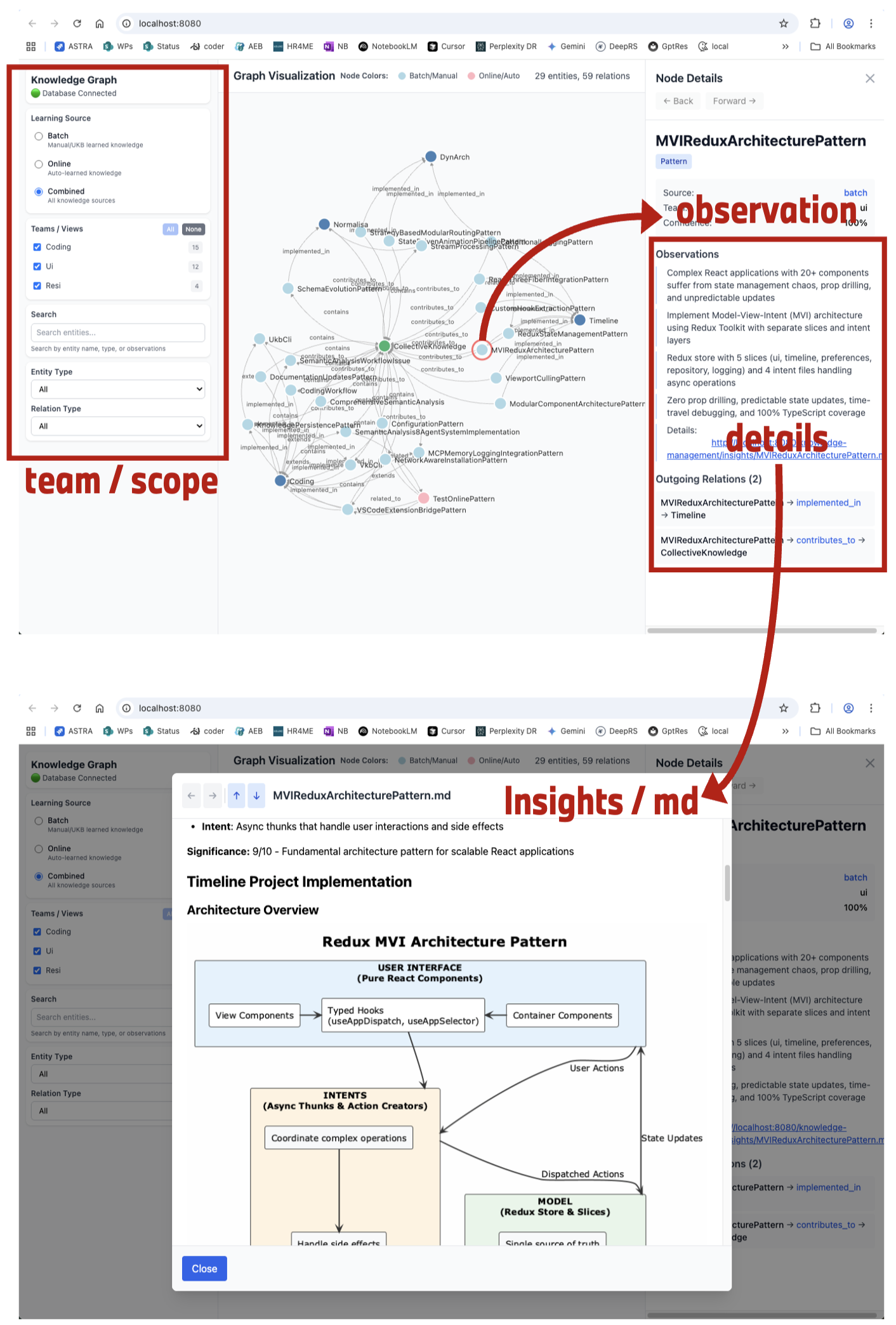 The VKB (Visualize Knowledge Base) interface: filter by team/scope, explore entity relationships, view observations and detailed insights with auto-generated diagrams.
Each insight gets classified into one of five entity types:
- ImplementationPattern - Code patterns and best practices
- ArchitecturalDecision - System design choices with rationale
- TechnicalSolution - Problem-solving approaches
- WorkflowPattern - Development process patterns
- ConfigurationPattern - Setup and configuration knowledge
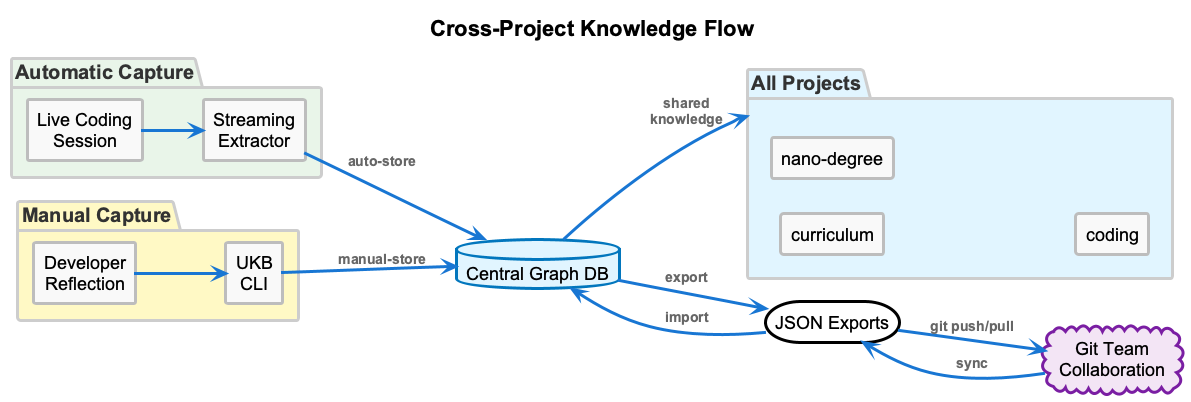 Knowledge flows from multiple projects into a central graph database, with git-tracked JSON exports enabling team collaboration.
This is where the "collective brain" vision comes in. When a new developer joins, they don't just get access to code - they get access to the reasoning behind every significant decision. When a new AI agent starts a session, it can query the accumulated knowledge of every previous session.
The more you use it, the smarter it gets. Patterns compound.
Note: The knowledge extraction system is functional but still being refined. The multi-agent workflow for semantic analysis works, but some edge cases need attention. This is one of the areas where contributions would be particularly valuable.
Constraint Enforcement: Preventing Mistakes Before They Happen
This is my favorite part, and it's working well.
Most code quality tools catch problems after you've written the code. Linters run post-hoc. Code reviews happen after commits. By then, the mistake is already made.
Coding takes a different approach: it uses PreToolUse hooks to intercept AI actions before they execute.
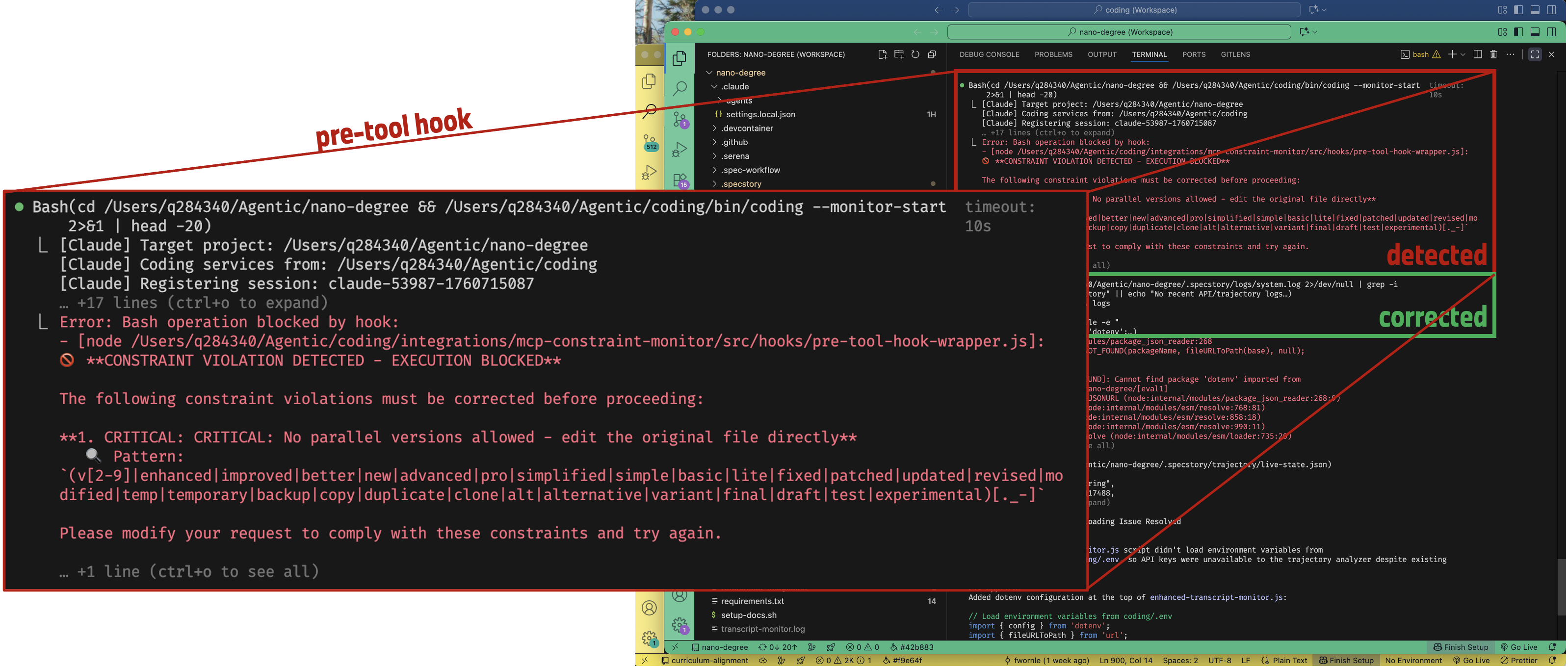 A constraint violation being detected and blocked in real-time. The AI tried to create a parallel file version - the hook caught it, blocked execution, and the AI corrected its approach.
When the AI wants to write code, the PreToolUse hook fires first. It evaluates 20+ constraints against the proposed action. If the constraint severity is CRITICAL or ERROR, the tool call is blocked entirely. WARNING and INFO severity allows the action but provides feedback.
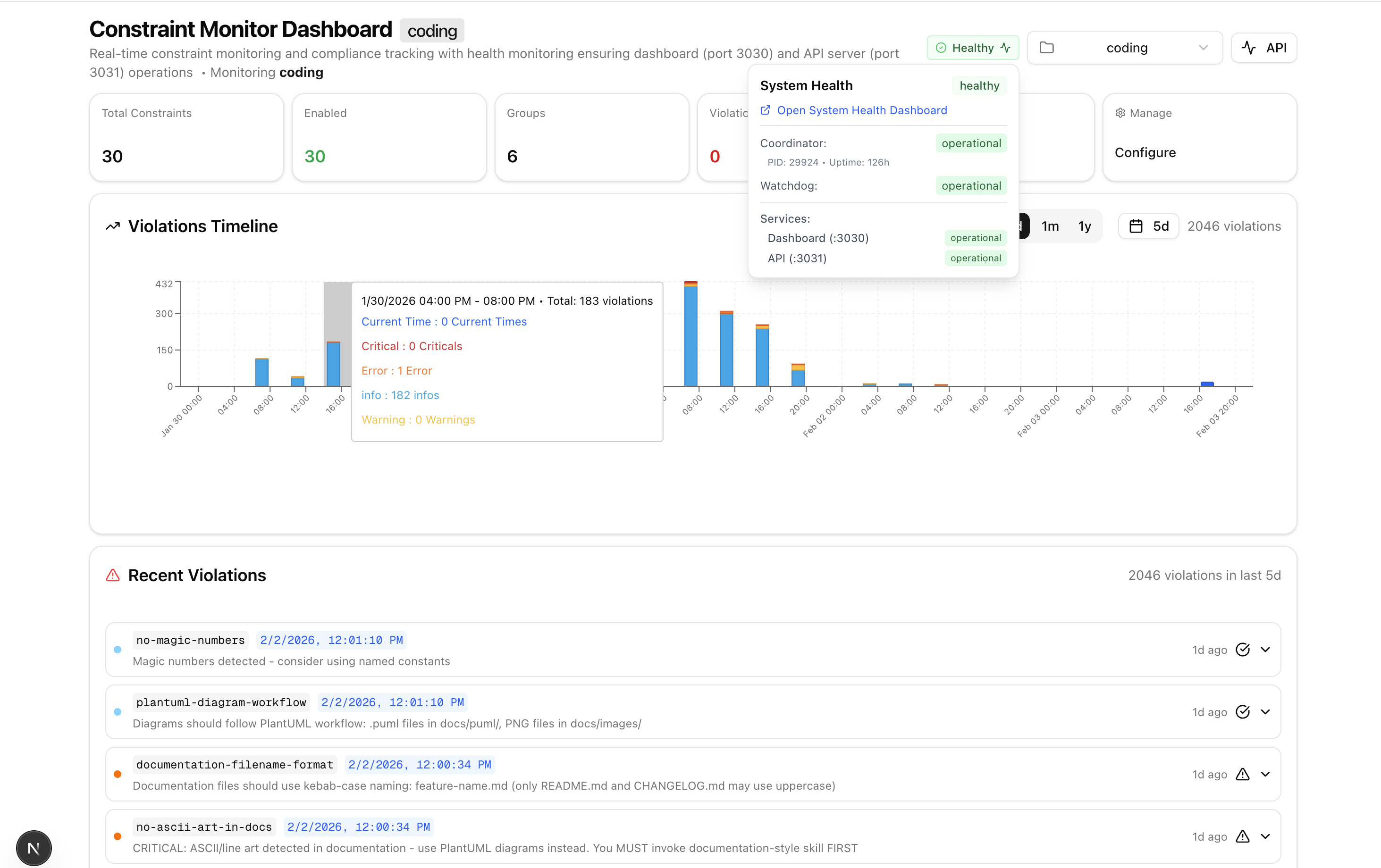 The constraint monitoring dashboard: violation timeline, severity breakdown, and real-time feed of recent violations.
The system currently enforces around 20 constraints (configurable, per-project) across several categories:
Security (blocks 100% of violations)
- No hardcoded secrets
- No dangerous function usage
Architecture (blocks 100% of violations)
- No parallel/duplicate files (prevents
-v2.jsproliferation) - Debug before speculating
- No evolutionary naming (
-new,-fixedsuffixes)
Code Quality
- Proper error handling
- No debug statements in production code
- Modern variable declarations only
When a critical constraint is violated, the tool call simply doesn't execute. The AI gets feedback about why, and can adjust its approach. It's like having a code reviewer that never sleeps and catches issues at the moment of creation.
Health Monitoring: Self-Healing Infrastructure
Running multiple services, databases, and monitoring processes requires robust health management.
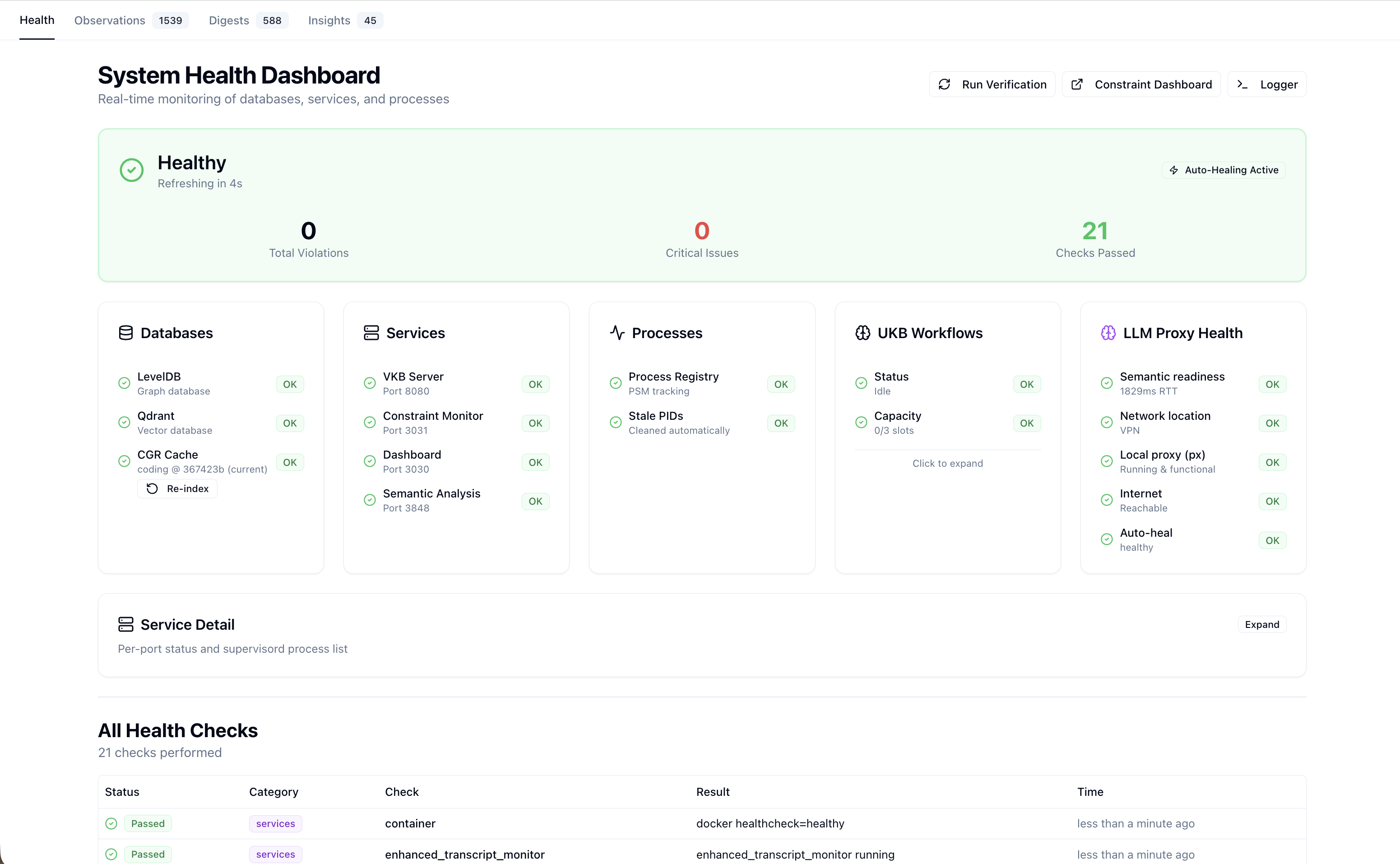 The health dashboard: real-time status of databases (Qdrant, CGR Cache), services (VKB Server, Constraint Monitor), processes, and UKB workflows - all with auto-healing active.
The system uses a 3-layer supervision architecture:
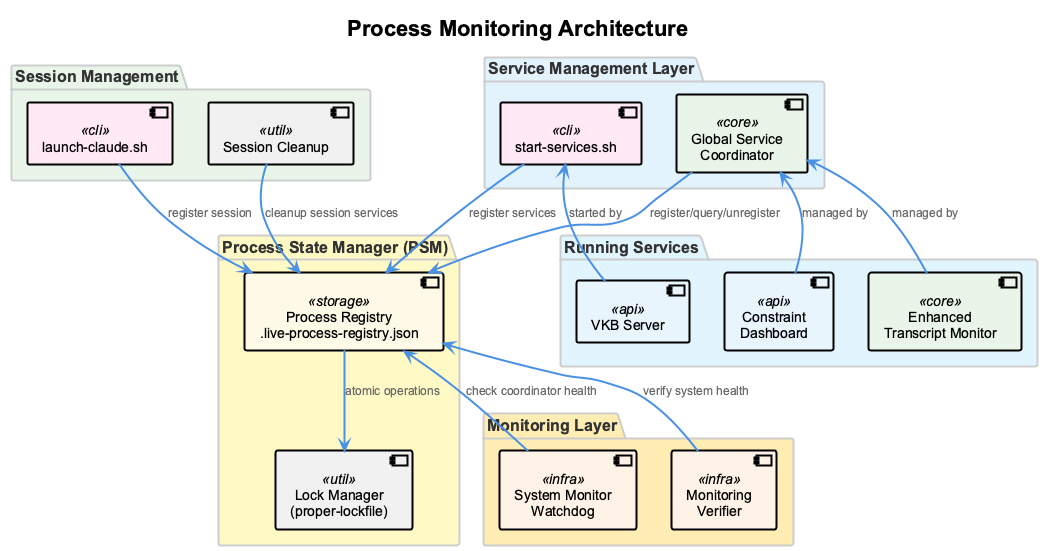 The process monitoring architecture: session management, service coordination, process state management with atomic operations, and a monitoring layer with watchdog and verifier.
If a process crashes, the watchdog detects it and restarts automatically. Services register themselves and can be queried for health status. The entire system is designed to run unattended for extended periods.
Provider Agnostic, Agent Agnostic
One design principle I aimed for: no lock-in.
The system is designed to work with any AI coding assistant. Claude Code is the primary and default agent — it gets the deepest integration with native MCP servers, transcript support, and hook functions. But the infrastructure is fully agent-agnostic. Adding a new agent requires only a single config file (config/agents/<name>.sh) — no changes to shared code.
Currently integrated:
| Agent | Launch | Integration |
|---|---|---|
| Claude Code (default) | coding | Native MCP + transcript support |
| GitHub Copilot CLI | coding --copilot | Pipe-pane I/O capture + HTTP adapter |
| OpenCode | coding --agent opencode | Pipe-pane I/O capture |
All agents share the same infrastructure: tmux session wrapping with unified status bar, health monitoring with multi-agent detection, LSL session logging, knowledge management, and constraint enforcement. The health system detects all running agents via process scanning and tracks their sessions with graduated activity indicators.
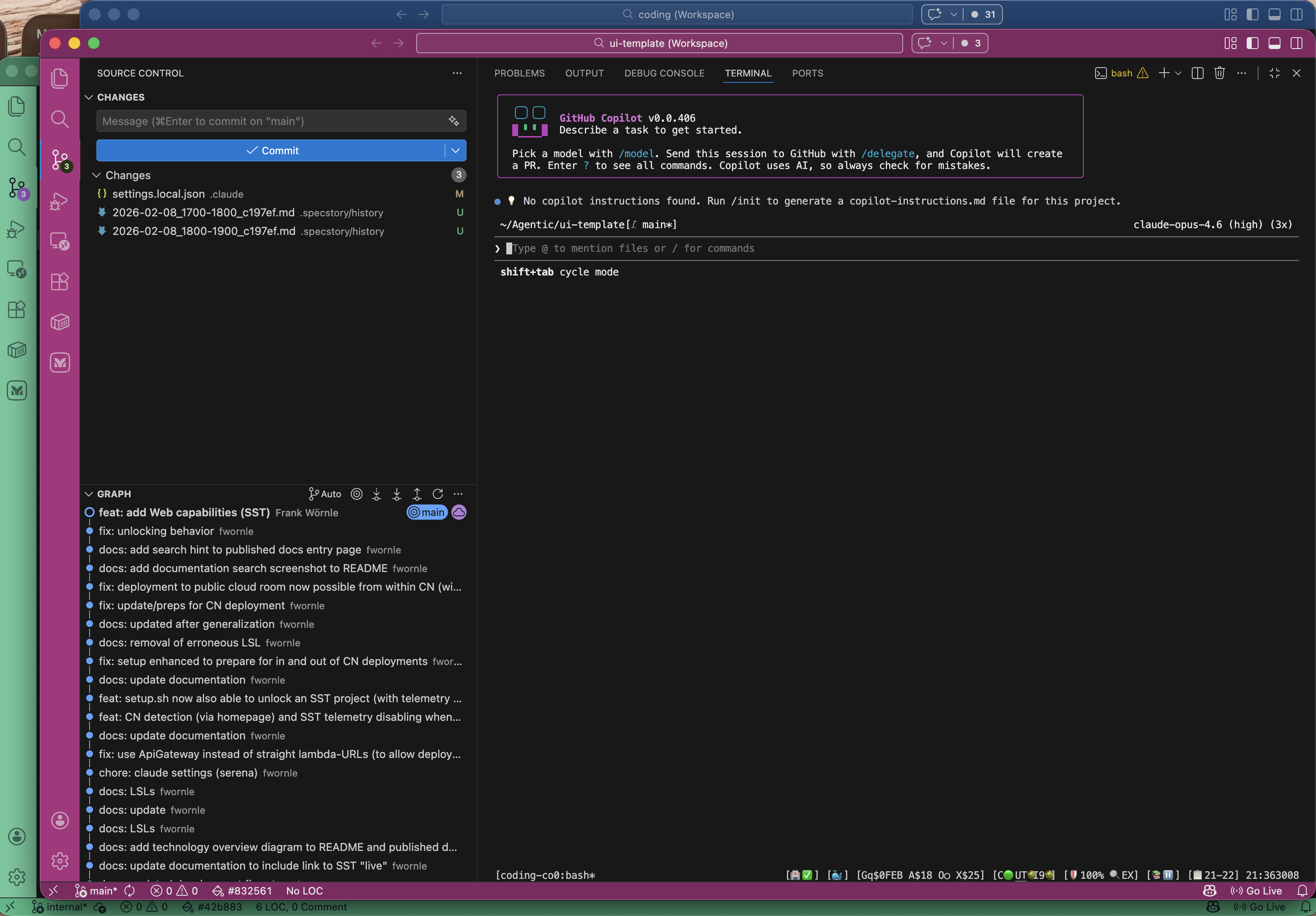 GitHub Copilot CLI running in the coding infrastructure — same tmux wrapper, status bar, and monitoring as Claude Code.
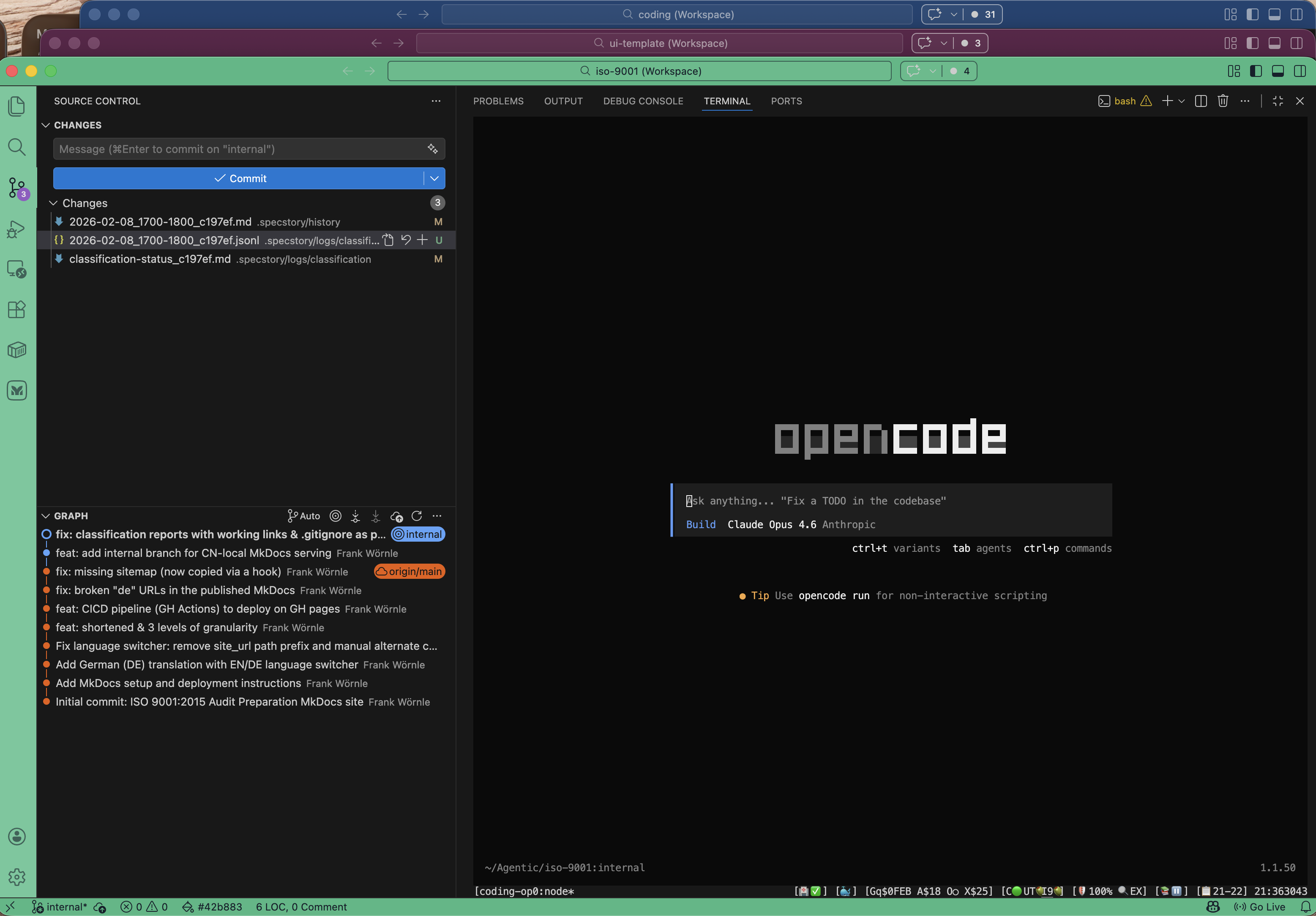 OpenCode integrated with a 25-line config file — zero changes to shared code.
Similarly, it's not locked to any LLM provider. The system supports 10 providers with intelligent routing:
- Claude Code (zero cost - uses existing subscription) ✨
- GitHub Copilot (zero cost - uses existing subscription) ✨
- Groq (fast, cheap API fallback)
- Anthropic (high quality API fallback)
- OpenAI (GPT-4 when needed)
- Local models via Docker Model Runner or llama.cpp (free, private)
Subscription-first routing: All requests try your existing Claude Code or GitHub Copilot subscriptions first ($0 per token), then fall back to paid APIs only if quotas are exhausted. Automatic quota tracking with exponential backoff ensures seamless operation.
Content sensitivity routing: Discussing API architecture? Send it to the cloud for fast, accurate analysis. Processing something with potential credentials? Route it locally - the data never leaves your machine.
Cost savings: Subscription-first routing eliminates per-token spend whenever Copilot or Claude max quota covers the request. Budget tracking is built in with configurable limits and automatic fallback to local models when thresholds are reached.
Unified LLM Layer Architecture
Under the hood, all LLM requests flow through @rapid/llm-proxy — a standalone abstraction layer that provides intelligent routing, resilience, and cost optimization across 14 LLM providers.
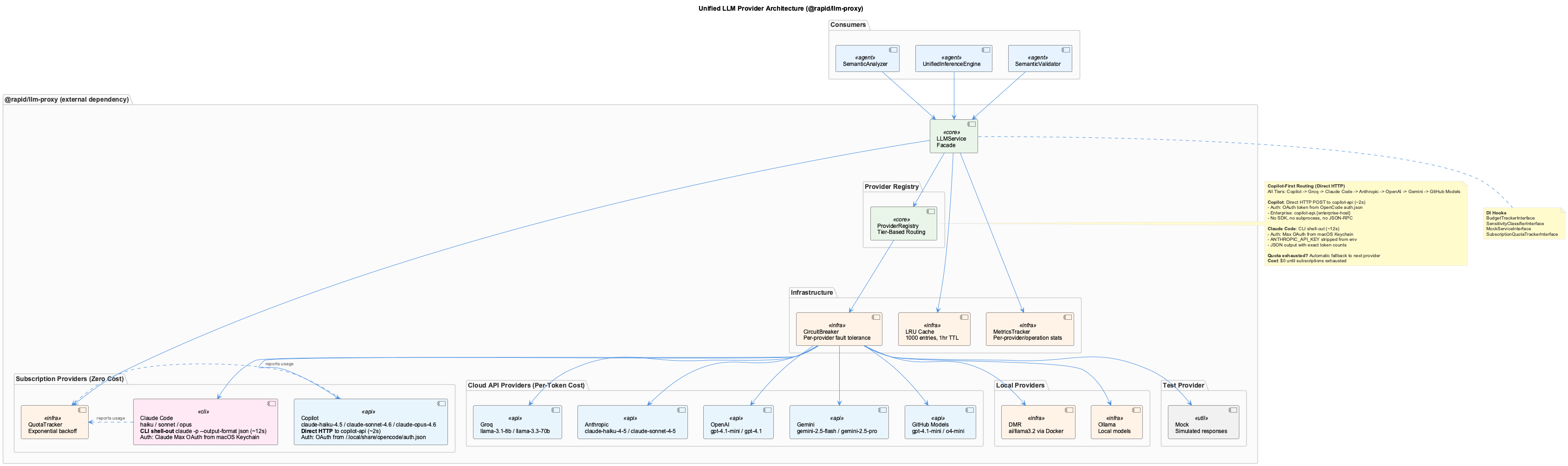 The unified LLM layer with subscription-first routing, circuit breaker, cache, and quota tracking.
Core Components:
| Component | Purpose |
|---|---|
| LLMService | Single entry point - routes all requests |
| ProviderRegistry | Manages 10 providers and tier-based selection |
| QuotaTracker | Tracks subscription usage with exponential backoff |
| CircuitBreaker | Prevents cascading failures (5 failures = 60s timeout) |
| LRU Cache | Deduplicates requests (1000 entries, 1hr TTL) |
| MetricsTracker | Records cost, latency, and token usage |
Tier-Based Routing:
The system automatically maps tasks to quality tiers:
Fast Tier (simple tasks)
├─ git_file_extraction
├─ commit_message_parsing
└─ basic_classification
    → Try: Claude Code → Copilot → Groq

Standard Tier (semantic analysis)
├─ git_history_analysis
├─ semantic_code_analysis
└─ ontology_classification
    → Try: Claude Code → Copilot → Groq → Anthropic → OpenAI

Premium Tier (deep understanding)
├─ insight_generation
├─ observation_generation
└─ pattern_recognition
    → Try: Claude Code → Copilot → Anthropic → OpenAI → Groq
When you run a UKB workflow or the LSL classifier makes a call, it specifies the task type (e.g., "semantic_code_analysis"). The system looks up which tier that task belongs to, then tries providers in order until one succeeds.
Fallback Chain:
Request with task type
  ↓
Check subscription quota
  ↓ (available)
Try Claude Code CLI
  ↓ (quota exhausted or CLI unavailable)
Try Copilot CLI
  ↓ (quota exhausted or CLI unavailable)
Try Groq API
  ↓ (circuit breaker open or failed)
Try Anthropic API
  ↓ (circuit breaker open or failed)
Try OpenAI API
  ↓ (all cloud providers failed)
Try DMR (local)
  ↓ (DMR unavailable)
Try Ollama (local)
  ↓ (all providers failed)
Error
Quota Management:
Subscription providers track usage in .data/llm-subscription-usage.json: - Records completions per hour (rolling window) - Estimates token usage (4 chars ≈ 1 token) - Marks exhaustion with exponential backoff: 5min → 15min → 1hr - Automatically retries when backoff expires - Prunes data older than 24 hours
On every request, the quota tracker checks availability. If exhausted, the circuit breaker temporarily marks the provider as unavailable and tries the next one. When quota becomes available again (successful completion or backoff expires), the provider is automatically re-enabled.
Cost Tracking:
The system records $0 cost for subscription providers, normal per-token costs for APIs. The budget tracker (if configured) enforces monthly limits and triggers fallback to local models when thresholds are reached.
This architecture means you can start a workflow, exhaust your Claude Code quota mid-way through, and the system seamlessly falls back to Copilot, then Groq — all without interruption or manual intervention.
See LLM Architecture for complete technical details.
Ontology-Based Classification
One of the more sophisticated aspects is the ontology system for knowledge classification.
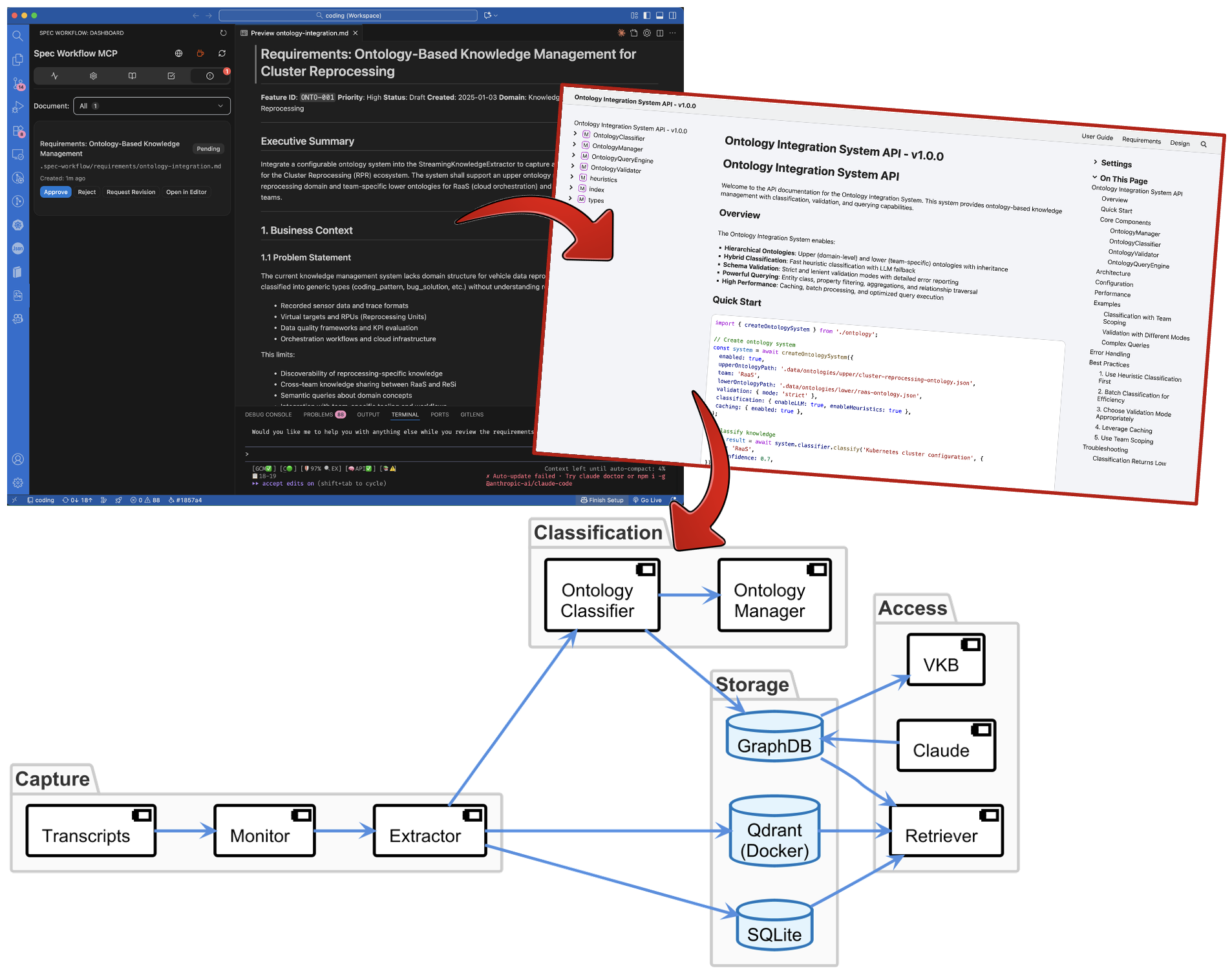 The full pipeline: from transcript capture through classification to storage, with ontology-based entity typing and a spec workflow for requirements management.
This enables structured knowledge that can be queried semantically, not just by keyword matching. More work is needed to improve this aspect - a lot of publications talk about ontologies and GraphRAG these days... should be easy to incorporate some of the shared ideas in the provided ontology classes.
Zero-Friction Deployment
All of this runs in Docker. One command starts everything:
coding              # Claude Code (default)
coding --copilot    # GitHub Copilot CLI
coding --agent opencode   # OpenCode
That's it. The infrastructure spins up in containers, your AI assistant connects, and you're working with full session logging, knowledge extraction, and constraint enforcement. All agents get the same infrastructure — the only difference is which coding assistant you interact with.
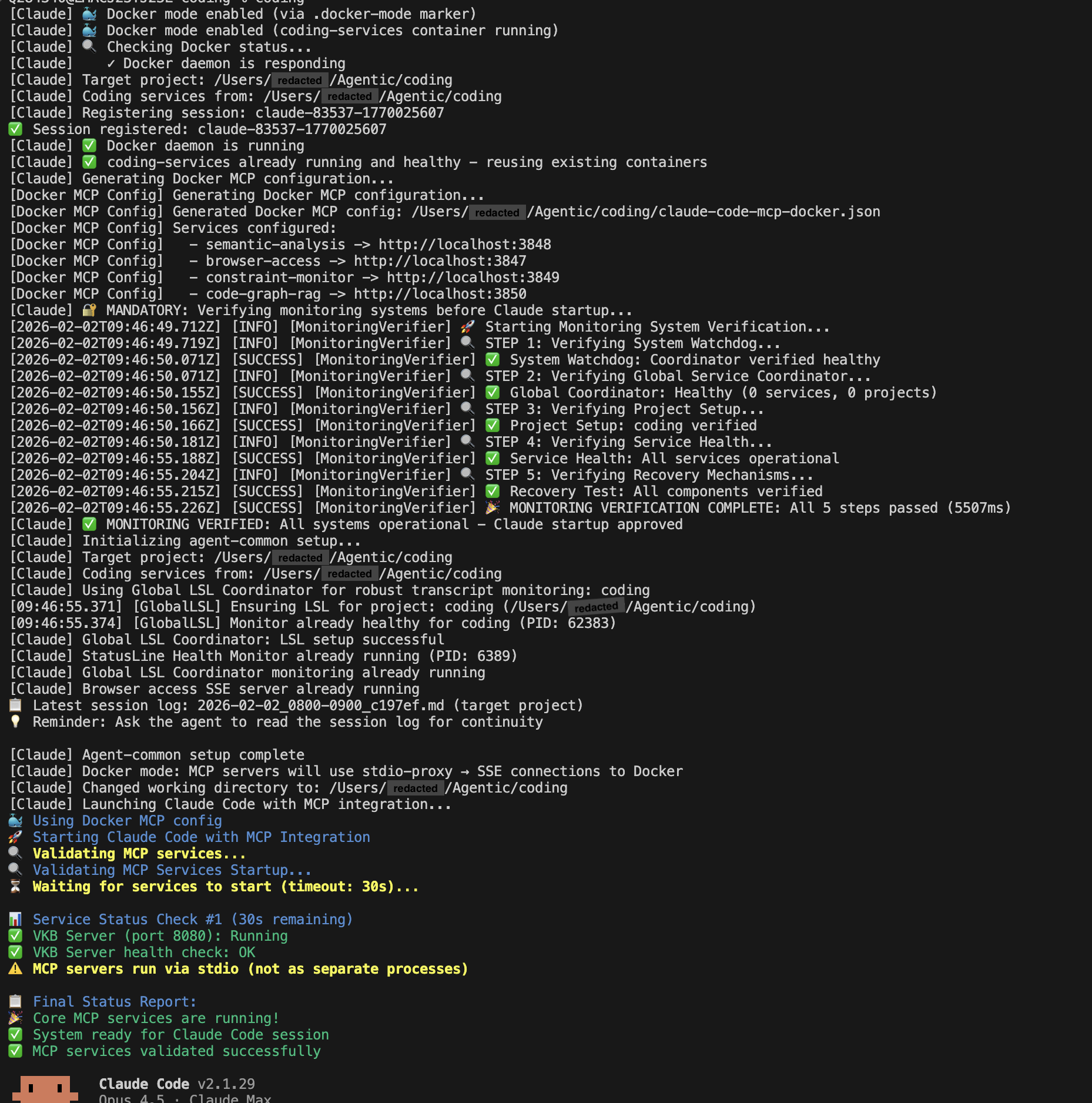 Coding startup - all launched services are checked for proper operations to ensure a fully working system.
Coding has the option to run in dockerized mode to keep the machine footprint low and allow for fast startup-/shutdown times.
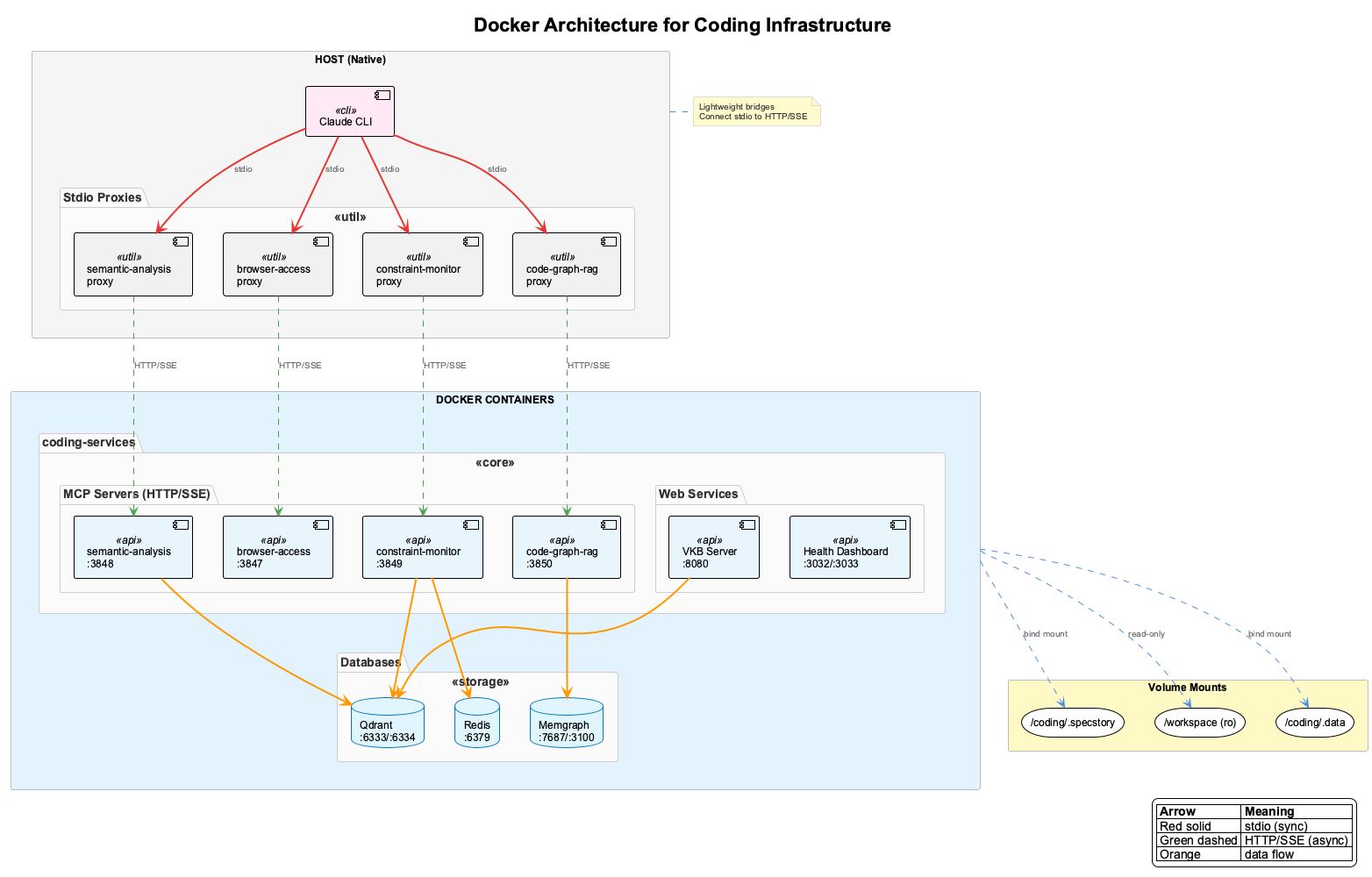 Coding running in dockerized mode - only the coding agent is installed natively, plus a set of thin layer of proxies.
The dashboard is at localhost:3030. The knowledge graph viewer is at 127.0.0.1:12436/viewer/coding (vkb). Health monitoring shows you exactly what's running and catches problems automatically.
If a process crashes or a status has gone stale, the 3-layer supervision architecture detects it and restarts or refreshes the status. Sessions can run for days without intervention. The health monitor detects all running agents (Claude, Copilot, OpenCode) and tracks their sessions with a graduated cooling scheme — active sessions glow green, idle ones fade through cooling stages, and sleeping sessions show as dormant. Sessions are only removed when the agent process exits, never hidden.
Current State: What Works, What's WIP
Let me be honest about where things stand:
Production-ready:
- Live Session Logging with 5-layer classification
- Constraint enforcement with PreToolUse hooks
- Health monitoring and automatic recovery
- Knowledge graph storage and visualization
- Multi-project support
Working but needs refinement:
- Continuous learning (automatic knowledge extraction)
- Some edge cases in the multi-agent workflow, which has grown from a much simpler set-up to what might have become a slightly too complicated configuration
The code itself reflects its vibe-coded origins. There are inconsistencies. Some abstractions could be cleaner. But it works, and more importantly, the patterns are sound.
Why Open Source This?
I think we're entering a new era of software development. AI coding assistants are getting good enough that the barrier to customization is dropping dramatically.
Instead of choosing between "use this SaaS product as-is" or "build everything from scratch," there's a middle path: take useful fragments, point your AI assistant at them, and shape them into exactly what you need.
This project is one of those fragments. The patterns for session logging, knowledge extraction, constraint enforcement - these are reusable. Fork it, strip out what you don't need, add what you do.
The age of custom-made software is approaching. And AI coding assistants make it accessible to far more people than ever before.
Documentation
Full documentation is available at fwornle.github.io/coding.
The documentation itself was produced in a fully vibed manner - including all the PlantUML architecture diagrams. It covers installation, configuration, all core systems, integrations, and deep-dive guides.
Getting Started
git clone --recurse-submodules https://github.com/fwornle/coding ~/Agentic/coding
cd ~/Agentic/coding && ./install.sh
source ~/.bashrc
coding
What's Next
The vision is AI assistants that genuinely learn from every interaction - not just within a session, but across sessions, across team members, building a collective intelligence that makes everyone more effective.
We're not fully there yet. But this is a solid foundation, and I'm curious to see what others build on top of it.
If you're working on similar problems - AI memory, team knowledge sharing, constraint systems - I'd love to hear about your approach. This space is moving fast, and there's a lot to figure out together.
MIT licensed. Contributions welcome. This is an experiment - treat it accordingly.
This article was produced over breakfast - in a fully declarative manner, of course. Look for Prompt Set "ps_1770097340854" in LSL file coding/.specstory/history/2026–02–03_0600–0700_c197ef.md, if you want to see how I asked Claude to write this… including the style guide it suggested.