Integrations
The MCP servers and services that run alongside your agent, what each one is for, and which port it answers on.
What runs alongside the agent
| Integration | Gives the agent |
|---|---|
| Semantic Analysis | The 14-agent knowledge extraction workflows |
| Constraint Monitor | Rule checking on every tool call |
| Graphify | A tree-sitter code graph — ask about structure instead of grepping |
| Dashboard | Health, tokens, measurement, all at :3032 |
| LLM CLI Proxy | One routed, accounted path for every LLM call |
The ports worth remembering
| Port | Service |
|---|---|
| 3032 | Health dashboard — the one you open |
| 3033 | Health API |
| 3030 | Constraint dashboard |
| 3848 | Semantic Analysis (workflows) |
| 8080 | Knowledge viewer (vkb) |
| 12435 | LLM proxy |
3848 runs workflows and 3033 does not — sending a workflow to the health API returns a confusing 404, and it is the single most common mix-up here.
Check they are up
The services
Everything below runs as a container and is started for you by coding.
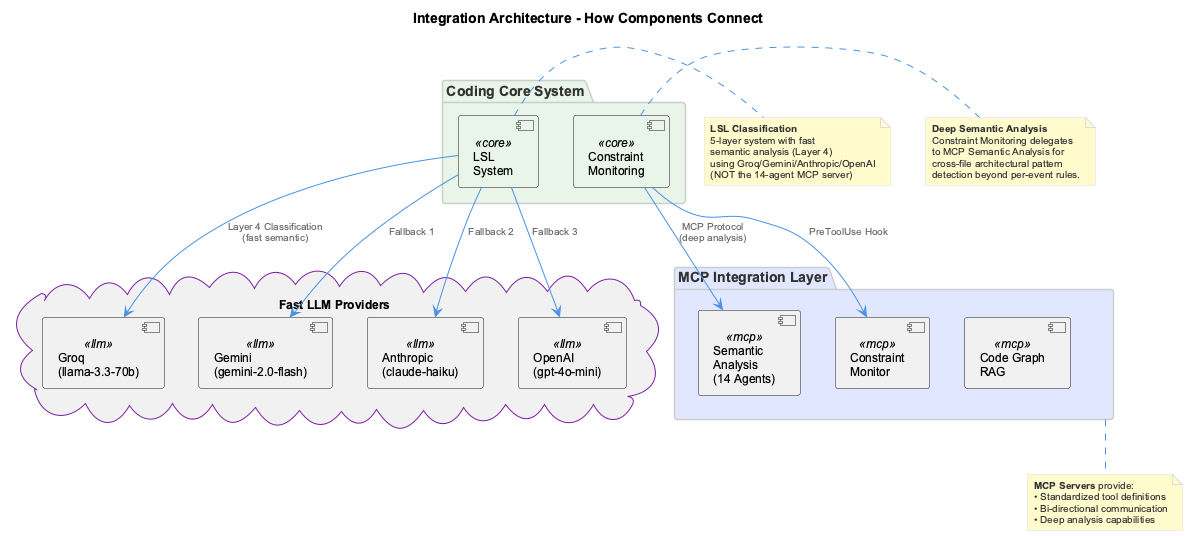
Semantic Analysis hosts the multi-agent knowledge workflows — the extraction pass that builds the knowledge graph, plus ontology management and entity refresh. It speaks HTTP/SSE on 3848, which is also what feeds the dashboard's live workflow view. Reach it with the semantic CLI rather than by hand.
Constraint Monitor evaluates rules against tool calls and records what fired. Its dashboard is on 3030, its API on 3031. The constraints CLI works even when the container is down, because it runs the check in-process.
Graphify builds a static tree-sitter graph of the codebase and serves it over MCP on 3851. It answers structural questions — what calls this, where is that defined — without a database and without guessing. Rebuild it when it goes stale; it is a snapshot, not a live index.
The dashboard on 3032 is the single front-end for health, token usage, routing, measurement and benchmarks. The health API behind it is on 3033.
The LLM CLI proxy on 12435 is the one path every LLM call takes, which is what makes routing, fallback and token accounting possible at all. Its endpoint is POST /api/complete — not the OpenAI-shaped /v1/chat/completions.
Ports
| Service | Port | Health check |
|---|---|---|
| Constraint dashboard / API | 3030 / 3031 | /health |
| Health dashboard | 3032 | /health |
| Health API | 3033 | /health |
| Semantic Analysis | 3848 | /health |
| Constraint Monitor SSE | 3849 | /health |
| Graphify | 3851 | — |
| Qdrant | 6333 / 6334 | /health |
| VKB server | 8080 | /health |
| LLM proxy | 12435 | /health |
| Observations API | 12436 | /health |
Two pairs are easy to confuse and worth committing to memory: 3848 runs workflows, 3033 reports health; and 12435 is the proxy, 12436 is observations. Both mistakes fail as a 404 rather than an error that names the problem.
Configuration
MCP servers are declared in the agent's own MCP configuration, pointing at the containerised endpoints through stdio proxies. The containers are brought up by coding, so in normal use there is nothing to start by hand — if a tool is missing from the agent, check the container is running before suspecting the config.
When something is not answering
coding --health                                  # the summary
docker compose -f docker/docker-compose.yml ps   # which containers are actually up
curl -s localhost:3033/health | jq .             # what the API believes
A service that is up but not answering its health check is usually mid-restart; one that is absent from docker ps never started, which is a Docker problem rather than a coding one.
MCP servers and tools that extend the coding infrastructure.
MCP Servers
-
Semantic Analysis
14-agent AI system for code understanding and knowledge extraction.
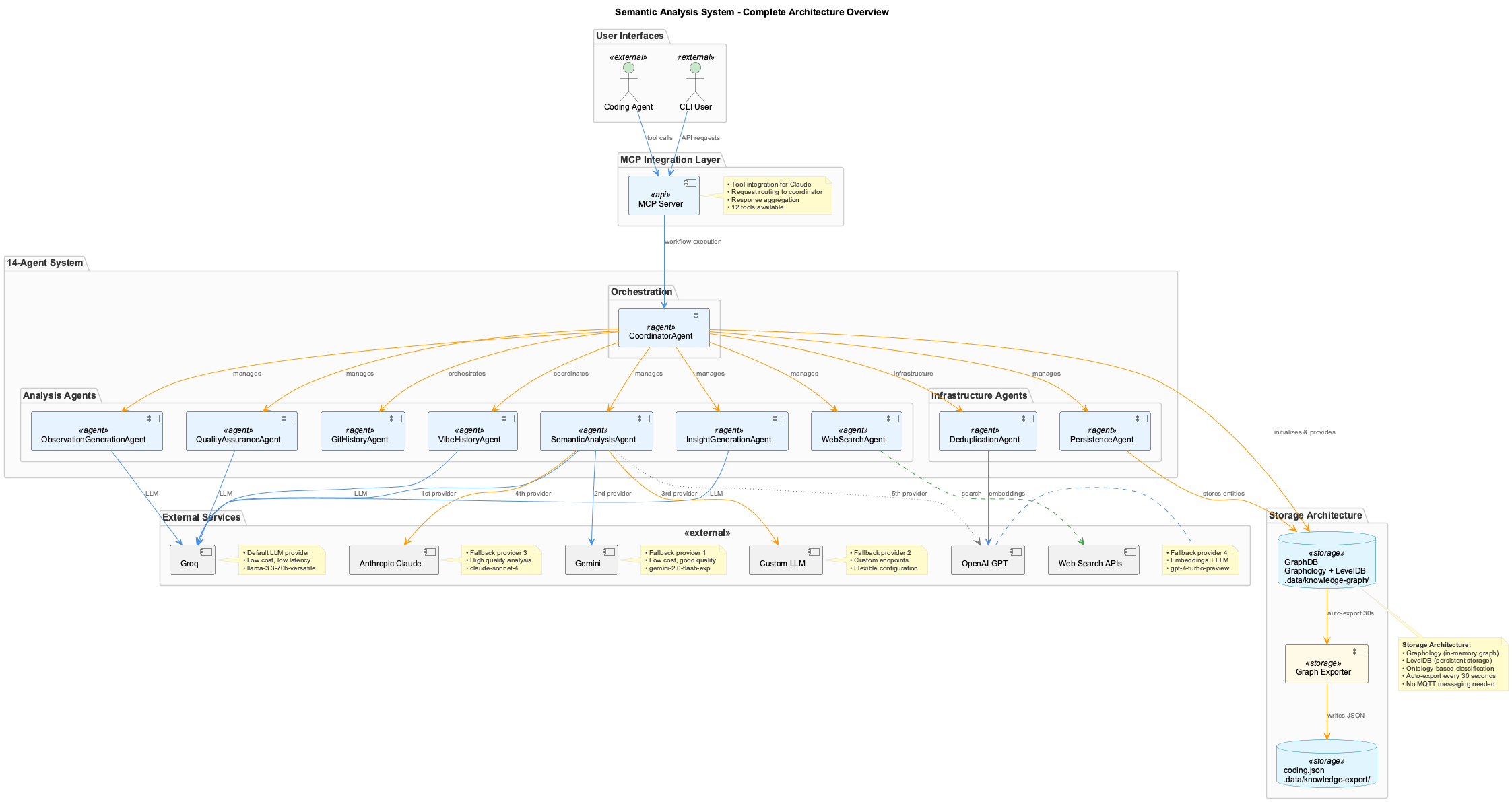
- Knowledge workflow orchestration
- Pattern recognition
- Ontology mapping
Port: 3848 (Docker)
-
Constraint Monitor
Real-time code quality enforcement via PreToolUse hooks.
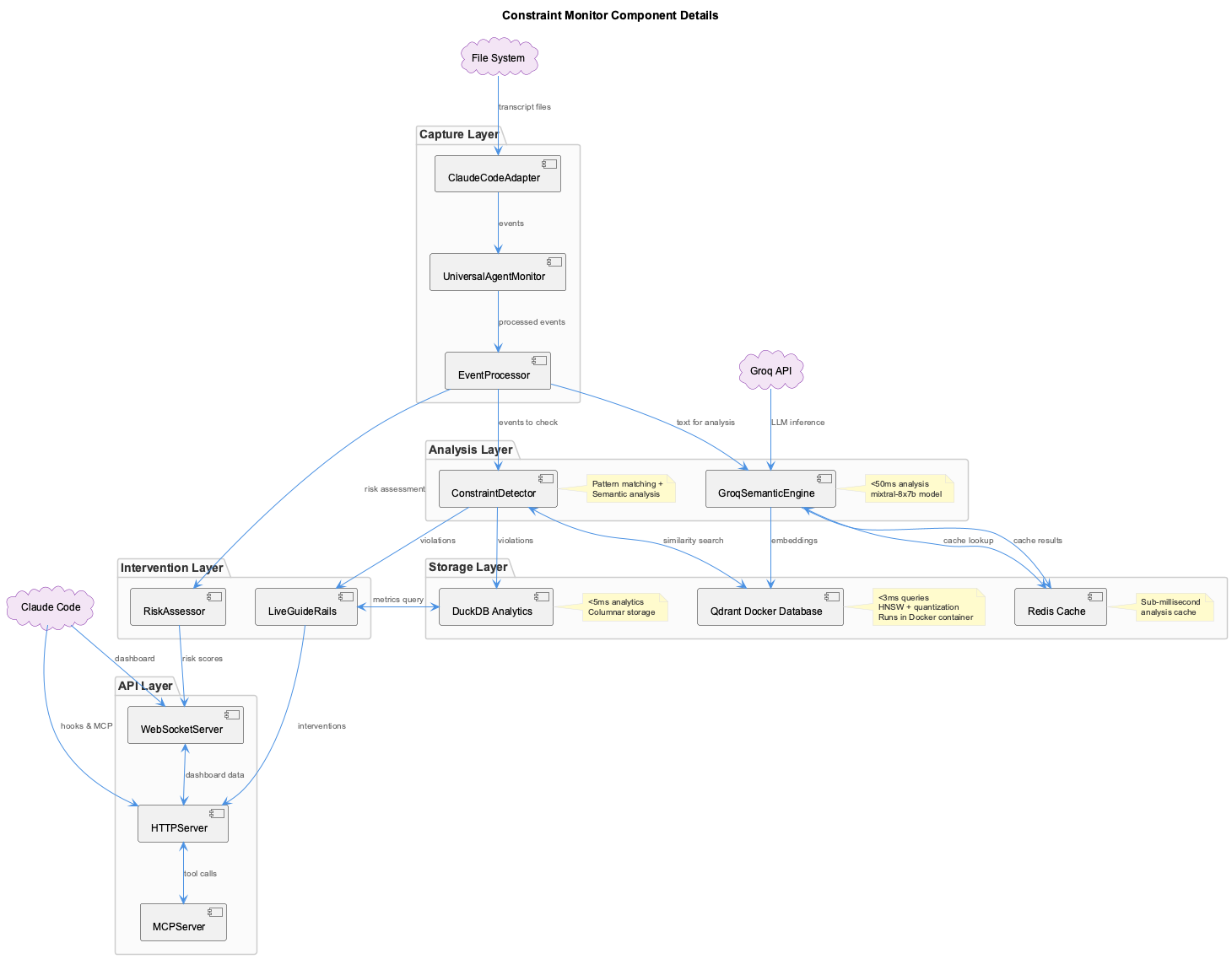
- 20+ configurable constraints
- Web dashboard
- Violation tracking
Port: 3849 (Docker)
-
Graphify
tree-sitter static code graph (file-based
graph.json, no database).- Call graph analysis
- Structural / natural language queries
- Shortest-path finding
Port: 3851 (HTTP MCP, in
coding-services) -
Dashboard
System monitoring and knowledge visualization.
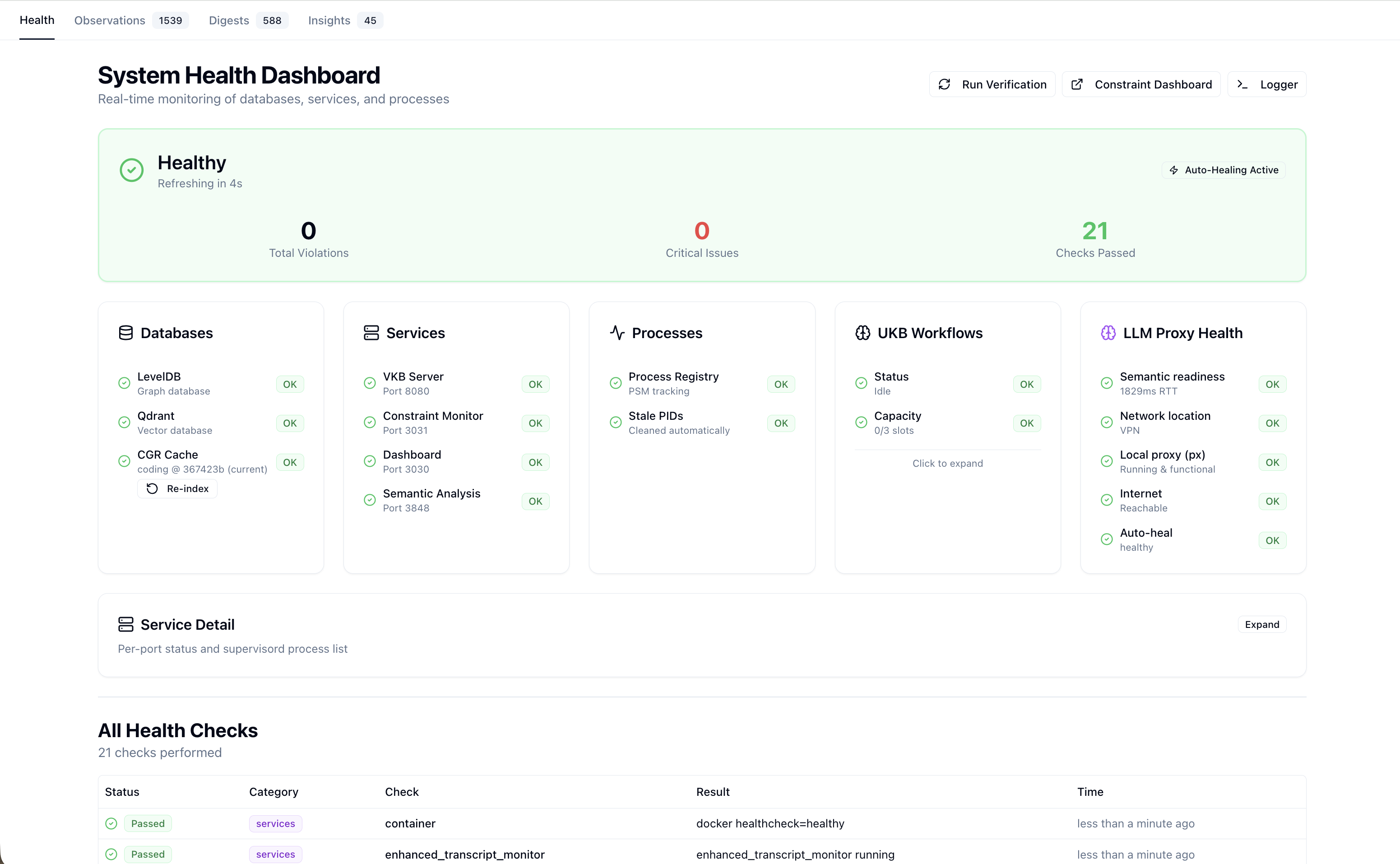
- VKB knowledge viewer
- Health monitoring
- Workflow visualization
Port: 8080 (VKB), 3032 (Health)
-
LLM Proxy Bridge
HTTP bridge exposing
@rapid/llm-proxyto Docker containers.- Direct HTTP to Copilot API, CLI for Claude Code
- Zero-cost subscription routing
- Automatic provider fallback
Port: 12435 (Host)
-
Observations API
Host-side single-owner API for observations / digests / insights. Also mounts the shared
@fwornle/km-coreREST router at/api/km/.- Runtime store: km-core
GraphKMStore(.data/knowledge-graph/). Legacy.observations/observations.db(SQLite, WAL mode) was archived 2026-06-05 (Phase 44 Plan 18). - In-process consolidator + retrieval
- Forwarded into the container by the Health Dashboard
Port: 12436 (Host)
- Runtime store: km-core
-
OKB (Operational Knowledge Base)
Cross-repo operational knowledge — RCAs, runbooks, design docs. Lives in
rapid-automations/integrations/operational-knowledge-management. Consumes the same@fwornle/km-corelibrary as the UKB and the observations API.- LLM-driven extraction + governance
- Four-tier ontology (upper + RaaS + KPI-FW + business)
- VOKB graph viewer
Ports: 8090 (API), 3002 (VOKB viewer)
Service Ports
| Service | Port | Protocol | Health Check |
|---|---|---|---|
| Semantic Analysis | 3848 | HTTP/SSE | /health |
| Constraint Monitor | 3030/3031/3849 | HTTP | /health |
| Graphify | 3851 | HTTP MCP | N/A |
| VKB Server | 8080 | HTTP | /health |
| Health Dashboard | 3032 | HTTP | /health |
| Health API | 3033 | HTTP | /health |
| Qdrant | 6333/6334 | HTTP/gRPC | /health |
| LLM Proxy Bridge | 12435 | HTTP | /health |
Observations API (mounts km-core /api/km/) | 12436 | HTTP | /health |
| OKB API (cross-repo) | 8090 | HTTP | /health |
| VOKB viewer (cross-repo) | 3002 | HTTP | N/A |
Architecture
flowchart TB
    CC[Claude Code] --> MCP{MCP Protocol}
    MCP --> SA[Semantic Analysis]
    MCP --> CM[Constraint Monitor]
    MCP --> CGR[Graphify]

    SA --> GDB[(GraphDB)]
    SA --> QD[(Qdrant)]
    CGR --> GJ[graph.json]
    CM --> CMDB[(Violations DB)]

    GDB --> VKB[VKB Dashboard]
    CMDB --> CMD[Constraint Dashboard]
MCP Configuration
MCP servers are configured automatically by the installer. They run as HTTP/SSE services in Docker containers; Claude communicates via stdio-proxy:
Configuration Location
- macOS/Linux:
~/.claude/settings.json - Windows:
%APPDATA%/Claude/settings.json
Auto-Configuration
The installer creates and maintains MCP configuration. Manual editing is rarely needed.
Available Tools
Each MCP server provides tools accessible within Claude sessions:
Semantic Analysis Tools
| Tool | Purpose |
|---|---|
determine_insights | AI-powered content analysis |
execute_workflow | Run multi-agent workflows |
analyze_code | Code pattern analysis |
analyze_repository | Repository-wide analysis |
create_ukb_entity_with_insight | Create knowledge entities |
refresh_entity | Update stale entities |
Constraint Monitor Tools
| Tool | Purpose |
|---|---|
check_constraints | Validate code against constraints |
get_violation_history | View past violations |
get_constraint_status | Current compliance metrics |
update_constraints | Modify constraint rules |
Graphify Tools
| Tool | Purpose |
|---|---|
query_graph | Structural / natural language queries |
get_node | Retrieve a single node by id |
get_neighbors | List a node's neighbours |
shortest_path | Shortest path between two nodes |
graph_stats | Graph size and shape statistics |
god_nodes | Most-connected hub nodes |
Health Checks
# Check all health endpoints
for port in 3848 3849 8080 3032; do
  echo "Port $port: $(curl -s http://localhost:$port/health | jq -r '.status // "N/A"')"
done

# Check MCP servers are registered
cat ~/.claude/settings.json | jq '.mcpServers | keys'
Submodule Management
Integration components are git submodules:
# Update all submodules
git submodule update --remote

# Initialize missing submodules
git submodule update --init --recursive

# Update specific submodule
git submodule update --remote integrations/semantic-analysis
Related Documentation
- Configuration - API keys and settings
- Data Flow - Integration data flow