Teams & Shared Learning
How to group your repos into teams, choose what the knowledge viewer shows, and share what coding learned with teammates. The design behind it is in Per-Repo Tenancy.
Group repos into teams
Open localhost:3032/teams (the people icon at the top right of the dashboard). Every repo coding found on this machine is a row; every team is a column. Tick a box to put a repo in a team.
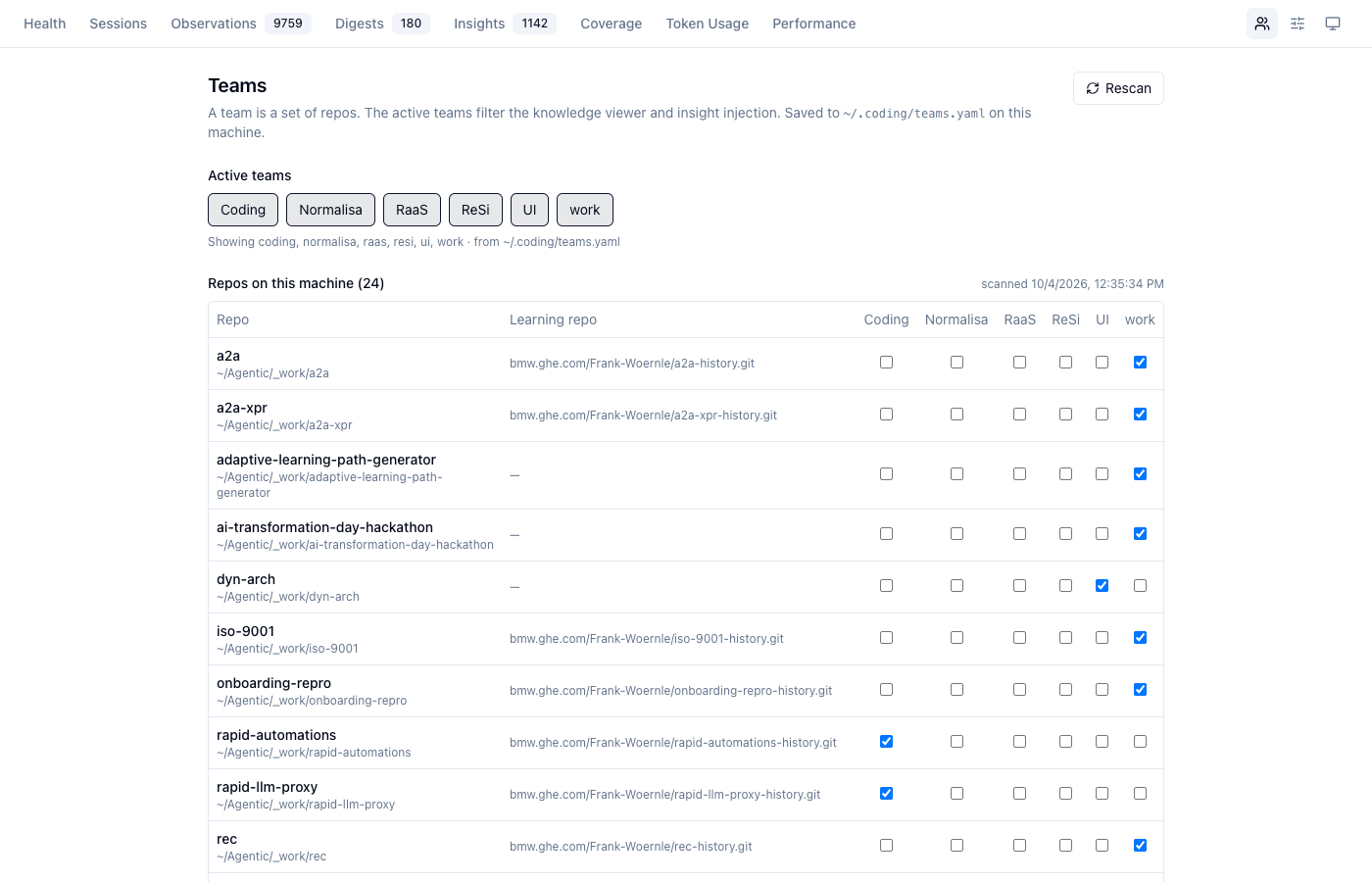
The chips under Active teams are the selection the knowledge viewer shows. Saved to ~/.coding/teams.yaml.
See it in the viewer
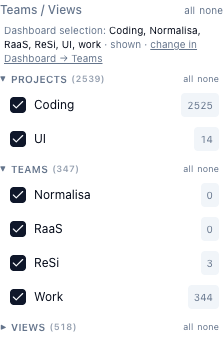
The viewer's Teams / Views rail starts from the same selection and changes it both ways — toggle a team here and the dashboard follows.
Share with a teammate
Your teammate starts coding in their checkout of the same repo and gives your <repo>-history URL at the first-launch prompt. From then on their launches pull your knowledge, and yours pull theirs.
The Teams tab
| Part | What it does |
|---|---|
| Active teams chips | the selection the viewer shows (click to toggle) |
| Repos on this machine | the discovery scan of $HOME (depth 4): git repos with a .coding/ (or a legacy, not yet migrated .specstory/history) |
| Learning repo column | where that repo's learned data is pushed; — means no choice yet (asked at the next coding launch there) |
| team columns | membership — a repo may be in several teams |
| Rescan | re-runs discovery now (it otherwise refreshes every 10 minutes) |
Add team creates your own team; its delete button removes a team of yours (shipped teams cannot be deleted). Only ~/.coding/teams.yaml is written; the shipped config/teams.yaml declares no memberships.
What a selection changes — and what it does not
| Surface | Uses |
|---|---|
| Knowledge viewer (graph, rail counts, History, LSL strip) | the active selection |
Dashboard pages that read obs-api with ?teams= | the teams requested |
| Knowledge injection into an agent | the teams of the repo the agent runs in — not the selection |
So narrowing the viewer to one team never hides knowledge from an agent working elsewhere. A repo that is in no team gets only its own project's knowledge.
The viewer
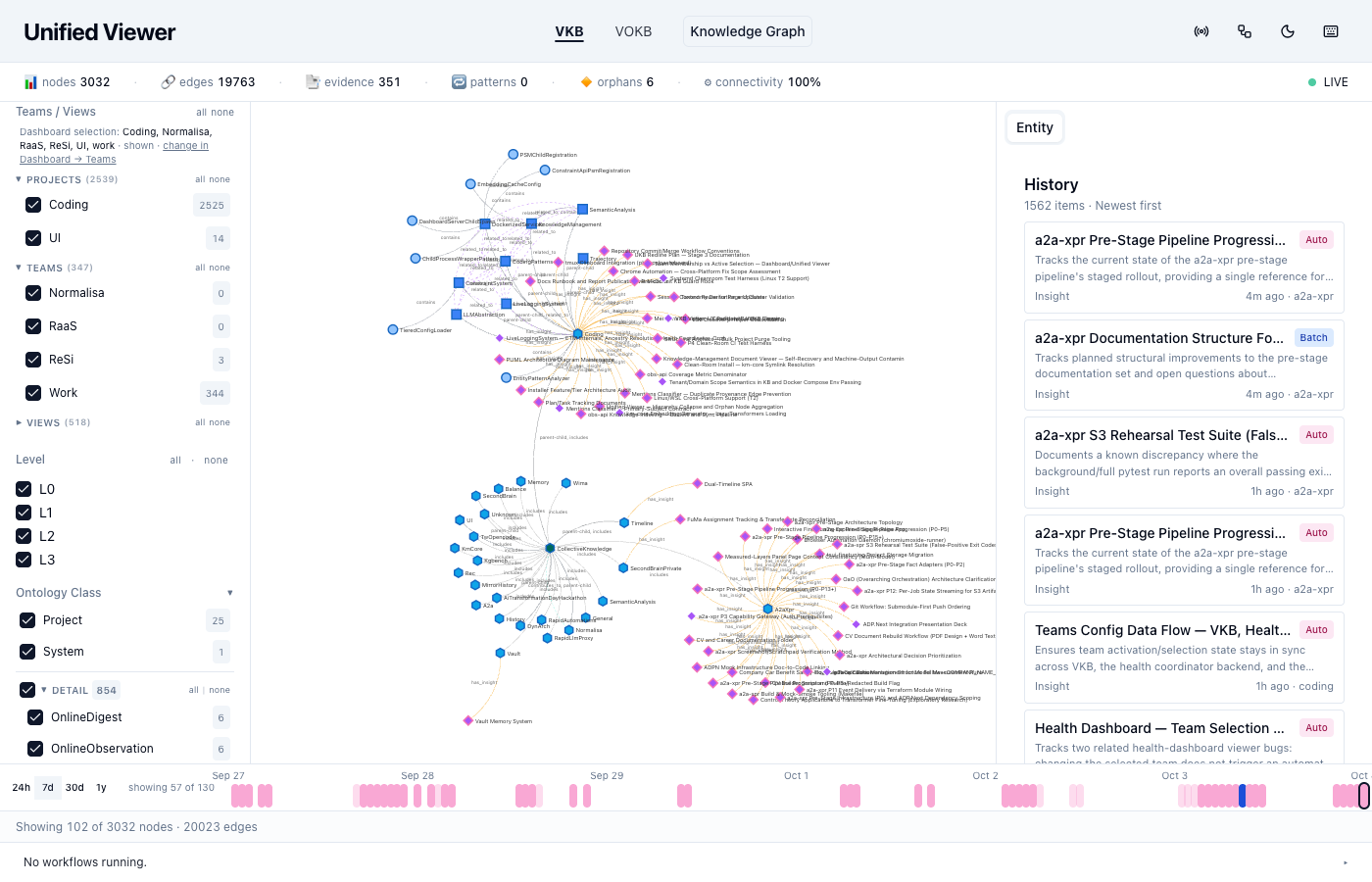
The rail lists Projects (repos), Teams and Views; the number next to each is the count of entities it admits. The line at the top names the dashboard's selection and links there. The canvas redraws only when the selection actually changes.
Choosing what runs: the Features tab
The settings icon next to Teams opens Features: the installed tier as a profile, and a switch per feature. Dependencies are explained inline ("Turning this off also switches off …"), and the chip next to each says when a change takes effect — on save, or for new sessions only.
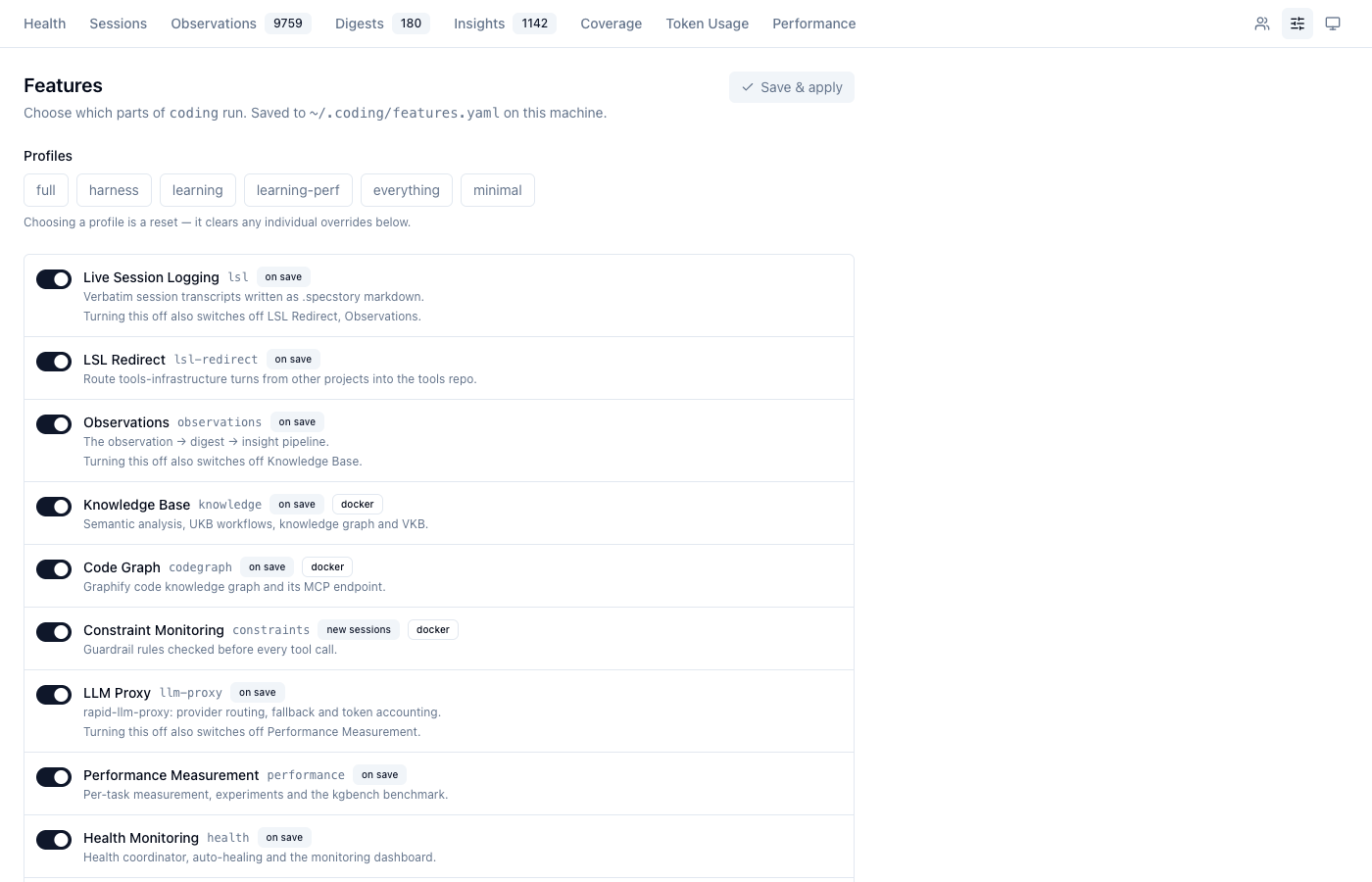
The same from a shell: coding-features status, coding-features profile learning, coding-features set performance off.
Sharing, step by step
- You work in repo
X. Learned data lands inX/.coding/and is committed locally at session end and every 30 minutes. coding synclists every learning repo with commits to push; the status line shows[P:n]whilenof them are waiting.coding sync --pushasks, then pushes.- A teammate launches
codinginXand pastes yourX-historyURL at the prompt (or Enter, if their default already points at it). The repo is cloned into theirX/.coding/. - Every later launch pulls; obs-api merges what arrived and the next prompt can use it.
For a repo they do not have checked out, add the remote to a team instead:
# ~/.coding/teams.yaml
teams:
  raas:
    repos:
      - https://bmw.ghe.com/alice/rapid-automations-history.git
It appears under Shared learning repos on the Teams tab; Clone N missing (or POST /teams/sync on the coordinator) clones it read-only under ~/.coding/data/<scope>/var/shared/, and coding sync pull keeps it current.
Commands
How the selection stays in sync
One writer: the health coordinator (:3034, PUT /teams) owns ~/.coding/teams.yaml. Both front-ends go through it.
| From | Path | Reads back |
|---|---|---|
| Dashboard → Teams | /api/teams-config on the dashboard, reverse-proxied to the coordinator | refetches on window focus and every 15 s; its store assigns only fields that changed |
| Viewer Teams rail | PUT /api/teams/active on obs-api (debounced), forwarded to the coordinator | polls GET /api/teams every 15 s |
The viewer remembers what it last wrote, so reading its own write back is not mistaken for a dashboard change, and a poll answer that started before a click (or while the click's write was pending) is ignored. A poll that brings nothing new writes nothing into the store — which is why the graph does not redraw while you look at it.
Discovery
lib/teams/discover.mjs: roots discovery.roots (default ~), depth 4, skipping dot-dirs, symlinks and an ignore list, never descending into a repo it has classified. A repo counts when it is a git repo with .coding/ or a legacy .specstory/history (one not yet migrated). The result is cached in <data home>/var/projects.json for 10 minutes; Rescan (POST /teams/discover) refreshes it now. Inside the coding-services container the cache is read through the data-home mount and $HOME/Agentic/… is mapped to /workspace/….
The learning-repo column
It shows the remote recorded in ~/.coding/repos.yaml for each repo; — means the first coding launch there has not happened yet (or was unattended, so nothing was decided). To change a recorded remote, edit repos.yaml and point the checkout at it:
Shared learning repos
A repos: entry that is only a remote is listed under Shared learning repos with its state (local = you have the checkout, shared = cloned, missing). Clone N missing calls POST /teams/sync, which clones into <data home>/var/shared/<X>/ (lib/teams/shared.mjs). Shared clones are pull-only: coding sync pull discards local changes in them first, and obs-api reads them but never writes there.
Endpoints
| Endpoint | Server | Does |
|---|---|---|
GET /teams · PUT /teams | coordinator :3034 | read / patch ~/.coding/teams.yaml (teams, active) |
POST /teams/discover | coordinator | rescan repos |
POST /teams/sync | coordinator | clone missing shared repos |
/api/teams-config/* | dashboard :3032 | proxy of the three above |
GET /api/teams | obs-api :12436 | teams with resolved projects and active (the viewer's source) |
PUT /api/teams/active | obs-api | the viewer's write path, forwarded to the coordinator |
?teams=a,b | obs-api read routes | filter entities, observations, digests, insights, LSL sessions |
Status line
[P:n] appears while n learning checkouts have local commits nobody pushed. It reads <data home>/var/sync-state.json, which the coordinator refreshes every 30 minutes and every coding sync rewrites — never git directly, so the status line stays fast.