Skills System
Skills are reusable workflow instructions that all supported coding agents (Claude Code, GitHub Copilot CLI, OpenCode) can use. A single skill definition propagates automatically to every agent.
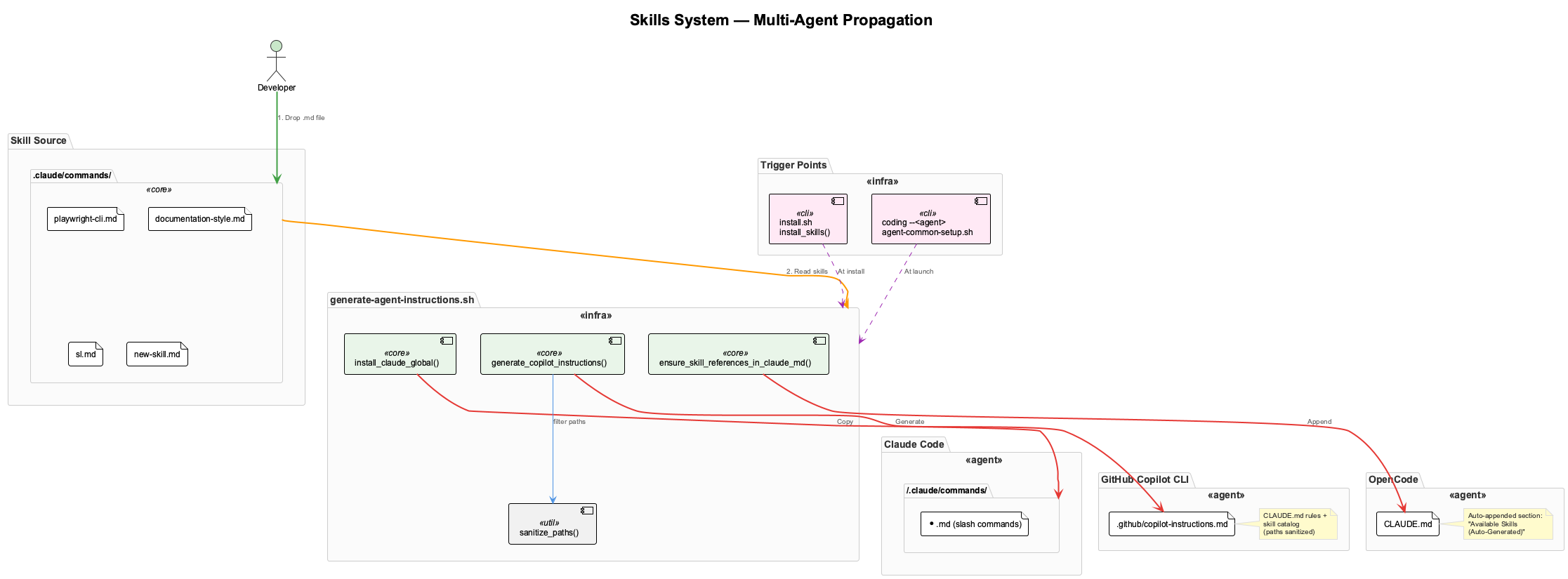
Adding a New Skill
-
Create a
.mdfile in.claude/commands/with YAML frontmatter: -
Run the propagation script:
That's it. The skill is now available in all three agents.
How It Works Per Agent
| Agent | Mechanism | Location |
|---|---|---|
| Claude Code | Copied as global slash command | ~/.claude/commands/*.md |
| Copilot CLI | Included in generated instructions | .github/copilot-instructions.md |
| OpenCode | Appended to project instructions | CLAUDE.md (auto-generated section) |
Claude Code
Skills in ~/.claude/commands/ become slash commands invokable via /skill-name. Claude reads these natively.
GitHub Copilot CLI
Copilot reads .github/copilot-instructions.md for project-level instructions. The generator creates this file by combining all rules from CLAUDE.md (with machine-specific paths sanitized) and a catalog of available skills.
OpenCode
OpenCode reads CLAUDE.md natively but has no slash command system. The generator appends an Available Skills (Auto-Generated) section listing all skills. This section is idempotent — re-running replaces it.
Automatic Sync Points
The script runs automatically at two points:
./install.sh—install_skills()during installationcoding --<agent>—ensure_agent_instructions()at every launch
Skills stay current even if you add new ones between installs.
Path Sanitization
Generated files never contain machine-specific paths:
| Pattern | Replacement |
|---|---|
| Absolute repo path | $CODING_REPO |
| Home directory | ~ |
| Username patterns | ~ |
This makes .github/copilot-instructions.md safe to commit.
Current Skills
| Skill | Trigger | Description |
|---|---|---|
| documentation-style | PlantUML, Mermaid, diagrams | Naming conventions, style sheets, validation |
| playwright-cli | Browser automation, screenshots, E2E | Drives Playwright from bash without MCP |
| sl | Session continuity | Loads recent Live Session Logs for context |