LLM Providers
Which backends can serve the project's LLM work, what each costs, and how to add or troubleshoot one.
Four kinds of provider
| Kind | Cost | Privacy | Notes |
|---|---|---|---|
| Subscription | none marginal | Uses your existing account | Preferred — flat rate |
| Cloud API | per token | Data leaves the machine | Fallback |
| Local | free | Data stays local | Speed varies with hardware |
| Mock | free | n/a | Tests and single-stepping |
Subscriptions are tried first, so most background work costs nothing per token.
Provider means account
Write <provider>/<model>, never a bare model name. A flat-rate subscription and a metered API key can serve the identical model and are completely different money.
Where the configuration lives
Two version-controlled YAMLs in the proxy repo — one deciding provider and model, one deciding what happens when that provider cannot. Both hot-reload on save.
Edit them in the dashboard at Token Usage → Settings, or by hand.
Why did this call go where it went
Free local runs
Point work at a local model runner and it costs nothing and leaves nothing. Expect a large latency difference — fine for a turn you are watching, usually wrong for high-volume background work.
What uses an LLM here
Knowledge extraction, session-content classification, continuous learning and code analysis. They differ enormously in volume: the background services make far more calls than you do interactively, which is why their routing matters more for cost than the model you chat with.
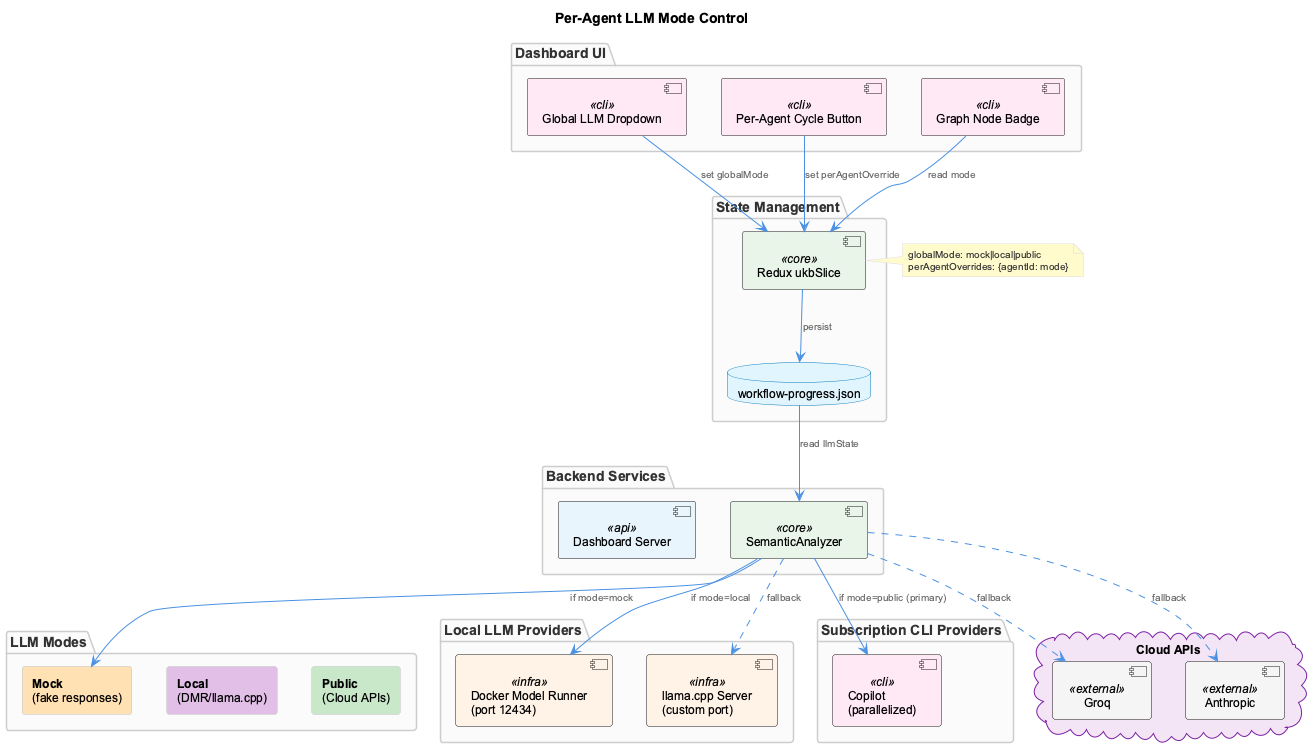
Choosing among providers
The ordering principle is simple — spend nothing before spending something. Subscription accounts are flat rate, so work served there has no marginal cost; metered APIs are the fallback for when a subscription cannot serve the request, whether through quota exhaustion or a missing capability.
Local runners sit alongside both. They are free and private, and their cost is latency: a laptop generating at a few tokens a second is entirely reasonable for a turn you are sitting in front of and a poor choice for a queue of background jobs, which is why scope is configurable per target rather than globally.
Provider ids name accounts
This is the single most common source of confusion in cost analysis. A provider id identifies the account that gets billed, not the company that makes the model. Two providers can serve the identical model at completely different cost, so a bare model name is never enough to answer "what did this cost". Always write <provider>/<model>.
The configuration
Two YAML files in the proxy repo decide everything: one maps a piece of work to a provider and a complexity band, the other gives each provider an ordered list of what to try when it cannot serve. Both hot-reload, and a file that will not parse aborts proxy startup rather than being half-applied — not knowing where calls should go is not a state to serve around.
Edit them from Token Usage → Settings on the dashboard, which validates before writing and preserves the comments in both files, or edit the YAML directly.
Full detail on how a route resolves is in LLM Routing; the provider layer underneath is LLM Architecture.
Resilience
A circuit breaker opens after five consecutive failures and resets after sixty seconds, so a failing provider is dropped quickly rather than retried into the ground. An LRU cache deduplicates identical requests. Quota is tracked optimistically — capacity is assumed until a provider says otherwise — with exponential backoff once one refuses.
When a provider misbehaves
Start by asking the proxy what it would do, which is the same decision the request path makes:
curl -s 'localhost:12435/api/llm/routing/resolve?job=<job>' | jq -r .summary
curl -s 'localhost:12435/api/llm/routing/resolve?job=<job>&tools=true' | jq .skipped
The skipped array names each dropped provider and why, which distinguishes the two cases that look identical from outside: a configuration problem you fix by editing YAML, and a runtime problem you fix with a login or a VPN connection.
If routing looks right and calls still fail, check egress rather than routing — on a corporate network with direct egress every off-premises provider fails identically while the routing decision was correct.
Configure cloud and local LLM providers for semantic analysis workflows.
Overview
The coding infrastructure uses LLMs for:
- Knowledge extraction (UKB workflows)
- Semantic classification (LSL content routing)
- Continuous learning (real-time session analysis)
- Code analysis (pattern recognition)
You can use subscription providers, cloud APIs, local models, or a combination:
| Mode | Providers | Cost | Privacy | Speed |
|---|---|---|---|---|
| Subscription | Claude Code, Copilot | $0 | Uses existing subscription | Fast (CLI / HTTP) |
| Cloud | Groq, Anthropic, OpenAI | $$$ | Data sent externally | Fast (API) |
| Local | DMR/llama.cpp | Free | Data stays local | Varies |
| Mock | Simulated | Free | N/A | Instant |
Subscription Providers (Zero Cost)
Claude Code (Recommended - Zero Cost)
Route requests through your existing Claude max subscription.
Setup:
# 1. Install Claude Code
# Download from: https://claude.ai/downloads

# 2. Verify installation
claude --version

# 3. Authenticate
claude login

# 4. Test
claude --print --silent "Say hello"
No environment variables needed - uses CLI directly.
Supported Models:
sonnet(Claude Sonnet 4.5) - fast and standard tiersopus(Claude Opus 4.6) - premium tier
Features: - ✅ Zero per-token cost - ✅ Automatic quota tracking - ✅ Exponential backoff on exhaustion - ✅ Seamless fallback to API providers
GitHub Copilot (Primary Provider — Parallelism-Optimized)
Route requests through your GitHub Copilot subscription via direct HTTP POST to the Copilot API. This is the primary provider for all tiers because it scales beautifully with parallelism — 0.77s effective per call at 10 concurrent (vs 5s sequential). Batch agents already use Promise.all, so copilot as primary unlocks peak throughput.
Setup:
The Copilot provider reads OAuth tokens automatically from ~/.local/share/opencode/auth.json (populated by OpenCode on login). No manual setup required if you use OpenCode.
# Verify auth tokens exist
cat ~/.local/share/opencode/auth.json | jq '.github_token | length'

# If missing, launch OpenCode to trigger OAuth flow
opencode
No environment variables or CLI tools needed — uses direct HTTP to the Copilot API.
Supported Models:
claude-haiku-4.5(fast tier — benchmarked fastest at 0.77s @10 parallel)claude-sonnet-4.5(standard tier)claude-opus-5(premium tier)
Features: - ✅ Zero per-token cost - ✅ Parallelism-optimized (0.77s effective @10 concurrent) - ✅ Shared quota tracking - ✅ Automatic rotation on exhaustion - ✅ Work and personal subscriptions supported
Worker Pool Tuning (claude-code)
When a claude-code request can't use the fast direct-OAuth path and falls back to the CLI, the proxy serves it from a warm worker pool (v7.3) instead of cold-spawning claude -p every time — dropping steady-state fallback latency from ~10-14s to ~2-3s. This applies to claude-code only; copilot uses direct HTTP and is never pooled. See LLM Proxy Bridge → Claude CLI Worker Pool for the architecture.
The pool ships with safe defaults — most operators never need to touch it. Tune these env vars on the proxy host when you want to trade RAM for latency, bound prompt-pool memory, or harden against a crash-storming key:
| Env var | Default | Purpose |
|---|---|---|
LLM_PROXY_WORKER_POOL_SIZE | 2 | Max persistent workers per (model × prompt) key |
LLM_PROXY_WORKER_PROMPT_CAP | 8 | LRU cap on distinct prompt-pools |
LLM_PROXY_WORKER_MAX_REQUESTS | 50 | Requests before a worker recycles |
LLM_PROXY_WORKER_MAX_INPUT_TOKENS | 150000 | Cumulative input tokens before recycle |
LLM_PROXY_WORKER_REQUEST_TIMEOUT_MS | 120000 | Per-request timeout |
LLM_PROXY_WORKER_IDLE_MS | 1800000 | Idle window before eviction (30 min) |
LLM_PROXY_WORKER_CRASH_THRESHOLD | 3 | Crashes within the window before cooldown |
LLM_PROXY_WORKER_CRASH_WINDOW_MS | 60000 | Crash-counting window |
LLM_PROXY_DISABLE_WORKER_POOL | (unset) | Set to 1 to bypass the pool entirely (overflow only) |
Tuning notes:
- Quiet hosts: leave
LLM_PROXY_WORKER_IDLE_MSat 30 min — idle workers evict themselves and free RAM; the next request transparently respawns one. - High prompt diversity: raise
LLM_PROXY_WORKER_PROMPT_CAPif many distinct (model × prompt) pairings thrash the LRU; lower it to cap memory. - Recycling:
LLM_PROXY_WORKER_MAX_REQUESTSandLLM_PROXY_WORKER_MAX_INPUT_TOKENSproactively retire long-lived workers before they accumulate state; lower them if you observe drift. - Crash storms: if a key keeps crashing, the pool routes it to cold one-shot overflow after
LLM_PROXY_WORKER_CRASH_THRESHOLDcrashes withinLLM_PROXY_WORKER_CRASH_WINDOW_MS, avoiding a spawn→crash→respawn loop. - Escape hatch: set
LLM_PROXY_DISABLE_WORKER_POOL=1to disable pooling entirely and force every fallback through the original cold one-shot CLI path — useful for isolating pool behaviour during debugging.
Cloud API Providers
Groq (Recommended Fallback)
Fastest inference for open models. Recommended for UKB workflows.
Supported Models:
llama-3.3-70b-versatile(default for semantic analysis)llama-3.1-8b-instant(fast, lower quality)mixtral-8x7b-32768(good for long context)
Anthropic Claude
High-quality analysis, used as fallback.
Supported Models:
claude-sonnet-4-5(standard tier)claude-haiku-4-5(fast tier)claude-opus-5(premium tier)
OpenAI
GPT models and embeddings.
Supported Models:
gpt-4.1(standard tier)gpt-4.1-mini(fast tier)o4-mini(premium tier - reasoning)text-embedding-3-small(embeddings)
Google Gemini
Alternative provider.
Supported Models:
gemini-2.5-flash(fast and standard tiers)gemini-2.5-pro(premium tier)
GitHub Models
Free tier access to OpenAI models via GitHub.
Supported Models:
gpt-4.1(standard tier)gpt-4.1-mini(fast tier)o4-mini(premium tier)
Base URL: https://models.github.ai/inference/v1
Local Models (DMR/llama.cpp)
Run models locally for zero cost and complete privacy.
Architecture
flowchart LR
    subgraph Host
        A[Coding Services] --> B[DMR Port 12434]
    end

    subgraph Docker
        B --> C[llama.cpp Server]
        C --> D[Local Model]
    end
Docker Model Runner (DMR)
DMR provides an OpenAI-compatible API for local models.
Setup:
- Configure Port (in
.env.ports):
- Start DMR (via Docker):
- Verify Connection:
llama.cpp Direct
For non-Docker setups or custom configurations.
Build llama.cpp:
Start Server:
Recommended Local Models
| Model | Size | RAM Required | Use Case |
|---|---|---|---|
llama-3.2-3b | 2GB | 4GB | Fast, development |
llama-3.2-8b | 5GB | 8GB | Balanced |
llama-3.1-70b-q4 | 40GB | 48GB | Production quality |
codellama-34b | 20GB | 24GB | Code-focused |
Model Download
# Using Hugging Face CLI
huggingface-cli download TheBloke/Llama-2-7B-GGUF \
  llama-2-7b.Q4_K_M.gguf \
  --local-dir ./models

# Or via DMR (if supported)
curl -X POST http://localhost:12434/v1/models/pull \
  -d '{"model": "llama-3.2-3b"}'
Unified LLM Layer
All LLM requests route through the @rapid/llm-proxy unified layer, which provides:
- 14 providers: 2 subscription (Copilot via direct HTTP, Claude Code via CLI), 5 cloud API, 2 local, 1 mock, plus proxy and OpenAI-compatible
- Copilot-first parallelized routing: Copilot scales with concurrency (0.77s @10 parallel), always tried first
- Tier-based routing: Automatic provider selection based on task complexity
- Quota tracking: Persistent usage tracking with exponential backoff
- Circuit breaker: Prevents cascading failures (threshold: 5 failures, reset: 60s)
- LRU cache: Deduplicates requests (1000 entries, 1-hour TTL)
- Metrics tracking: Cost, performance, and usage stats per provider
Cost Savings: Subscription-first routing pushes most UKB/LSL analysis through Copilot/Claude max subscriptions before any paid API call, eliminating the per-token spend on those flows entirely.
See @rapid/llm-proxy Architecture and LLM Architecture for complete details.
Tier-Based Routing
Requests are automatically routed based on task complexity and cost optimization:
Tier Definitions
| Tier | Use Cases | Provider Priority | Cost |
|---|---|---|---|
| Fast | Simple extraction, parsing, basic classification | Copilot → Groq → Claude Code → Anthropic → OpenAI → Gemini → GitHub Models | $0 → Lowest |
| Standard | Semantic analysis, ontology classification, documentation | Copilot → Groq → Claude Code → Anthropic → OpenAI → Gemini → GitHub Models | $0 → Medium |
| Premium | Insight generation, pattern recognition, QA review | Copilot → Groq → Claude Code → Anthropic → OpenAI → Gemini → GitHub Models | $0 → Highest |
Routing Flow
flowchart TB
    A[LLM Request] --> B{Determine Tier}
    B -->|Fast| C[Copilot → Groq → Claude Code → ...]
    B -->|Standard| D[Copilot → Groq → Claude Code → Anthropic → OpenAI → ...]
    B -->|Premium| E[Copilot → Groq → Claude Code → Anthropic → OpenAI → ...]
    C --> F{Quota Available?}
    D --> F
    E --> F
    F -->|No| G[Skip to Next Provider]
    F -->|Yes| H{Circuit Breaker OK?}
    H -->|No| G
    H -->|Yes| I{Check Cache}
    I -->|Hit| J[Return Cached]
    I -->|Miss| K[Make Request]
    K --> L{Success?}
    L -->|Yes| M[Record Usage & Cache]
    M --> N[Return Result]
    L -->|No - Quota| O[Mark Exhausted]
    O --> G
    L -->|No - Other| P{More Providers?}
    P -->|Yes| F
    P -->|No| Q[Try Local: DMR → Ollama]
    Q --> R{Success?}
    R -->|Yes| N
R -->|No| S[Fail with Error]Configuration
Tier routing is configured in config/llm-providers.yaml:
# Copilot first — scales with parallelism (0.77s effective @10 concurrent)
provider_priority:
  fast: ["copilot", "groq", "claude-code", "anthropic", "openai", "gemini", "github-models"]
  standard: ["copilot", "groq", "claude-code", "anthropic", "openai", "gemini", "github-models"]
  premium: ["copilot", "groq", "claude-code", "anthropic", "openai", "gemini", "github-models"]

task_tiers:
  fast:
    - git_file_extraction
    - commit_message_parsing
    - basic_classification
  standard:
    - git_history_analysis
    - semantic_code_analysis
    - ontology_classification
  premium:
    - insight_generation
    - observation_generation
    - pattern_recognition

# Subscription quota tracking
providers:
  claude-code:
    cliCommand: "claude"
    quotaTracking:
      enabled: true
      softLimitPerHour: 100
  copilot:
    cliCommand: "copilot-cli"
    quotaTracking:
      enabled: true
      softLimitPerHour: 100
Semantic Workload Routing
Different workloads are routed to appropriate providers:
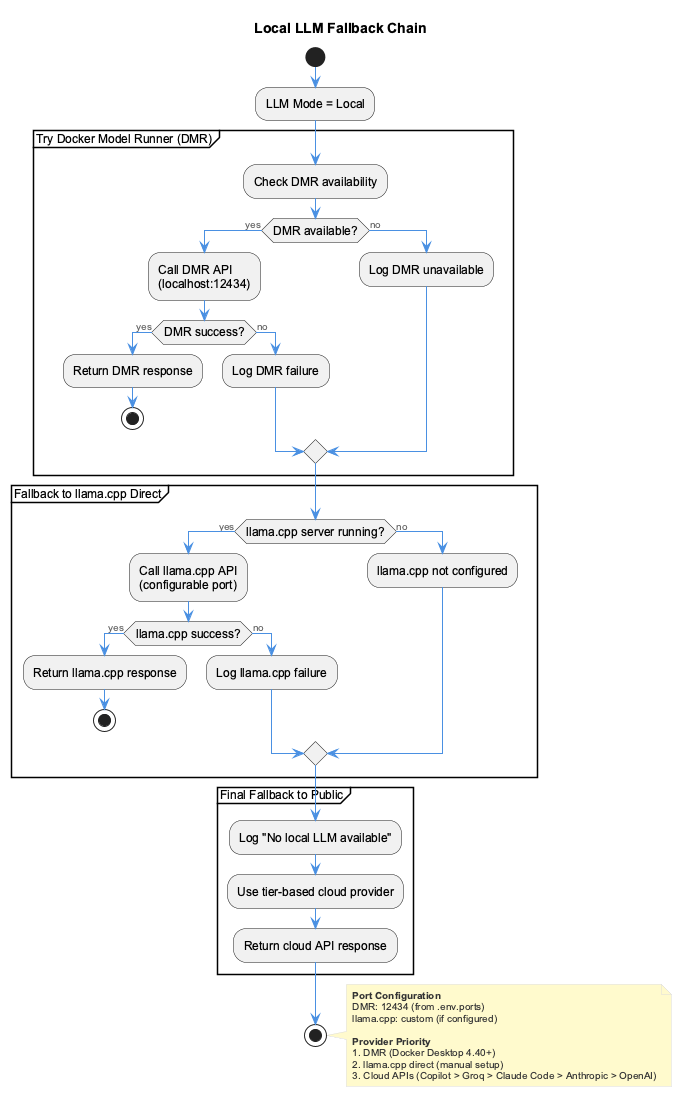
Routing Rules
| Workload | Default Provider | Rationale |
|---|---|---|
| Knowledge Extraction | Groq (llama-70b) | Needs quality + speed |
| Semantic Classification | Local or Groq | High volume, lower quality OK |
| Embedding Generation | OpenAI or Local | Vector consistency |
| Sensitive Content | Local only | Privacy requirement |
| Budget Exceeded | Local only | Cost control |
Sensitivity-Based Routing
The 5-layer sensitivity classifier automatically routes:
- Safe content → Cloud providers (fast, accurate)
- Sensitive content → Local models (private, free)
Sensitive patterns detected:
- API keys and tokens
- Passwords and credentials
- Email addresses
- Corporate identifiers
- Financial data
Workflow-Specific Configuration
UKB Workflows
Continuous Learning
# .env
LEARNING_LLM_PROVIDER=groq
LEARNING_BUDGET_LIMIT=10  # Monthly USD cap (configurable)
LEARNING_FALLBACK_TO_LOCAL=true
LSL Classification
Debug Mode
For development and testing, use mock or local modes:
Mock Mode
Returns simulated responses without LLM calls:
Local-Only Mode
Force all calls to local models:
Provider Override
Force a specific provider:
Cost Management
Budget Tracking
The system tracks LLM costs per provider:
Response:
{
  "monthlyLimit": 10,
  "used": 2.50,
  "remaining": 7.50,
  "percentage": 25.0,
  "providers": {
    "groq": 1.20,
    "anthropic": 0.85,
    "openai": 0.45
  }
}
Provider Costs
| Provider | Input (per 1M tokens) | Output (per 1M tokens) | Notes |
|---|---|---|---|
| Claude Code | $0 | $0 | Uses existing subscription |
| GitHub Copilot | $0 | $0 | Uses existing subscription |
| Groq | $0.40 | $0.60 | Fast fallback |
| Anthropic Claude Sonnet 4.5 | $3.00 | $15.00 | Standard fallback |
| Anthropic Claude Opus 4.6 | $5.00 | $25.00 | Premium fallback |
| OpenAI GPT-4.1 | $2.50 | $10.00 | Fallback |
| Google Gemini 2.5 Flash | $0.35 | $1.05 | Fallback |
| GitHub Models | Free (rate limited) | Free (rate limited) | API access |
| Local (DMR) | $0 | $0 | Final fallback |
Cost Savings: When subscription quota is available, those requests cost $0 per token instead of the per-token rates above — the per-call savings compound across the day-to-day volume of UKB/LSL analysis.
Budget Alerts
Configure alerts in .env:
BUDGET_ALERT_50=log      # Log at 50%
BUDGET_ALERT_80=warn     # Warning at 80%
BUDGET_ALERT_90=notify   # Notification at 90%
BUDGET_EXCEEDED=local    # Switch to local when exceeded
Troubleshooting
DMR Not Responding
# Check if DMR is running
curl http://localhost:12434/health

# Check Docker container
docker ps | grep dmr

# View logs
docker logs coding-dmr
Model Not Found
# List available models
curl http://localhost:12434/v1/models

# Pull model (if DMR supports)
curl -X POST http://localhost:12434/v1/models/pull \
  -d '{"model": "llama-3.2-3b"}'
Slow Local Inference
- Use smaller quantized models (Q4_K_M)
- Increase context size only if needed
- Ensure GPU acceleration is enabled
- Check available RAM
Provider Timeout
Related Documentation
- Health Dashboard - Workflow debug controls
- Knowledge Workflows - UKB system details
- Configuration - API keys setup