Knowledge Workflows
How knowledge is captured, processed and stored — the on-demand extraction pass and the continuous learning that runs beside it.
Two systems, different rhythms
| System | What it does | When |
|---|---|---|
| Semantic Analysis | Deep extraction by a 14-agent workflow | On demand |
| Continuous Learning | Real-time capture from live sessions | Always, in the background |
The first is a considered pass over your history; the second notices things as they happen.
Running the extraction pass
semantic workflow run wave-analysis --team coding     # production, 10-20 min
semantic workflow status                              # progress
Asking for it in chat works too — the agent runs the same command. It is asynchronous: the command returns a workflow id and leaves the run going, so watch the dashboard rather than waiting on the terminal.
Add --debug for a mocked-LLM, single-stepped run that spends nothing.
What comes out
Entities, relations and insights, written to the graph and exported as JSON under .data/knowledge-export/. Those exports are git-tracked, so knowledge changes show up in diffs and travel with the repo.
Looking at it
The extraction pass
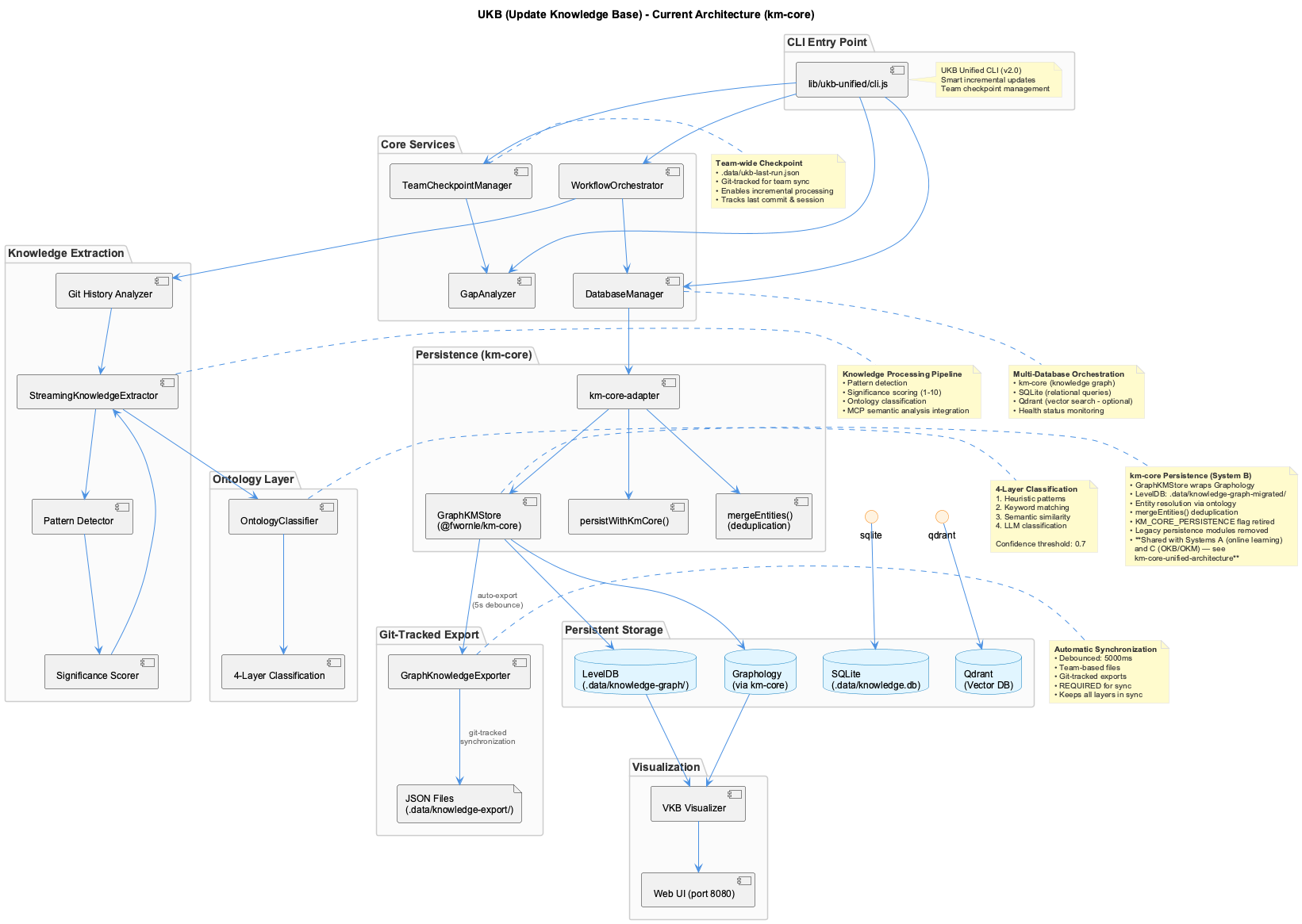
A 14-agent workflow reads your git history and session logs and produces entities, relations and insights. An orchestrator routes between the agents and a QA agent decides, per step, whether to proceed, retry, skip or escalate — so a weak result is caught inside the run rather than persisted and discovered later.
Two things to know before you run it. It takes 10–20 minutes and is asynchronous, so treat the returned workflow id as the handle and watch the dashboard. And --debug runs the whole thing against a mocked LLM with single-stepping, which is the way to understand the workflow without paying for it.
The incremental pass starts from the last checkpoint; a full pass reprocesses everything from the first commit.
Where knowledge is stored
Two databases, because the two access patterns are genuinely different: a graph for structure — what relates to what — and a vector store for similarity, which is what makes retrieval work at injection time. Both are fronted by the same shared kernel, and both are exported to git-tracked JSON.
That export is what makes knowledge shareable. A teammate pulls the JSON and their instance hydrates from it; nobody ships a database file.
Continuous learning alongside it
While the extraction pass is deliberate and occasional, the continuous learning path records observations as sessions happen, consolidating them into digests and, over a longer window, into persistent insights. It runs under a budget so it cannot become the dominant consumer, and it applies temporal decay so that what mattered last month does not outrank what matters now.
How this feeds back
Everything above exists to be injected. At prompt time the retrieval service searches these stores and puts the most relevant material into the agent's context — see Knowledge Context Injection for the retrieval side. Extraction fills the well; injection draws from it.
What not to do
The old ukb shell script is gone, and so is the MCP server that briefly replaced it. There is one supported path — the semantic CLI, which the agent will run for you if you ask in chat. Hand-editing the JSON exports is also unsupported: they are generated artefacts, and the next pass overwrites them.
Complete guide to the knowledge capture, processing, and storage systems.
Overview
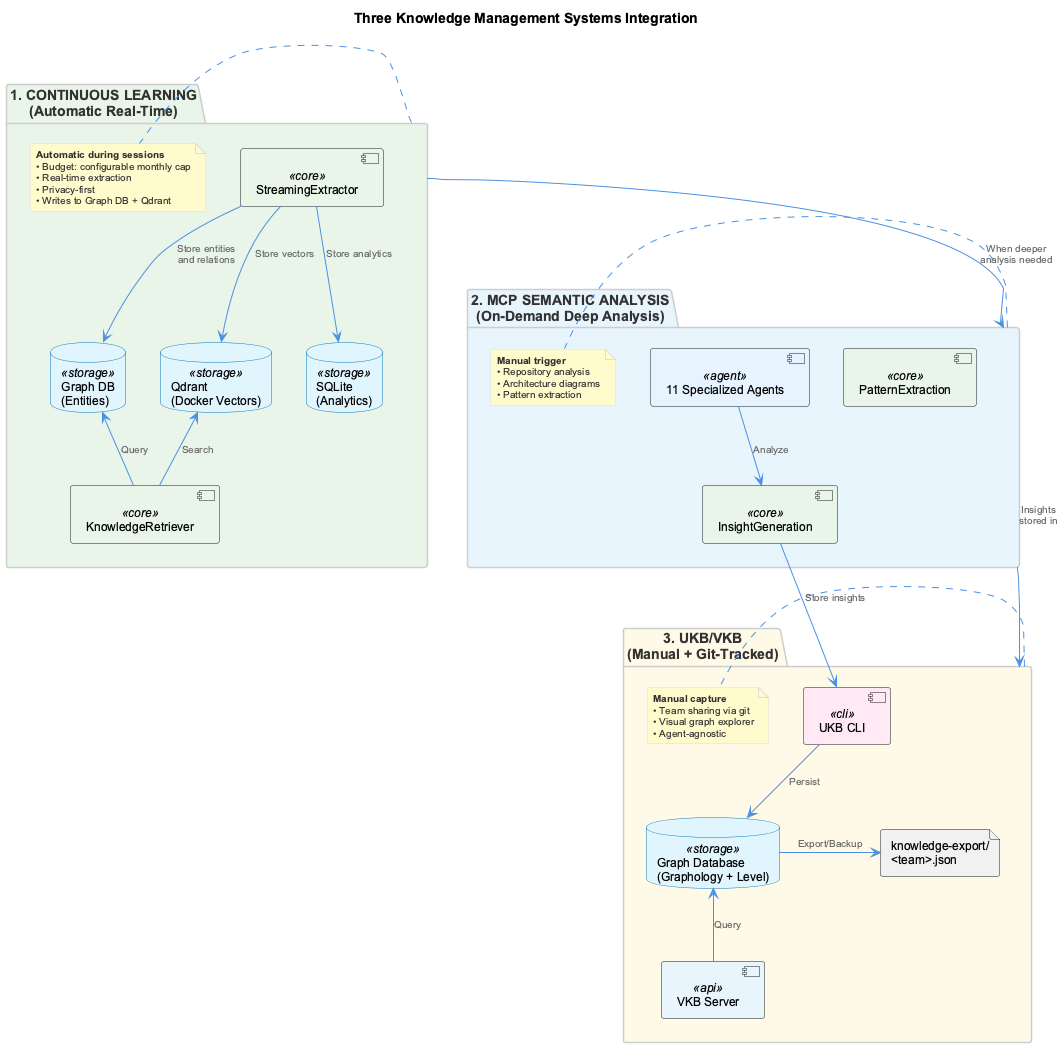
The coding infrastructure uses two complementary knowledge management systems:
| System | Purpose | Trigger | Storage |
|---|---|---|---|
| Semantic Analysis | Deep, on-demand code analysis with 14 specialized agents | Type "ukb" in Claude chat | GraphDB to LevelDB to JSON |
| Continuous Learning | Real-time session learning with budget control | Automatic during sessions | Qdrant + SQLite |
UKB - Update Knowledge Base
Current system: the semantic CLI
The legacy shell script is gone, and so is the MCP server that briefly replaced it — the semantic-analysis MCP tools were retired in favour of a CLI, which the agent runs on your behalf. Asking for a "ukb" pass in chat still works; it resolves to:
semantic workflow run wave-analysis --team coding     # production pass
semantic workflow status                              # progress
Quick Start
# In Claude chat (NOT terminal):
User: "ukb"

# Claude executes incremental analysis automatically
# Shows summary of entities created, relations, insights generated
Full Analysis
This processes entire git history and all session logs instead of just changes since last checkpoint.
What Happens When You Type "ukb"
- Claude detects knowledge update request
- Decides: incremental or full analysis
- Runs
semantic workflow run wave-analysis --team codingagainst the workflow server - Executes 14-agent workflow with SmartOrchestrator
- QA agent provides semantic routing (proceed/retry/skip/escalate)
- Stores to GraphDB to LevelDB to JSON export
- Shows you a summary with confidence metrics
14-Agent Multi-Agent System
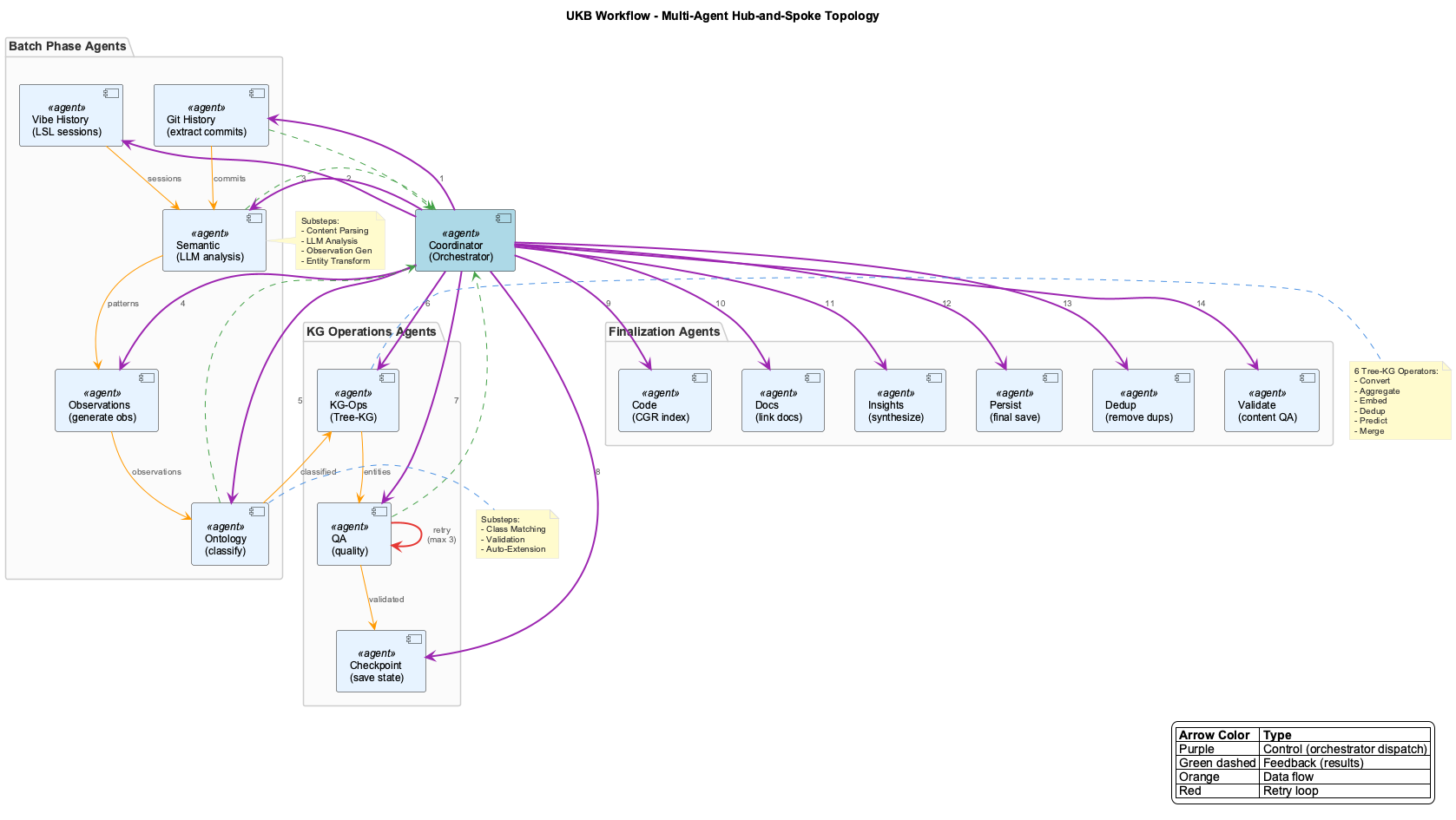
Smart Orchestrator Flow
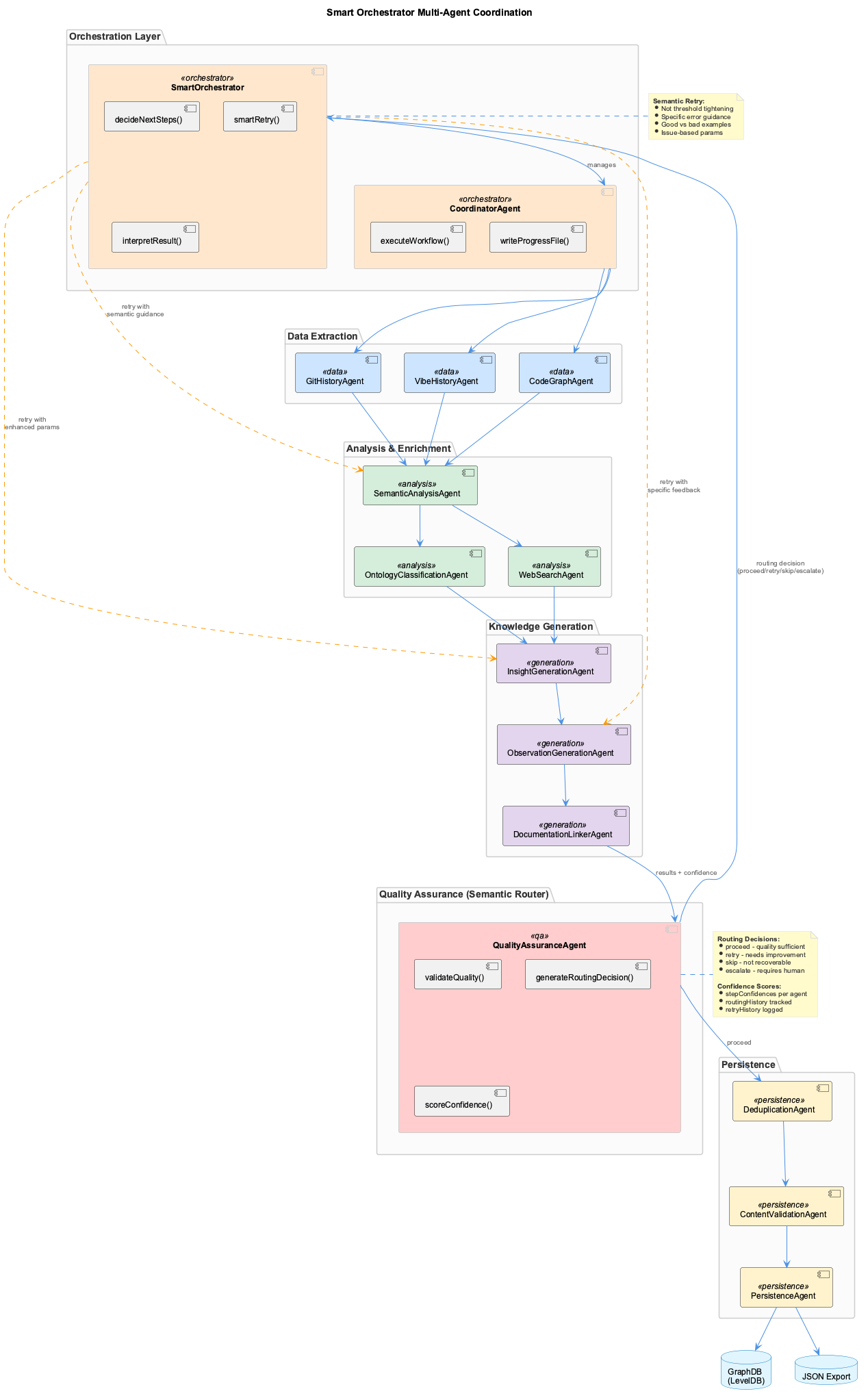
Orchestration Layer
- SmartOrchestrator - Semantic coordination with confidence propagation and intelligent retry
- CoordinatorAgent - Executes workflow definitions, manages agent lifecycle
Data Extraction Agents
- GitHistoryAgent - LLM-powered commit pattern analysis and evolution extraction
- VibeHistoryAgent - Analyzes session logs with LLM context extraction
- CodeGraphAgent - AST-based indexing via graphify
graph.json(requires Docker)
Analysis & Enrichment Agents
- SemanticAnalysisAgent - Deep semantic analysis with LLM fallback chain
- OntologyClassificationAgent - Maps entities to project ontology
- WebSearchAgent - Researches patterns with optional LLM result ranking
Knowledge Generation Agents
- InsightGenerationAgent - Creates structured insights with PlantUML diagrams
- ObservationGenerationAgent - Adds observations using LLM structuring
- DocumentationLinkerAgent - LLM-powered semantic doc-to-code matching
Quality & Persistence Agents
- QualityAssuranceAgent - Semantic Router: validates quality, generates routing decisions (proceed/retry/skip/escalate), provides confidence scoring
- DeduplicationAgent - Semantic duplicate detection using OpenAI embeddings
- ContentValidationAgent - Final validation and entity refresh
- PersistenceAgent - Stores entities to GraphDB
SmartOrchestrator Features
- Semantic Retry: Not mechanical threshold tightening - provides specific guidance on what went wrong
- Confidence Propagation: Each step reports confidence; downstream agents are aware of upstream quality
- Routing Decisions: QA generates proceed/retry/skip/escalate based on semantic analysis
- LLM-Assisted Decisions: Uses AI to interpret failures and suggest remediation
Storage Architecture
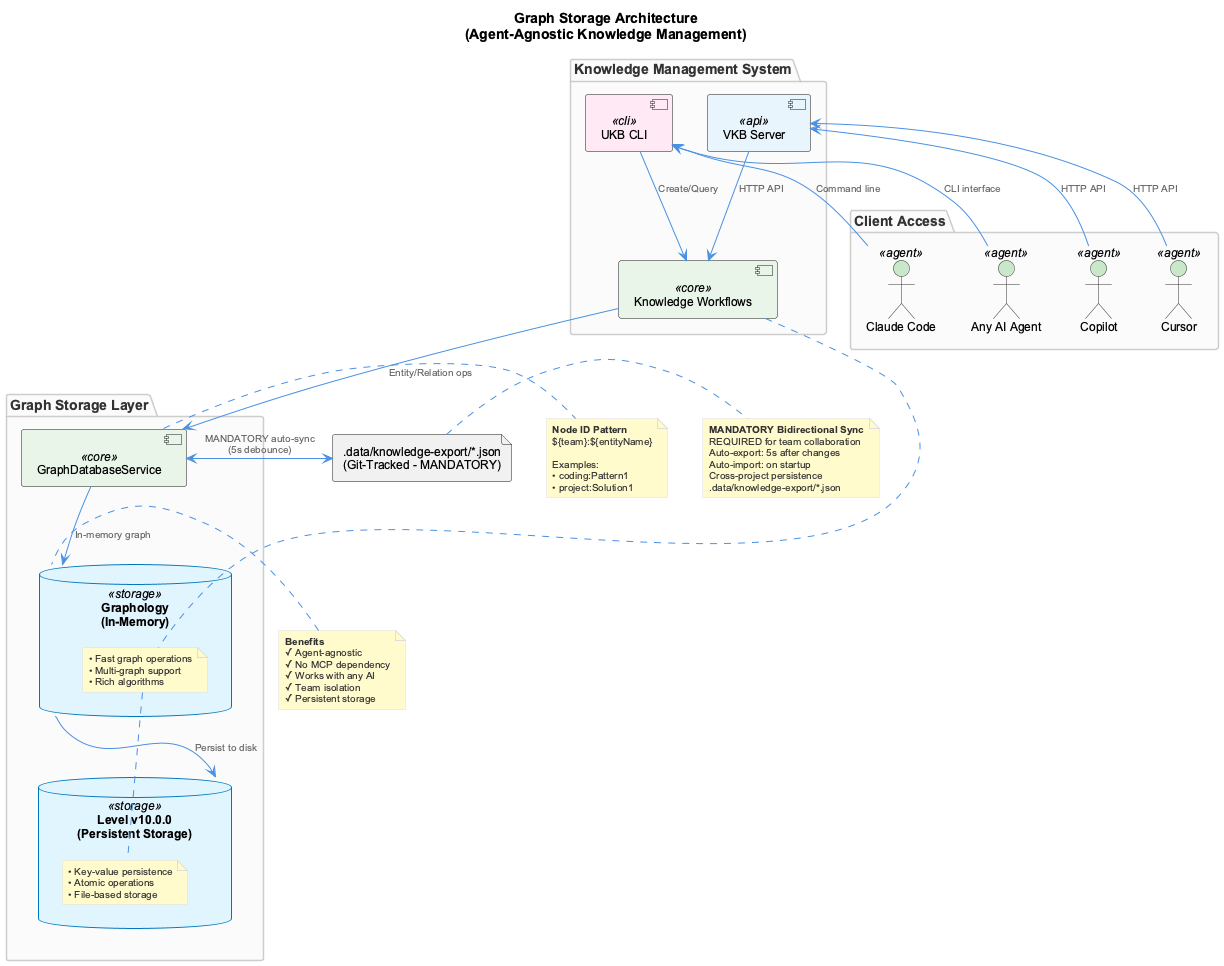
The storage flows through three layers:
- Graphology (in-memory) - Fast graph operations with 1-second auto-persist
- LevelDB (persistent) - Durable storage at
.data/knowledge-graph/ - JSON Files (git-tracked) - Team sync via
.data/knowledge-export/coding.json
| Layer | Location | Purpose |
|---|---|---|
| GraphDB | In-memory Graphology | Fast graph operations |
| LevelDB | .data/knowledge-graph/ | Persistent storage |
| JSON Export | .data/knowledge-export/coding.json | Git-tracked team sync |
| Checkpoint | .data/ukb-last-run.json | Incremental processing |
Team Synchronization
Developer A workflow:
- Types "ukb" in Claude
- Workflow executes
- Updates: .data/knowledge-export/coding.json
- Updates: .data/ukb-last-run.json
- Git commits both files
- Git pushes to remote
Developer B workflow:
- Git pulls from remote
- Gets updated coding.json (knowledge)
- Gets updated ukb-last-run.json (checkpoint)
- Types "ukb" in Claude
- Only processes commits/sessions since checkpoint (avoiding duplicate work)
Continuous Learning System
Key Features
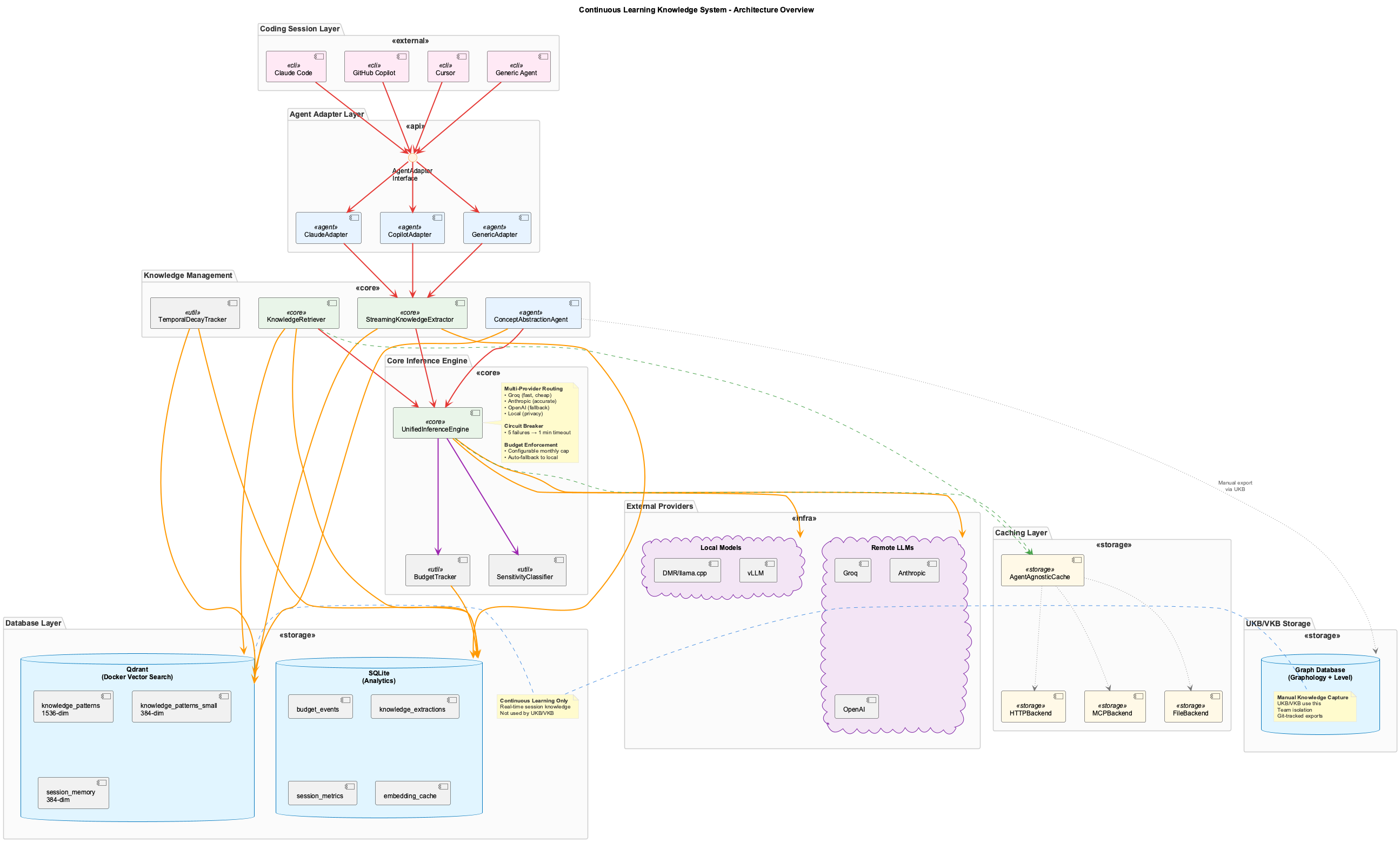
- Agent-Agnostic Design: Currently optimized for Claude Code; designed to support other AI assistants in future
- Real-Time Extraction: Learns as you code, not after the fact
- Semantic Search: Find relevant knowledge using vector similarity
- Budget-Aware: Tracks LLM costs and enforces a configurable monthly limit
- Privacy-First: Automatically routes sensitive data to local models
- Cross-Session Learning: Share knowledge across different coding sessions
System Components
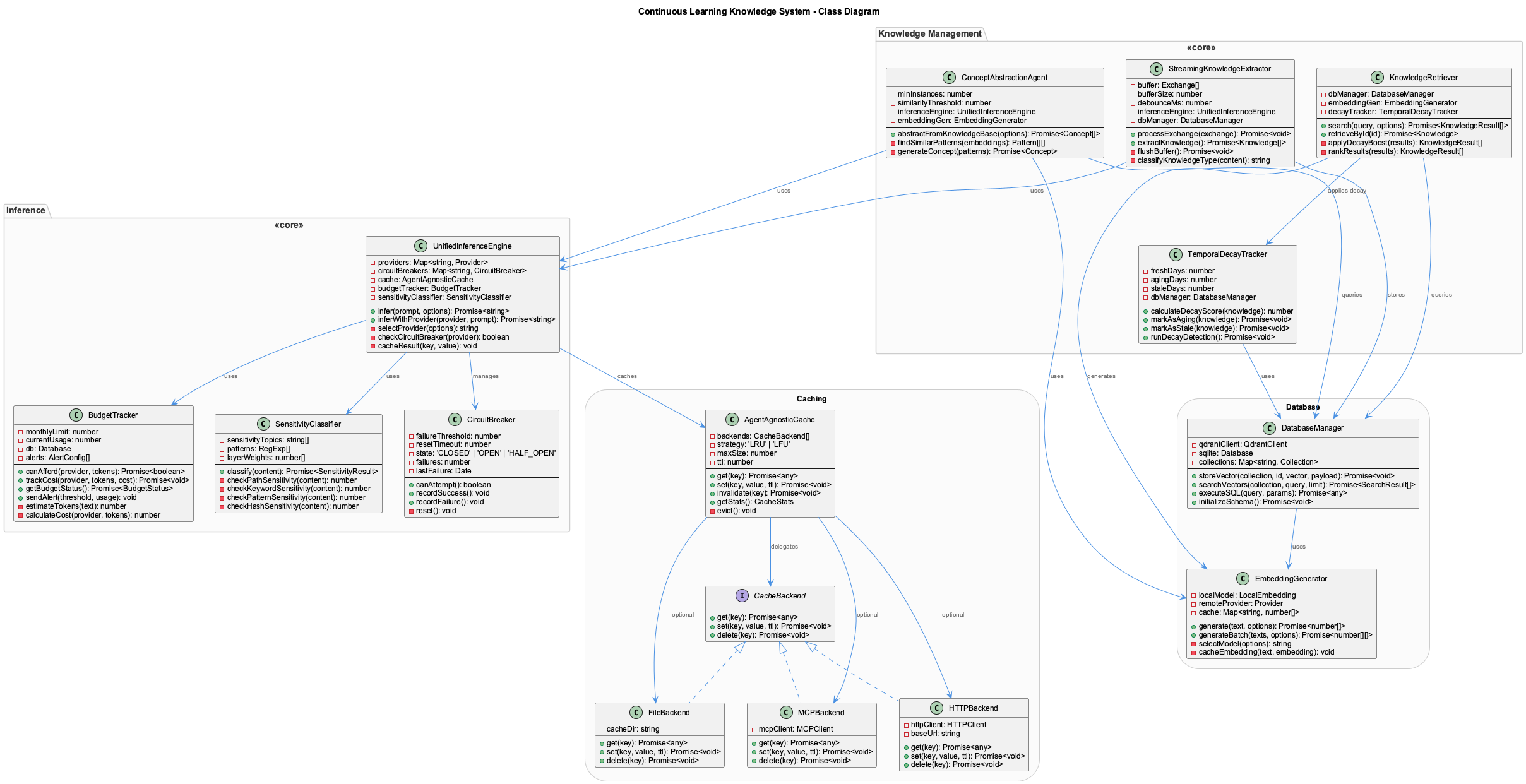
Inference Layer:
UnifiedInferenceEngine- Central LLM inference with multi-provider supportBudgetTracker- Cost tracking with configurable monthly limit enforcementSensitivityClassifier- 5-layer privacy detectionCircuitBreaker- Failure detection and provider failover
Knowledge Management:
StreamingKnowledgeExtractor- Real-time knowledge extraction with bufferingKnowledgeRetriever- Semantic search with temporal decayConceptAbstractionAgent- Pattern generalization (3+ instances)TemporalDecayTracker- Knowledge aging and freshness management
Knowledge Extraction Flow
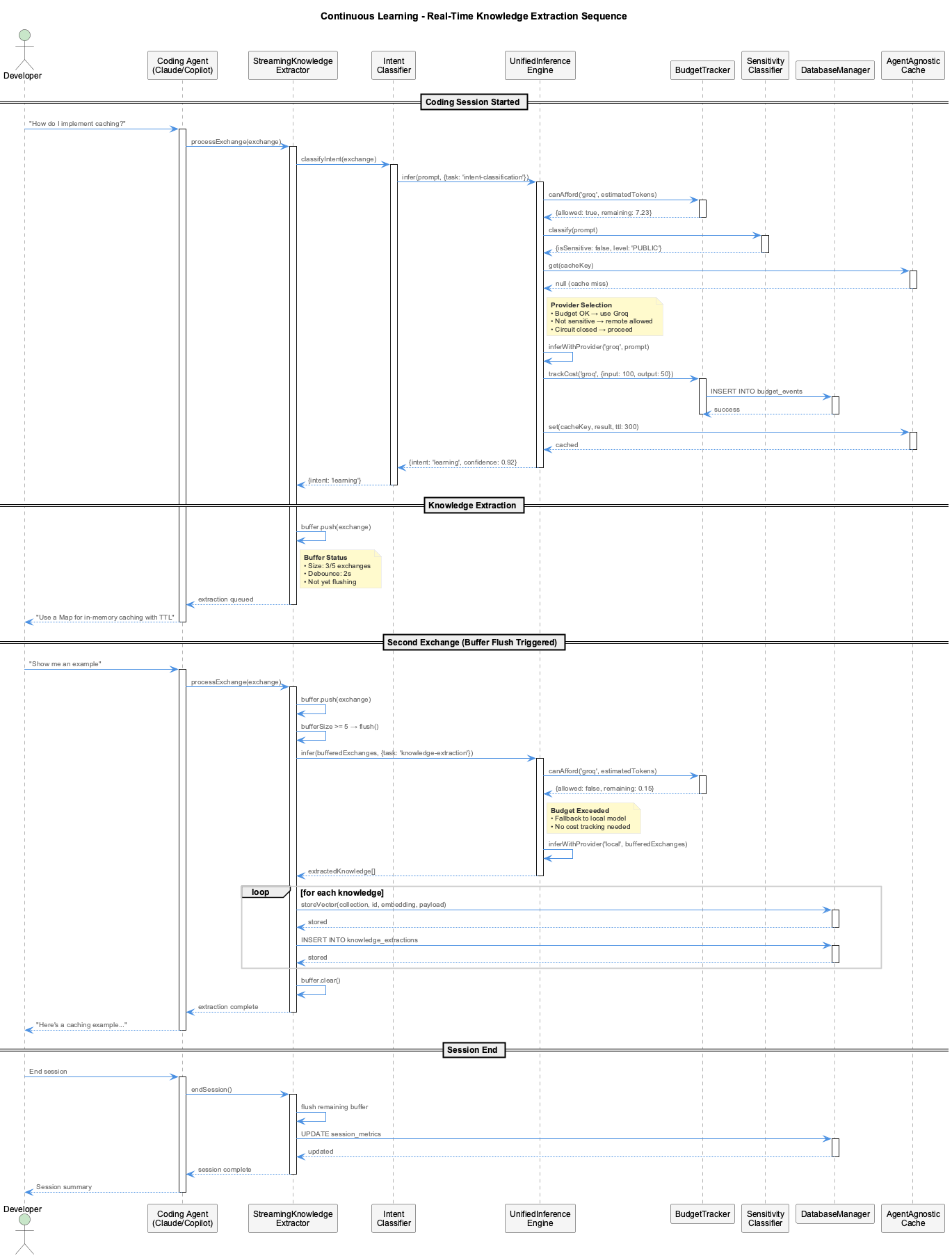
- Exchange Processing: Developer interacts with coding agent
- Intent Classification: Classifier categorizes developer intent
- Budget Check: Budget tracker verifies cost allowance
- Sensitivity Detection: Classifier routes sensitive data to local models
- Knowledge Extraction: Buffered exchanges are processed and stored
- Budget Fallback: Automatic fallback to local models when budget exceeded
Knowledge Retrieval Flow
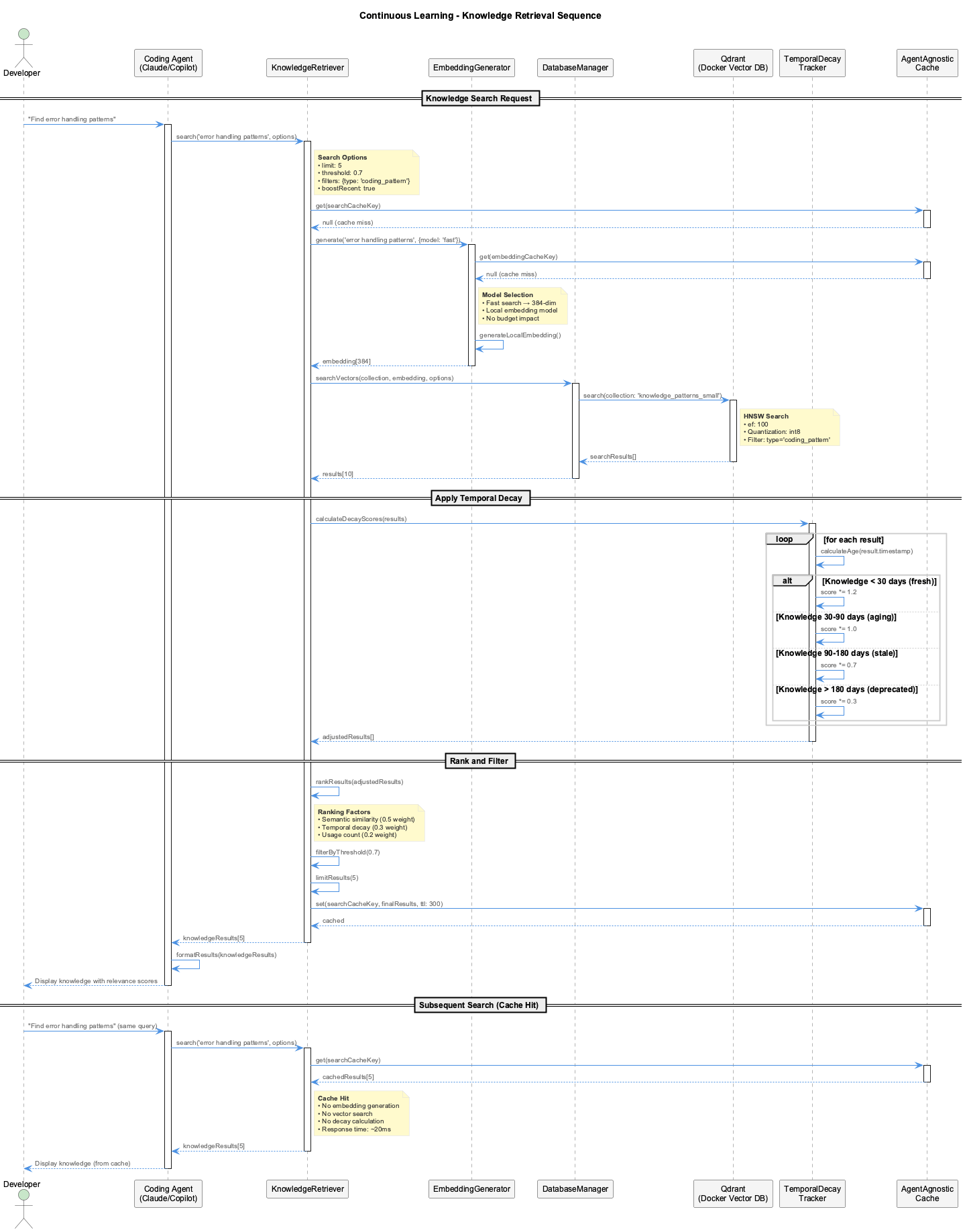
- Search Request: Developer queries for knowledge patterns
- Cache Check: System checks for cached results first
- Embedding Generation: Query converted to vector embedding
- Vector Search: Qdrant performs HNSW search with filters
- Temporal Decay: Results adjusted based on knowledge age
- Ranking & Filtering: Results ranked by relevance and filtered by threshold
- Cache Storage: Results cached for future queries (5-minute TTL)
Performance: Cache hits return results in ~20ms vs ~300ms for vector search.
Dual-Database Strategy
| Database | Purpose | Location |
|---|---|---|
| Qdrant | Vector search (semantic similarity) | localhost:6333 |
| SQLite | Analytics, budget tracking, metadata | .cache/knowledge.db |
Qdrant Collections
| Collection | Dimensions | Purpose |
|---|---|---|
knowledge_patterns | 1536-dim | High-quality long-term storage |
knowledge_patterns_small | 384-dim | Fast local embeddings |
session_memory | 384-dim | Session-specific memory |
SQLite Tables
budget_events- LLM cost trackingknowledge_extractions- Extraction metadatasession_metrics- Session analyticsembedding_cache- Cached embeddings
Budget Configuration
Monthly Limit
Configure a monthly USD cap that suits your usage; alerts fire at the configured threshold percentages.
const system = new KnowledgeLearningSystem({
  budgetLimit: 10,  // monthly USD cap (configurable)
  budgetAlerts: [
    { threshold: 50, action: 'log' },
    { threshold: 80, action: 'warn' },
    { threshold: 90, action: 'notify' }
  ],
  budgetAwareRouting: true  // Prefer cheaper providers when budget tight
});
Provider Costs
| Provider | Input (per 1K tokens) | Output (per 1K tokens) |
|---|---|---|
| Groq | $0.0004 | $0.0006 |
| OpenRouter | $0.001 | $0.001 |
| Local (DMR/llama.cpp) | $0 | $0 |
Fallback Chain
The system tries providers in order: groq (remote, fast) then openrouter (remote, accurate) then local (free, private)
Temporal Decay
Knowledge ages over time with configurable decay rates:
| Category | Max Age | Rank Adjustment |
|---|---|---|
| Fresh | 30 days | +20% |
| Aging | 90 days | No change |
| Stale | 180 days | -30% |
| Deprecated | 365 days | -70% |
Exceptions (never decay):
coding_principlearchitecture_pattern
Status Indicators
Knowledge System Status
| Status | Icon | Meaning |
|---|---|---|
| Ready | [📚●] green | Knowledge extraction ready and operational |
| Processing | [📚⏳] | Actively extracting knowledge from session |
| Idle | [📚●] grey | Operational but waiting/sleeping |
| Warning | [📚●] amber + ●N | Has N errors but still operational |
| Paused/Disabled | [📚🔇] | Knowledge extraction disabled in config |
| Offline | [📚●] red | System offline or initialization failed |
Initialization
Automatic Initialization
Knowledge system is automatically initialized during fresh installations:
# Run the installer (automatically initializes knowledge system)
./install.sh

# Or initialize manually if needed
node scripts/initialize-knowledge-system.js
Verification
# Check knowledge-pipeline freshness via the coordinator (Phase 33+:
# .health/*-transcript-monitor-health.json is no longer written; the
# health-coordinator's knowledge_pipeline slice is the source of truth)
curl -fs http://localhost:3034/health/state | jq '.knowledge_pipeline'

# Check status line
CODING_REPO=/path/to/coding node scripts/combined-status-line.js

# Run E2E tests
node scripts/test-knowledge-extraction.js [--verbose]
Visualization
Start VKB Server
VKB Features
- Interactive graph visualization
- Entity browsing and search
- Relation exploration
- Real-time updates via WebSocket
See VKB Visualization Guide for complete documentation.
Migration Guide
What to Stop Doing
ukbas a shell command in any form — the binary was removed, and so was the MCP server that replaced it- Manual JSON file editing
What to Start Doing
- Type "ukb" in Claude chat
- Let the agent run the
semanticCLI for you - Trust the 14-agent workflow with SmartOrchestrator
- Review auto-generated insights and confidence metrics
- Commit
.data/knowledge-export/*.jsonand.data/ukb-last-run.json
Troubleshooting
Qdrant Connection Errors
# Check if Qdrant is running
curl http://localhost:6333/health

# Start Qdrant with Docker
docker run -p 6333:6333 qdrant/qdrant
Budget Exceeded
// Check budget status
const budget = await system.getBudgetStatus();
// Review budget.used, budget.remaining, budget.percentage

// Force heuristic mode (no LLM costs)
const system = new KnowledgeLearningSystem({
  forceHeuristic: true
});
Slow Vector Search
- Enable quantization for faster searches
- Reduce search limit
- Use 384-dim embeddings instead of 1536-dim
Key Files
| File | Purpose |
|---|---|
.data/knowledge-graph/ | LevelDB persistent storage |
.data/knowledge-export/coding.json | Git-tracked knowledge export |
.data/ukb-last-run.json | Incremental processing checkpoint |
.cache/knowledge.db | SQLite analytics database |
Coordinator state.knowledge_pipeline slice (http://localhost:3034/health/state) | Knowledge extraction health (Phase 33+; supersedes the retired .health/*-transcript-monitor-health.json) |
config/knowledge-system.json | Knowledge system configuration |