Constraint Testing
Constraints are checked before a tool call runs, not after. This is how they fire, how to test one, and how to override a false positive honestly.
What a constraint does
A PreToolUse hook sees each tool call before execution. A CRITICAL or ERROR match blocks the call; WARNING and INFO let it through with feedback. Eighteen ship configured, covering security, architecture, code quality and documentation.
| Severity | Score impact | Tool call |
|---|---|---|
| CRITICAL | −3.0 | blocked |
| ERROR | −2.0 | blocked |
| WARNING | −1.0 | proceeds |
| INFO | −0.5 | proceeds |
Compliance starts at 10.0 and each violation subtracts.
When one blocks you
Read what it says — the message names the rule and usually the fix. Then fix the code.
Do not reword the command to slip past the pattern. Swapping an API purely to dodge a regex leaves the real problem in place and removes the only signal that it was there.
When it is genuinely wrong
Say so explicitly, in the request:
with a sentence of rationale. That keeps the escape hatch auditable — an override is a recorded decision, a reworded command is a silent one.
Where to look
The dashboard at localhost:3030 shows the live violation feed, compliance trend and each rule's configuration.
How enforcement is wired
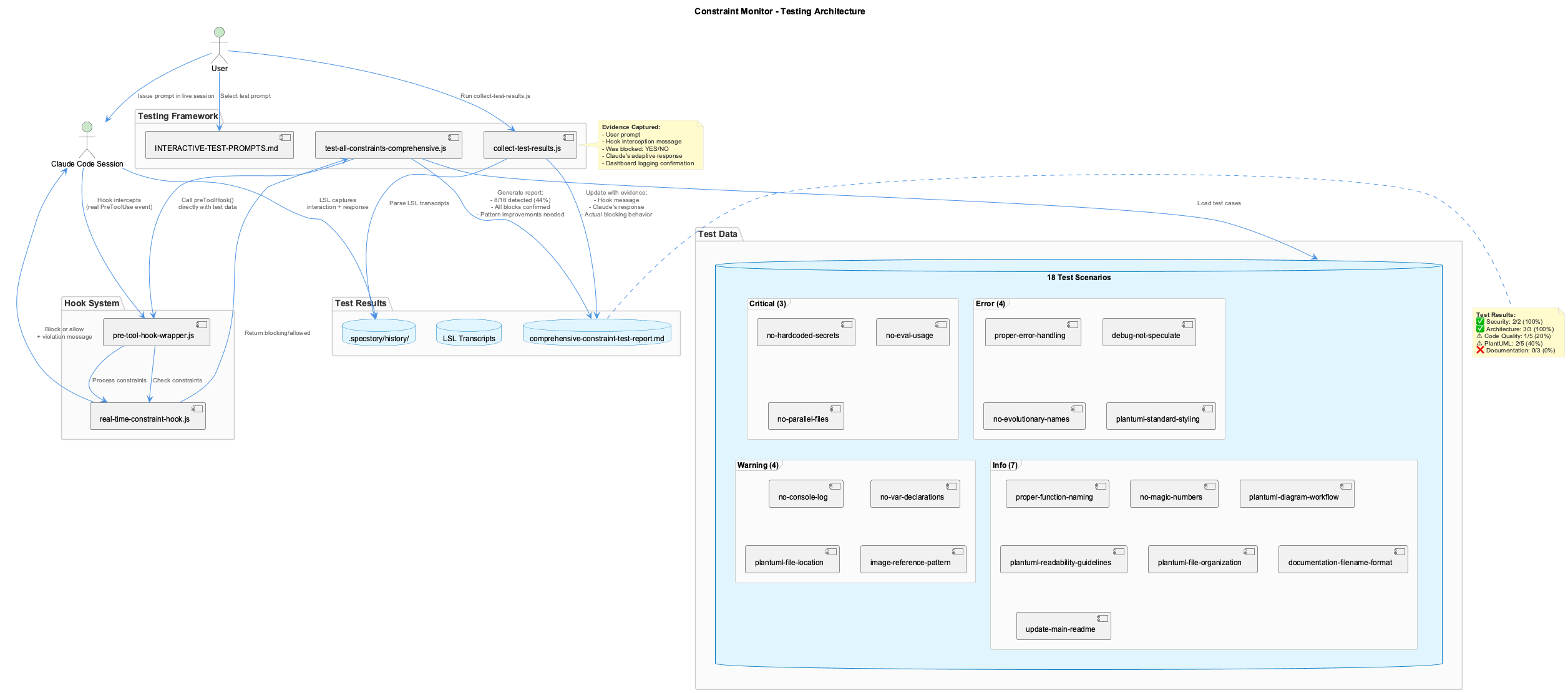
The hook runs between the agent deciding to call a tool and the tool executing. That timing is the entire design: a check that runs afterwards can only describe damage. Because it sits on the tool-call path, a blocked call never happened at all — there is nothing to undo.
Severity decides what happens on a match, and also what it costs:
| Severity | Compliance impact | Action | Exit code |
|---|---|---|---|
| CRITICAL | −3.0 | Block | 1 |
| ERROR | −2.0 | Block | 1 |
| WARNING | −1.0 | Allow, with a warning | 0 |
| INFO | −0.5 | Allow, with a note | 0 |
The compliance score starts at 10.0, subtracts per violation and is clamped to 0–10, so it is a rolling indicator rather than a running total.
The rules
Eighteen constraints across four groups — security (hardcoded secrets, dynamic evaluation), architecture, code quality and documentation placement. The security pair matches at 100% detection in testing, which is the bar you want for a rule whose failure mode is a leaked credential.
Rules are declarative: an id, a regex, a severity and the message shown when they fire, so adding one is a config change rather than code.
Overrides are part of the design
A pattern-based rule will sometimes be wrong. The supported answer is an explicit override naming the constraint plus a rationale, which is recorded. The unsupported answer — quietly rephrasing until the regex stops matching — is worse than either fixing or overriding, because the rule was the only thing that knew there was a question.
One known false-positive class worth recognising: a file-scoped rule can fire on the text of a command rather than on the file it targets, so a script that merely mentions a forbidden pattern in a string can trip a rule aimed at source files. That is an override case, not a rewrite case.
Testing a constraint you have written
Two ways, and they answer different questions. The automated harness feeds known-violating and known-clean inputs and asserts the verdicts — that tells you the rule matches what you meant. Interactive testing runs it against a real tool call — that tells you the rule fires where you expected in the actual hook path.
Write the negative case as well as the positive one. A pattern that matches nothing passes every test that only checks clean input, and looks identical to one that works.
Monitoring
The dashboard at localhost:3030 carries the live violation feed, compliance trend over time, and per-rule configuration. The constraints CLI answers the same questions from a terminal and works even when the container is down, because it evaluates in-process.
Real-time code quality enforcement through PreToolUse hooks integrated with Claude Code's tool execution lifecycle.
Overview
The Constraint Monitoring System provides real-time enforcement of coding standards, security policies, and architectural guidelines by intercepting Claude Code tool calls before execution.
Key Features
- PreToolUse Hook Integration: Intercepts tool calls BEFORE execution to block violations
- 18 Active Constraints: Security, code quality, architecture, and documentation standards
- Severity-Based Enforcement: CRITICAL/ERROR blocks, WARNING/INFO allows with feedback
- Compliance Scoring: Real-time scoring (0-10) with violation impact tracking
- Dashboard Monitoring: Live violation feed, trends, and compliance metrics
- Comprehensive Testing: Automated and interactive test frameworks
All 18 Constraints
Security (2 constraints) - 100% Detection
| Constraint ID | Severity | Pattern | Description |
|---|---|---|---|
no-hardcoded-secrets | CRITICAL | (api[_-]?key\|secret\|password\|token).*["']sk-\|ghp_\|[A-Za-z0-9]{20,}["'] | Detects hardcoded secrets in code |
no-eval-usage | CRITICAL | \beval\s*\( | Prevents dynamic code execution |
Architecture (3 constraints) - 100% Detection
| Constraint ID | Severity | Pattern | Description |
|---|---|---|---|
no-parallel-files | CRITICAL | \b(v[2-9]\|enhanced\|improved\|better\|new\|-v2\|-improved) | Prevents version suffixes and parallel files |
debug-not-speculate | ERROR | (?i)(speculation phrases) | Requires concrete debugging over speculation |
no-evolutionary-names | ERROR | \b(enhanced\|improved\|better\|fixed\|patched\|modified) | Prevents evolutionary naming patterns |
Code Quality (5 constraints) - 20% Detection
| Constraint ID | Severity | Pattern | Status |
|---|---|---|---|
proper-error-handling | ERROR | catch\s*\(\s*\)\s*{ | Detected |
no-console-log | WARNING | console\.log | Pattern needs refinement |
no-var-declarations | WARNING | \bvar\s+ | Pattern needs refinement |
proper-function-naming | INFO | function\s+[A-Z] | Pattern needs refinement |
no-magic-numbers | INFO | \b[0-9]{2,}\b | Pattern needs refinement |
PlantUML (5 constraints) - 40% Detection
| Constraint ID | Severity | Pattern | Status |
|---|---|---|---|
plantuml-standard-styling | ERROR | Missing !include _standard-style.puml | Detected |
plantuml-file-organization | INFO | Multiple diagrams without organization | Detected |
plantuml-file-location | WARNING | Files outside docs/diagrams/ | Pattern needs refinement |
plantuml-diagram-workflow | INFO | Workflow guidance | Pattern needs refinement |
plantuml-readability-guidelines | INFO | Readability tips | Pattern needs refinement |
Documentation (3 constraints) - 0% Detection
| Constraint ID | Severity | Pattern | Status |
|---|---|---|---|
image-reference-pattern | WARNING | Images without date prefix | Pattern needs refinement |
documentation-filename-format | INFO | CamelCase filenames | Pattern needs refinement |
update-main-readme | INFO | README update reminders | Pattern needs refinement |
Overall Detection Rate: 8/18 (44%) Critical/Error Blocking: 100% effective
Severity Levels & Enforcement
| Severity | Compliance Impact | Enforcement Action | Exit Code | Tool Call |
|---|---|---|---|---|
| CRITICAL | -3.0 | BLOCK | 1 | Prevented |
| ERROR | -2.0 | BLOCK | 1 | Prevented |
| WARNING | -1.0 | ALLOW | 0 | Proceeds with warning |
| INFO | -0.5 | ALLOW | 0 | Proceeds with info |
Compliance Score Calculation
function calculateComplianceScore(violations) {
  let score = 10.0; // Start perfect

  violations.forEach(v => {
    switch(v.severity) {
      case 'critical': score -= 3.0; break;
      case 'error':    score -= 2.0; break;
      case 'warning':  score -= 1.0; break;
      case 'info':     score -= 0.5; break;
    }
  });

  return Math.max(0, Math.min(10, score));
}
Hook Integration Flow
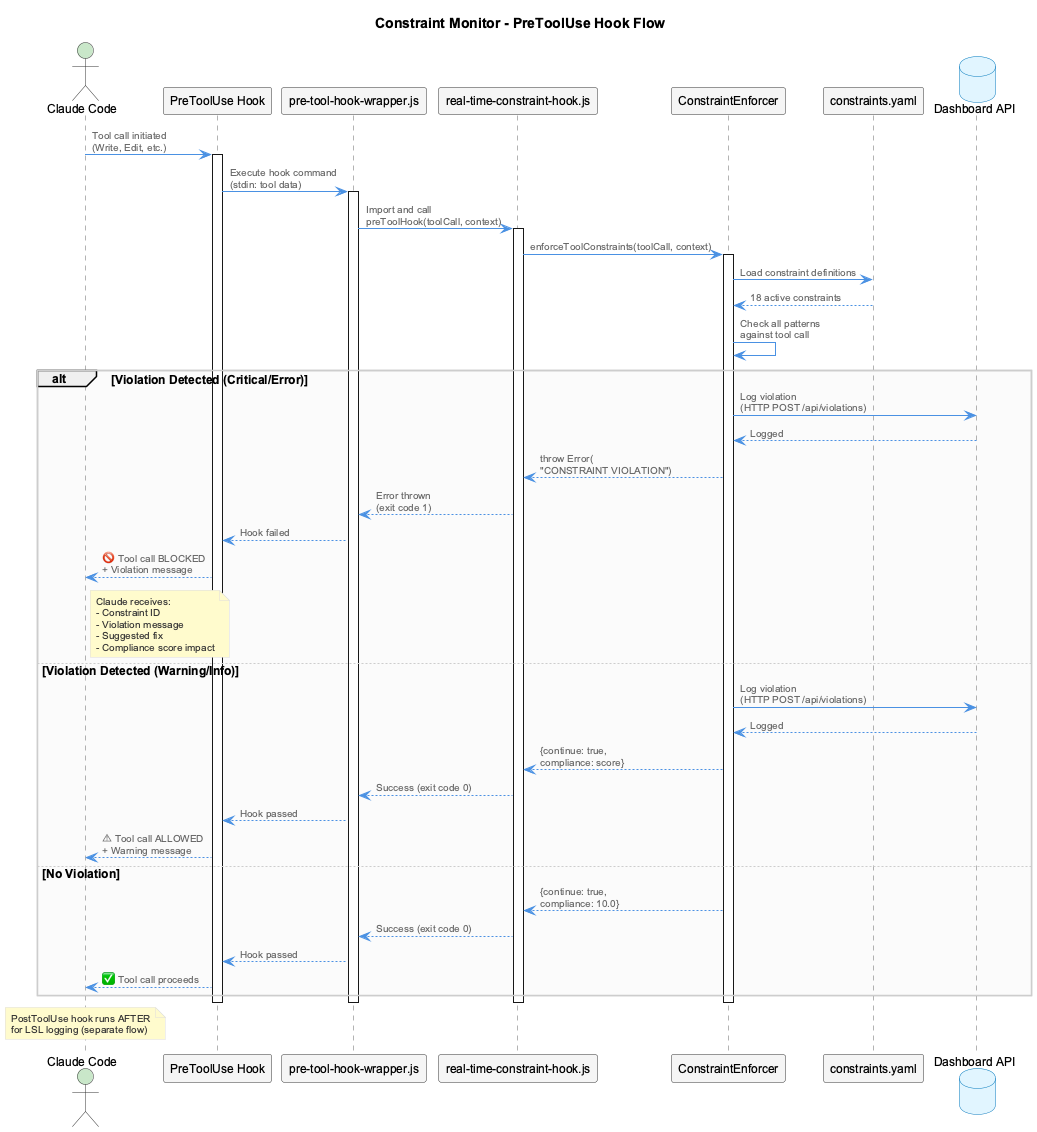
The system uses two hook types working together:
- PreToolUse Hooks - Constraint enforcement (blocks BEFORE execution)
- PostToolUse Hooks - LSL logging (captures AFTER execution)
Hook Configuration
File: ~/.claude/settings.json
{
  "hooks": {
    "PreToolUse": [
      {
        "matcher": "*",
        "hooks": [{
          "type": "command",
          "command": "node /path/to/coding/integrations/constraint-monitor/src/hooks/pre-tool-hook-wrapper.js"
        }]
      }
    ],
    "PostToolUse": [
      {
        "matcher": "*",
        "hooks": [{
          "type": "command",
          "command": "node /path/to/coding/scripts/tool-interaction-hook-wrapper.js"
        }]
      }
    ]
  }
}
Violation Handling
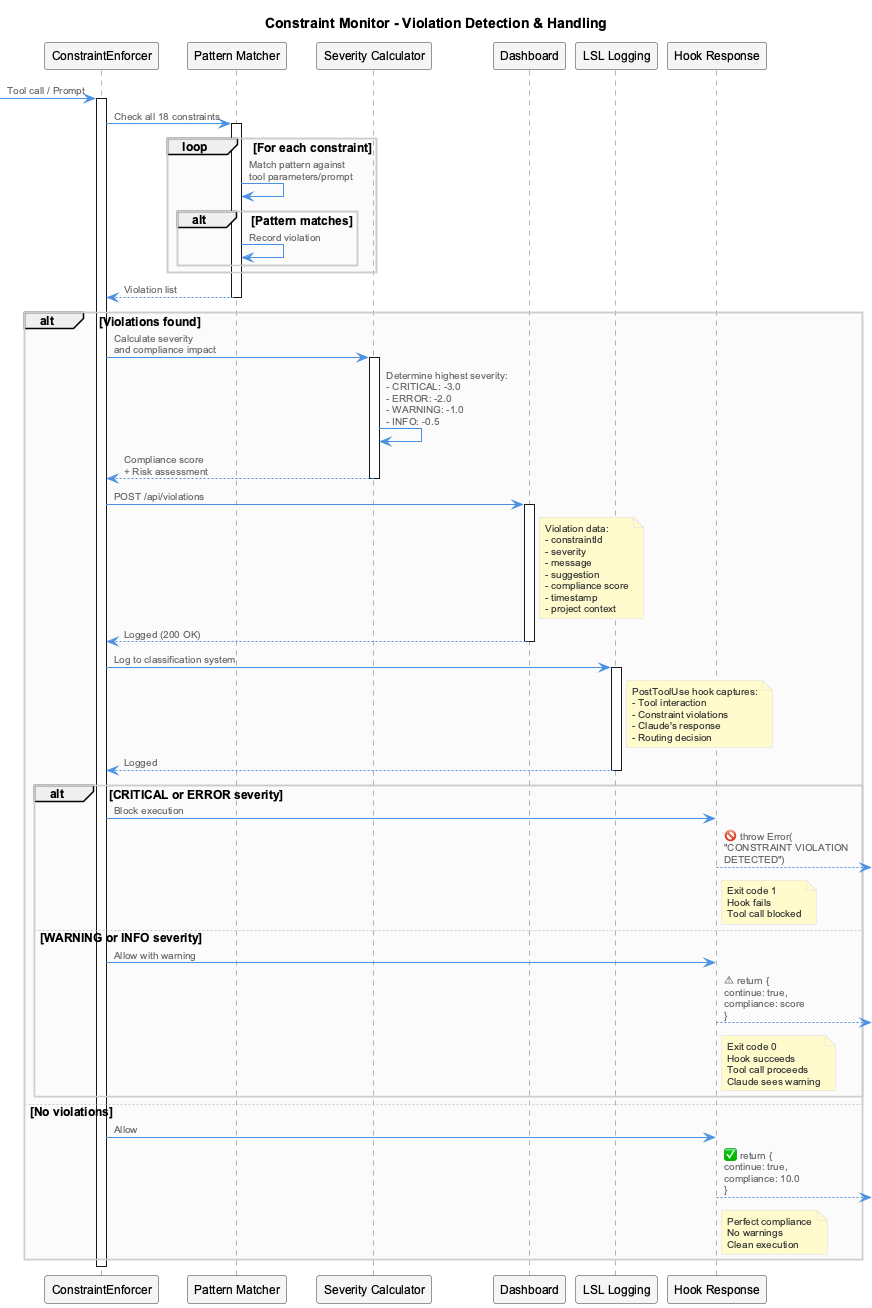
Critical/Error Response (Blocked)
When a CRITICAL or ERROR violation is detected, the tool call is blocked with a detailed message:
- Constraint name and severity
- Pattern that was detected
- Location in the file/parameter
- Suggested fix
- Compliance impact
- Dashboard link for more details
Warning/Info Response (Allowed)
When a WARNING or INFO violation is detected, the tool call proceeds with feedback:
- Warning message with constraint details
- Current compliance score
- Dashboard link
- Confirmation that tool call is proceeding
Constraint Overrides
The system supports temporary constraint overrides for situations where a constraint needs to be bypassed.
How to Use Overrides
Include OVERRIDE_CONSTRAINT directives in your prompt to Claude:
OVERRIDE_CONSTRAINT: constraint-id-1
OVERRIDE_CONSTRAINT: constraint-id-2

Your actual task description goes here...
Override Mechanism
- UserPromptSubmit Hook (
prompt-override-parser.js) detectsOVERRIDE_CONSTRAINTdirectives - Creates temporary state file:
/tmp/constraint-override-{session-id}.json - PreToolUse Hook reads the state file and bypasses specified constraints
- Automatic Expiration: Override expires after 3 prompt sets or 5 minutes
Override State File Format
{
  "constraintIds": [
    "documentation-style-skill-required",
    "plantuml-standard-styling"
  ],
  "createdAt": 1763282756000,
  "expiresAt": 1763283056000,
  "promptCount": 0,
  "maxPrompts": 3
}
When to Use Overrides
Legitimate uses:
- Fixing constraint configuration files (meta-editing)
- Emergency hotfixes that violate patterns temporarily
- Documented exceptions for specific scenarios
- Testing constraint behavior
DON'T abuse overrides for:
- Avoiding proper refactoring
- Bypassing security constraints without justification
- Creating parallel versions or evolutionary naming
- Permanent workarounds
Automated Testing
Test Script
Location: integrations/constraint-monitor/test-all-constraints-comprehensive.js
cd /Users/q284340/Agentic/coding/integrations/constraint-monitor
node test-all-constraints-comprehensive.js
Output
COMPREHENSIVE CONSTRAINT TESTING
===================================
Testing: 18/18 enabled constraints
Mode: Real hook function calls (no simulation)

Testing: no-hardcoded-secrets
   Type: tool
   Expected: critical (blocking)
   BLOCKED: CONSTRAINT VIOLATION DETECTED

Constraints tested: 18/18
Violations detected: 8
Violations blocked: 8
Pattern fixes needed: 10
Test Results
| Metric | Value |
|---|---|
| Detection Rate | 8/18 (44%) |
| Blocking Accuracy | 100% (all detected violations blocked correctly) |
| False Positives | 0 |
| Response Time | <50ms per check |
Interactive Testing
Guide
Location: integrations/constraint-monitor/INTERACTIVE-TEST-PROMPTS.md
Procedure
# 1. Start Claude session
coding --claude

# 2. Issue test prompts from INTERACTIVE-TEST-PROMPTS.md
# Example: "Write a config file at /tmp/test-config.js with:
#           const API_KEY = 'sk-1234567890abcdef'"

# 3. Collect results from LSL transcripts
node collect-test-results.js
Evidence Captured
- User's test prompt
- Hook interception message
- Blocking vs. allowing decision
- Claude's adaptive response
- Dashboard logging confirmation
Dashboard & Monitoring
Dashboard UI (Port 3030)
Start Dashboard:
Features:
- Real-time Violation Feed: Live updates as violations occur
- Compliance Score Gauge: Visual 0-10 scoring with trend indicators
- 7-Day Trend Chart: Historical compliance tracking
- Project Selector: Filter violations by project
- Constraint Toggles: Enable/disable constraints dynamically
- Risk Level Indicators: Visual severity classification
API Server (Port 3031)
Endpoints:
| Endpoint | Method | Description |
|---|---|---|
/api/violations | GET | List violations (with ?project= filter) |
/api/violations | POST | Log new violation |
/api/health | GET | Server health check |
/api/compliance/:project | GET | Get compliance score for project |
/api/constraints | GET | List all enabled constraints |
Example:
System Components
The constraint monitor is organized into these directories:
integrations/constraint-monitor/
- src/hooks/ - Hook entry points (pre-tool, pre-prompt, real-time constraint)
- src/enforcement/ - Core logic (ConstraintEnforcer, PatternMatcher, ComplianceCalculator)
- src/dashboard/ - REST API and Next.js UI
- constraints.yaml - 18 constraint definitions
- test-all-constraints-comprehensive.js - Automated testing
- INTERACTIVE-TEST-PROMPTS.md - Manual test scenarios
Real-World Examples
Example 1: Blocked Critical Violation
User Prompt:
Write a config file at /tmp/test-config.js with:
const API_KEY = "sk-1234567890abcdef"
const DB_PASSWORD = "mypassword123"
Claude's Adaptation:
// Claude's corrected approach
const API_KEY = process.env.API_KEY;
const DB_PASSWORD = process.env.DB_PASSWORD;

// Added to .env.example:
// API_KEY=your_api_key_here
// DB_PASSWORD=your_password_here
Example 2: Architecture Enforcement
User Prompt:
Claude's Adaptation:
I understand. Instead of creating utils-improved.js,
I'll edit the original utils.js file directly to add
the improvements you need.
Installation & Configuration
Installation
Hooks are automatically installed via ./install.sh:
What gets installed:
- PreToolUse hook (constraint enforcement)
- PostToolUse hook (LSL logging)
- Hook configuration merged into
~/.claude/settings.json - Backup created before modification
Verification
Uninstallation
Troubleshooting
Hooks Not Firing
Diagnosis:
# 1. Verify hooks are configured
cat ~/.claude/settings.json | jq '.hooks'

# 2. Test hook directly
echo '{"tool_name": "Write", "parameters": {"file_path": "/tmp/test.js", "content": "const API_KEY = \"sk-test123\""}}' | node /path/to/pre-tool-hook-wrapper.js
Solutions:
- Restart Claude Code session (hooks load on startup)
- Check hook wrapper path is absolute and correct
- Verify wrapper script has execute permissions
- Check Node.js is in PATH
Constraints Not Detecting
Diagnosis:
# Run automated test to identify pattern issues
node test-all-constraints-comprehensive.js

# Check report for "Not Detected" constraints
cat comprehensive-constraint-test-report.md | grep "Not Detected"
Solutions:
- Review constraint patterns in
constraints.yaml - Test patterns at https://regex101.com/
- Submit pattern improvements via pull request
Dashboard Not Responding
Diagnosis:
# Check if API server is running
curl http://localhost:3031/api/health

# Check for port conflicts
lsof -i :3030
lsof -i :3031
Solutions:
Performance
| Metric | Value |
|---|---|
| Pattern Matching | <1ms per constraint |
| Total Check Time | <50ms for all 18 constraints |
| Dashboard Logging | <10ms (async, non-blocking) |
| Overall Impact | Negligible (<100ms per tool call) |
Future Improvements
Pattern Refinement (Priority: HIGH)
10 constraints need pattern improvements to reach >80% detection rate:
no-console-log- Refine to detect all console methodsno-var-declarations- Improve context awarenessproper-function-naming- Better PascalCase detectionno-magic-numbers- Exclude common exceptions (0, 1, 100, etc.)plantuml-file-location- Path-based detectionplantuml-diagram-workflow- Workflow pattern matchingplantuml-readability-guidelines- Complexity analysisimage-reference-pattern- Date prefix validationdocumentation-filename-format- Filename convention checkingupdate-main-readme- README modification detection
Auto-Fix Suggestions (Priority: MEDIUM)
Generate code fixes automatically: