Agent Integration
Adding a coding agent takes one config file. This is what that file contains and what it buys you.
One file
Create config/agents/<name>.sh:
AGENT_NAME="myagent"
AGENT_DISPLAY_NAME="MyAgent"
AGENT_COMMAND="myagent"
AGENT_SESSION_PREFIX="myagent"
AGENT_SESSION_VAR="MYAGENT_SESSION_ID"
AGENT_TRANSCRIPT_FMT="myagent"
AGENT_ENABLE_PIPE_CAPTURE=true
AGENT_PROMPT_REGEX='>\s+([^\n\r]+)[\n\r]'
AGENT_REQUIRES_COMMANDS="myagent"

agent_check_requirements() {
  command -v myagent &>/dev/null || { _agent_log "myagent not on PATH"; exit 1; }
}
Try it
What you get without writing it
Container startup, session logging, tmux wrapping with the shared status bar, knowledge injection, constraint enforcement, health monitoring, pipe-pane I/O capture, and session registration and cleanup.
The proof that one file is really enough: the OpenCode integration is 25 lines.
Why one file is sufficient
Everything shared lives in layers the agent does not own, so an agent contributes only what is genuinely specific to it — its binary, how its prompts look on the wire, and any checks it needs before launching.
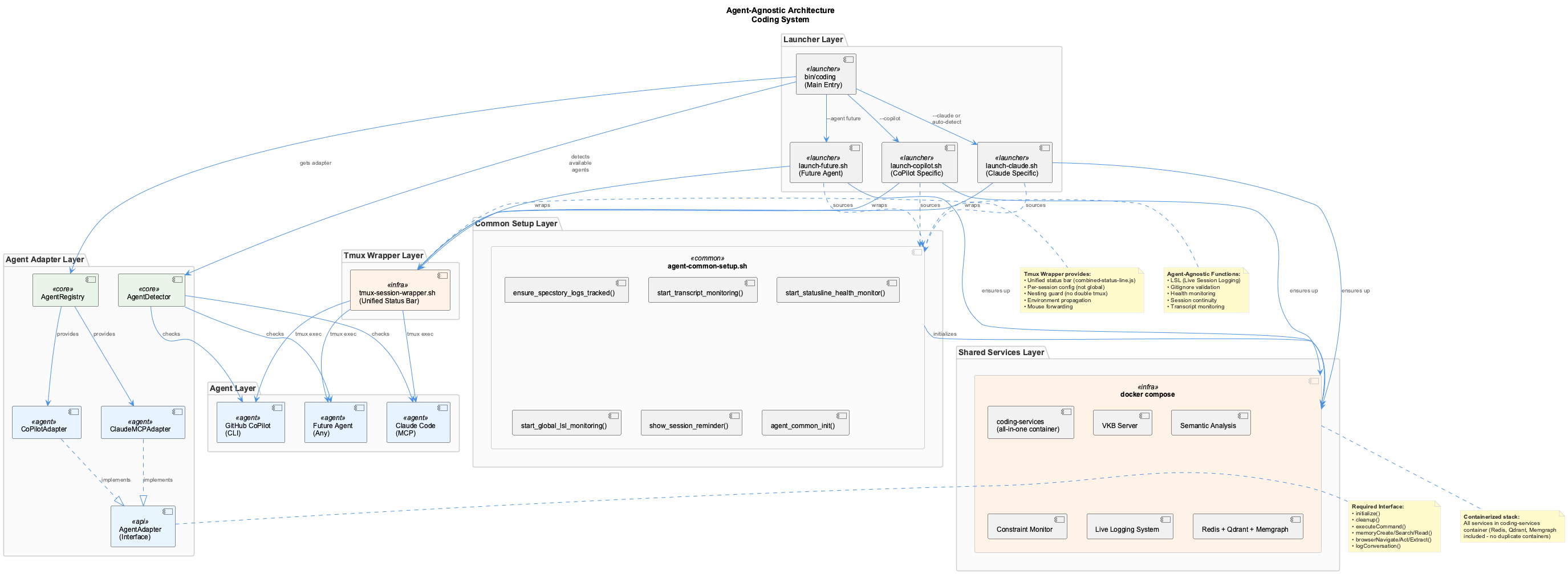
From the top: the agent itself; the tmux wrapper that gives every agent the same status bar; your config file; the shared orchestrator that handles Docker, services and session management; common setup; the shared services; and an adapter interface resolved by naming convention.
What happens at launch
bin/codingchecks thatconfig/agents/<name>.shexists- The orchestrator sources it
- Network detection runs and configures the proxy for wherever you are
- Services come up
- Your
agent_check_requirementsandagent_pre_launchhooks run - Connectivity is validated
- The agent launches inside tmux with the shared status bar
Network detection runs at step 3, before your hooks, so by the time they execute the proxy environment is already correct for the current network.
The variables that matter
| Variable | What it is for |
|---|---|
AGENT_NAME | Internal identifier, used in environment variable names |
AGENT_COMMAND | The binary to exec inside tmux |
AGENT_SESSION_PREFIX | Prefix for the tmux session name |
AGENT_TRANSCRIPT_FMT | Which transcript format the session logger should expect |
AGENT_ENABLE_PIPE_CAPTURE | Capture terminal I/O — needed for agents with no native transcript |
AGENT_PROMPT_REGEX | How to recognise a user prompt in that captured stream |
AGENT_REQUIRES_COMMANDS | Binaries that must exist before launching |
AGENT_ENABLE_PIPE_CAPTURE and AGENT_PROMPT_REGEX go together. An agent that writes its own session transcript does not need them; one that only prints to the terminal does, and the regex is what turns that stream back into discrete prompts.
Hooks you can define
agent_check_requirements runs before anything expensive and should fail loudly if the agent cannot run. agent_pre_launch is for anything the agent needs set up immediately before it starts. Both are optional — an agent whose binary is simply on the PATH needs neither.
Testing a new agent
That resolves the config and reports what would happen without launching. Once it runs, check that sessions appear in the status line and that logs are being written for the project — if the agent is absent from the status line, it has no session monitor, which usually means the transcript format or pipe capture is not configured correctly.
Adding New Coding Agents to the Coding System
This guide provides step-by-step instructions for integrating new AI coding assistants into the agent-agnostic Coding system.
1-File Integration
Adding a new agent requires only a single config file (config/agents/<name>.sh). No changes to shared code needed.
Overview
The Coding system supports multiple AI coding assistants through a config-driven architecture. All agents share common infrastructure:
- Tmux Session Wrapping - Unified status bar rendering via
tmux-session-wrapper.sh - Live Session Logging (LSL) - Automatic transcript monitoring
- Knowledge Management - VKB server and semantic analysis
- Constraint Monitoring - Real-time code quality enforcement
- Health Monitoring - System status and recovery
- Browser Automation - Playwright integration
- Session Continuity - Cross-session context
- Pipe-Pane Capture - Optional I/O capture for non-native agents (prompt detection, hook firing)
Architecture
Agent-Agnostic Design
The system follows a layered architecture:
- Agent Layer - Your AI coding assistant (Claude, CoPilot, OpenCode, Pi, etc.)
- Tmux Wrapper Layer - Shared
tmux-session-wrapper.shwraps all agents in tmux with unified status bar - Config Layer - Agent definitions in
config/agents/<name>.sh - Orchestration Layer -
launch-agent-common.shhandles all shared startup (Docker, services, monitoring) - Common Setup Layer - Shared initialization (LSL, monitoring, gitignore)
- Shared Services Layer - VKB, Semantic Analysis, Constraints, LSL
- Adapter Layer - Abstract interface + agent implementations (loaded dynamically)
Integration Flow
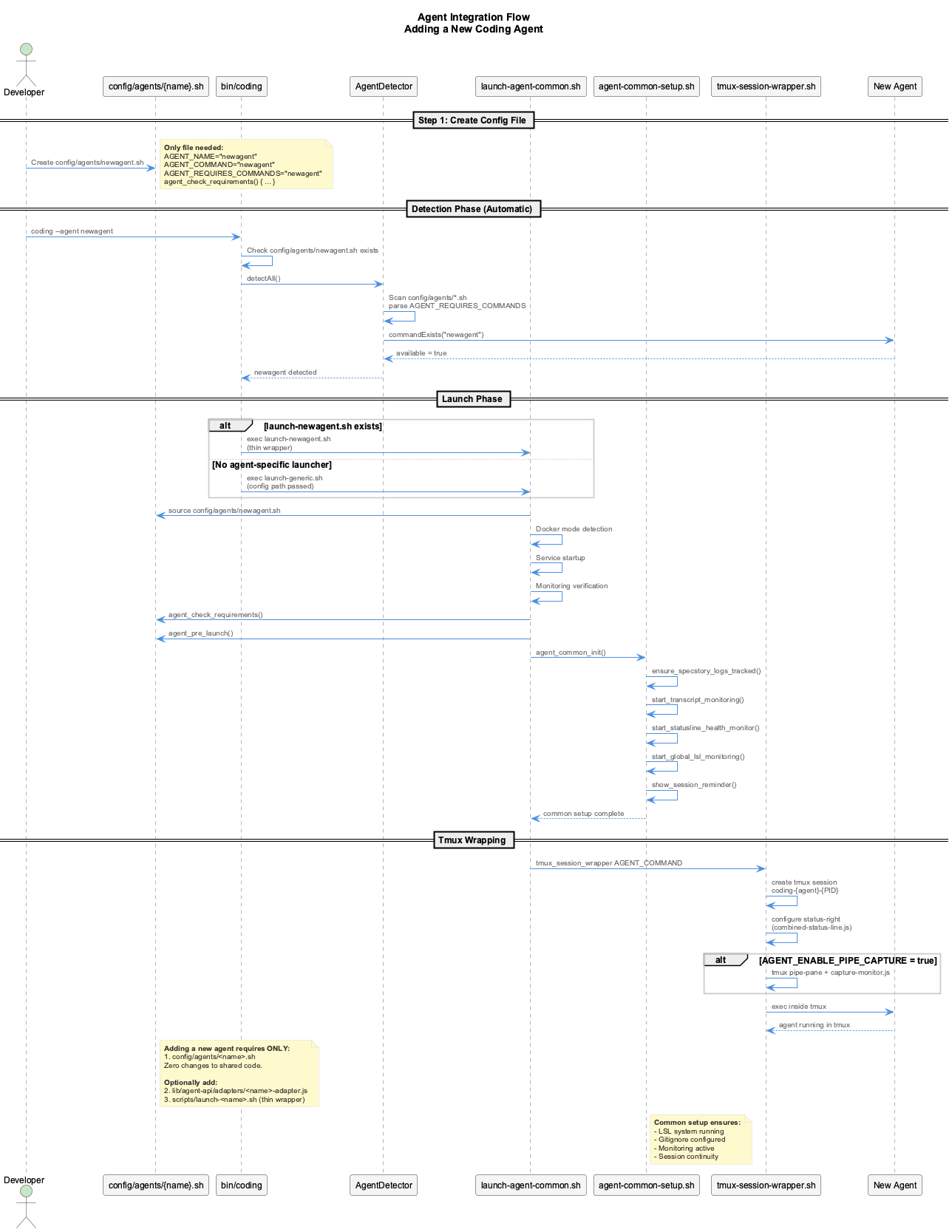
When a new agent is launched:
bin/codingvalidates config exists inconfig/agents/<name>.sh- Shared orchestrator (
launch-agent-common.sh) sources the config - Network detection — VPN/CN status, proxy auto-configuration
- Services start (Docker compose brings up the
coding-servicescontainer stack) - Agent-specific hooks run (
agent_check_requirements,agent_pre_launch) - Agent validates API connectivity (
validate_agent_connectivity) - Agent launches wrapped in tmux session with unified status bar
Startup Sequence
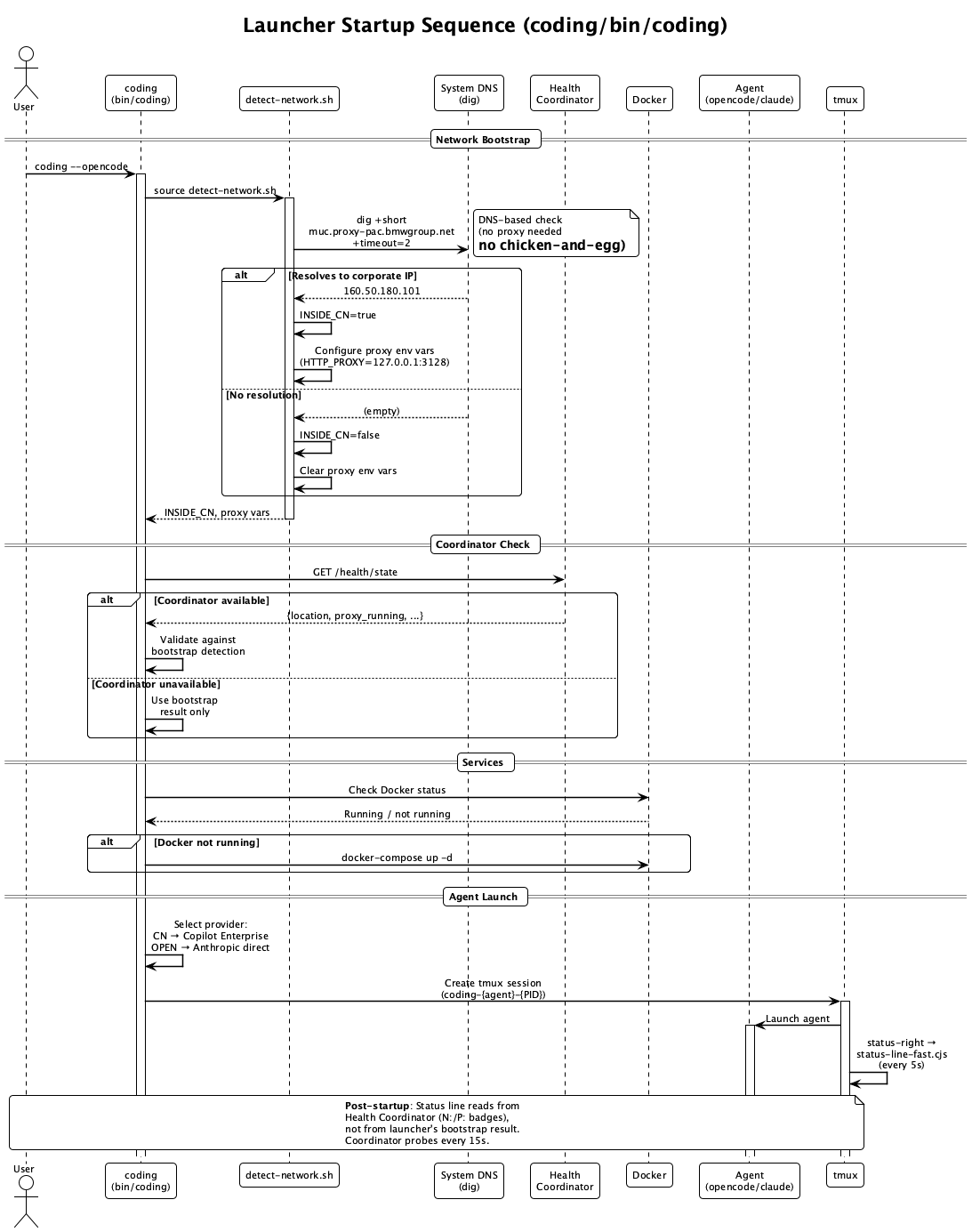
Network-Aware Agent Selection
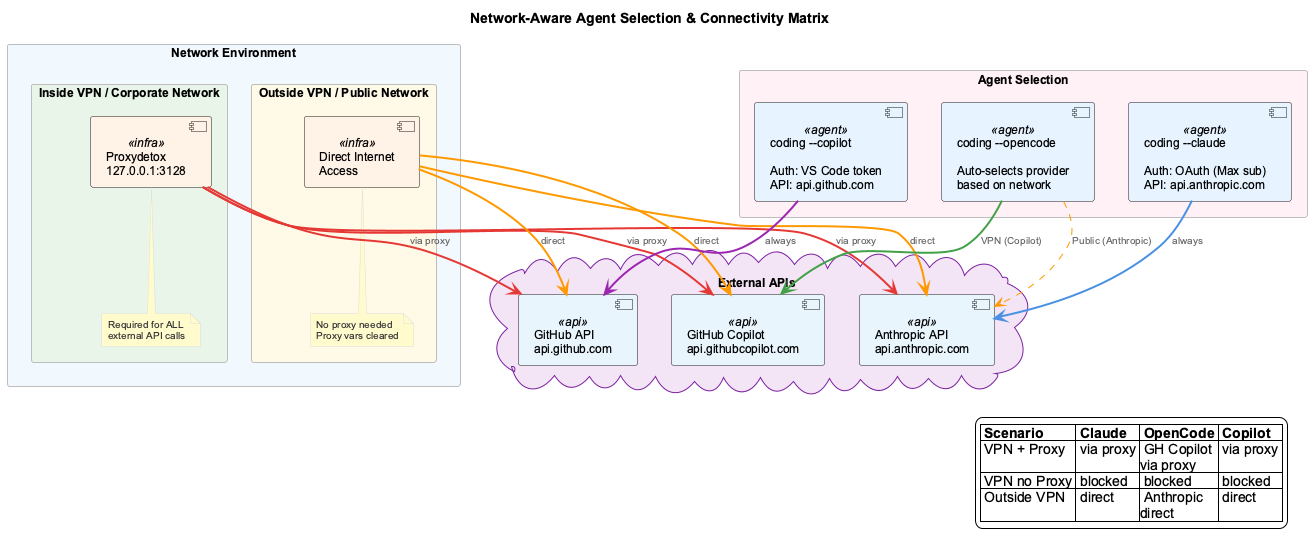
The launcher detects the network environment and automatically configures each agent:
| Scenario | Proxy | Claude Code | OpenCode | Copilot CLI |
|---|---|---|---|---|
| Inside VPN | Required (proxydetox) | Anthropic via proxy | GH Copilot Enterprise via proxy | GH API via proxy |
| Outside VPN | Cleared | Anthropic direct | Anthropic direct | GH API direct |
| Inside VPN, no proxy | Missing | Blocked | Blocked | Blocked |
Key behaviors:
detect-network.shruns early in the startup pipeline (before agent hooks)- Inside CN: auto-detects proxydetox on
127.0.0.1:3128, setsHTTP_PROXY/HTTPS_PROXY - Outside CN: clears proxy env vars that would route through a non-existent proxy
- OpenCode auto-switches model:
github-copilot-enterprise/claude-opus-4.6(VPN) →claude-opus-4-6(public) - All agents call
validate_agent_connectivity()to verify API reachability before launch CODING_FORCE_CN=true/falseoverrides detection for testing
Launcher Service-Startup Flow
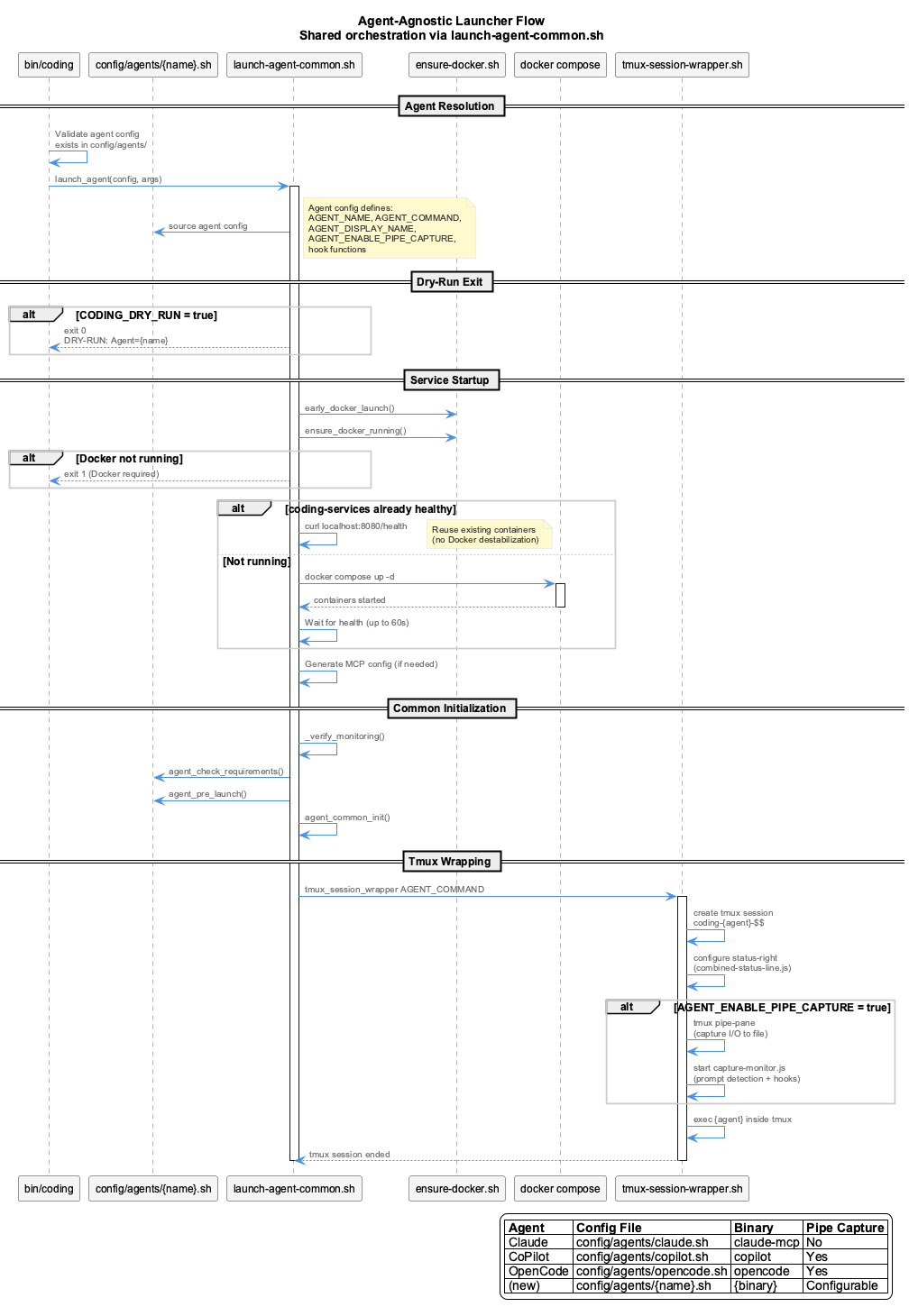
All agents share identical container-startup logic via launch-agent-common.sh:
- Container reuse (health check before starting new containers)
- Docker compose service startup
- Docker MCP config generation
Quick Start (1 File)
Create config/agents/myagent.sh:
#!/bin/bash
# Agent definition: My Agent
# Sourced by launch-agent-common.sh

AGENT_NAME="myagent"
AGENT_DISPLAY_NAME="MyAgent"
AGENT_COMMAND="myagent"
AGENT_SESSION_PREFIX="myagent"
AGENT_SESSION_VAR="MYAGENT_SESSION_ID"
AGENT_TRANSCRIPT_FMT="myagent"
AGENT_ENABLE_PIPE_CAPTURE=true
AGENT_PROMPT_REGEX='>\s+([^\n\r]+)[\n\r]'
AGENT_REQUIRES_COMMANDS="myagent"

# Verify agent CLI is available
agent_check_requirements() {
  if ! command -v myagent &>/dev/null; then
    _agent_log "Error: myagent CLI is not installed or not in PATH"
    exit 1
  fi
  _agent_log "myagent CLI detected"
}
That's it. Now test:
# Verify config is discovered
coding --agent myagent --dry-run

# Launch (if myagent binary is installed)
coding --agent myagent
What You Get Automatically
- Docker container startup
- Monitoring verification
- LSL transcript monitoring
- Tmux session with status bar
- Pipe-pane I/O capture (since
AGENT_ENABLE_PIPE_CAPTURE=true) - Session registration and cleanup
- All shared infrastructure
Agent Config Reference
Required Variables
| Variable | Description | Example |
|---|---|---|
AGENT_NAME | Internal identifier (used in env vars) | "myagent" |
AGENT_COMMAND | Binary/script to exec inside tmux | "myagent" or "$CODING_REPO/bin/my-wrapper" |
Optional Variables
| Variable | Default | Description |
|---|---|---|
AGENT_DISPLAY_NAME | $AGENT_NAME | Human-readable name for log messages |
AGENT_SESSION_PREFIX | $AGENT_NAME | Prefix for session ID ({prefix}-{PID}-{timestamp}) |
AGENT_SESSION_VAR | (none) | Env var to export session ID as (e.g. CLAUDE_SESSION_ID) |
AGENT_TRANSCRIPT_FMT | $AGENT_NAME | Transcript format identifier |
AGENT_ENABLE_PIPE_CAPTURE | false | Enable tmux pipe-pane I/O capture |
AGENT_PROMPT_REGEX | (none) | Regex for prompt detection (required if capture enabled) |
AGENT_REQUIRES_COMMANDS | $AGENT_COMMAND | Space-separated list of required CLI binaries |
Hook Functions
Define these functions in your config to customize behavior:
# Called after services start, before agent launch
# Use to verify agent-specific dependencies
agent_check_requirements() {
  # Return non-zero or exit 1 to block launch
}

# Called just before tmux wrapping
# Use to start agent-specific services, log info
agent_pre_launch() {
  # Start HTTP adapter, set env vars, etc.
}

# Called on EXIT/INT/TERM (before PSM cleanup)
# Use to stop agent-specific background processes
agent_cleanup() {
  # Kill background servers, etc.
}
Hook Environment
All hooks have access to _agent_log for logging, $CODING_REPO, $TARGET_PROJECT_DIR, $SESSION_ID, and all other env vars set by the orchestrator.
Optional Enhancements
Agent Adapter (for programmatic API access)
If other components need to interact with your agent programmatically, create lib/agent-api/adapters/myagent-adapter.js:
import { BaseAdapter } from '../base-adapter.js';

class MyAgentAdapter extends BaseAdapter {
  constructor(config = {}) {
    super(config);
    this.capabilities = ['memory', 'browser', 'logging'];
  }

  async initialize() { this.initialized = true; }
  async cleanup() { /* cleanup resources */ }

  // Implement methods from API Contract below
}

export default MyAgentAdapter;
The adapter is loaded automatically by convention: lib/agent-api/adapters/${agentType}-adapter.js.
Agent-Specific Launcher (thin wrapper)
If you need to customize the sourcing order or add pre-config logic, create scripts/launch-myagent.sh:
#!/bin/bash
set -e
SCRIPT_DIR="$(cd "$(dirname "${BASH_SOURCE[0]}")" && pwd)"
CODING_REPO="$(dirname "$SCRIPT_DIR")"
export CODING_REPO
source "$SCRIPT_DIR/agent-common-setup.sh"
source "$SCRIPT_DIR/launch-agent-common.sh"
launch_agent "$CODING_REPO/config/agents/myagent.sh" "$@"
If no launch-myagent.sh exists, bin/coding automatically falls back to launch-generic.sh.
API Contract
AgentAdapter Interface
All adapters MUST implement these methods:
Lifecycle Methods
Command Execution
Memory Operations
async memoryCreate(entities: Entity[]): Promise<CreateResult>
async memoryCreateRelations(relations: Relation[]): Promise<CreateResult>
async memorySearch(query: string): Promise<Entity[]>
async memoryRead(): Promise<GraphData>
async memoryDelete(entityNames: string[]): Promise<DeleteResult>
Browser Operations
async browserNavigate(url: string): Promise<NavigationResult>
async browserAct(action: string, variables: Record<string, any>): Promise<ActionResult>
async browserExtract(): Promise<string>
async browserScreenshot(options?: ScreenshotOptions): Promise<Buffer>
Logging Operations
async logConversation(data: ConversationEntry): Promise<LogResult>
async readConversationHistory(options?: HistoryOptions): Promise<ConversationEntry[]>
Utility Methods
Type Definitions
Full Type Definitions (click to expand)
interface Entity {
  name: string;
  entityType: string;
  observations: string[];
  significance?: number;
  created?: string;
  lastUpdated?: string;
  metadata?: Record<string, any>;
}

interface Relation {
  from: string;
  to: string;
  relationType: string;
  created?: string;
  metadata?: Record<string, any>;
}

interface GraphData {
  nodes: Entity[];
  edges: Relation[];
  metadata?: { nodeCount: number; edgeCount: number; lastAccessed: string; };
}

interface CreateResult { success: boolean; created?: number; updated?: number; errors?: string[]; }
interface DeleteResult { success: boolean; deleted: number; notFound: number; }
interface NavigationResult { success: boolean; url?: string; error?: string; }
interface ActionResult { success: boolean; result?: any; error?: string; }
interface ConversationEntry { timestamp: string; type: string; content: any; metadata?: Record<string, any>; }
interface LogResult { success: boolean; logFile?: string; error?: string; }
interface HistoryOptions { limit?: number; startDate?: Date; endDate?: Date; type?: string; }
Testing
Test Checklist
- [ ] Config:
config/agents/<name>.shexists with required variables - [ ] Dry-run:
coding --agent <name> --dry-runsucceeds - [ ] Detection: Agent detected by
AgentDetector(check withcoding --help) - [ ] Launch: Agent starts via
coding --agent <name> - [ ] Tmux: Agent launches inside tmux session with status bar
- [ ] LSL: Transcripts monitored and classified
- [ ] Monitoring: StatusLine health monitoring active
- [ ] Cleanup: Graceful shutdown works (
agent_cleanupcalled) - [ ] E2E:
tests/integration/launcher-e2e.shpasses
Validation Commands
# Dry-run (safe, no actual launch)
coding --agent myagent --dry-run

# Check detection
coding --help

# Launch agent
coding --agent myagent

# Check LSL status
coding --lsl-status

# Run full E2E test suite
./tests/integration/launcher-e2e.sh
Examples
Claude Code (config/agents/claude.sh)
AGENT_COMMAND="$CODING_REPO/bin/claude-mcp"— launches via MCP wrapperAGENT_ENABLE_PIPE_CAPTURE=false— Claude has native transcript supportagent_check_requirements()— checks MCP sync statusagent_pre_launch()— logs container startup info
GitHub Copilot CLI (config/agents/copilot.sh)
AGENT_COMMAND="copilot"— launches copilot CLI directlyAGENT_ENABLE_PIPE_CAPTURE=true— captures I/O via tmux pipe-paneAGENT_PROMPT_REGEX— detects submitted prompts via❯markeragent_pre_launch()— starts HTTP adapter serveragent_cleanup()— stops HTTP adapter on exit
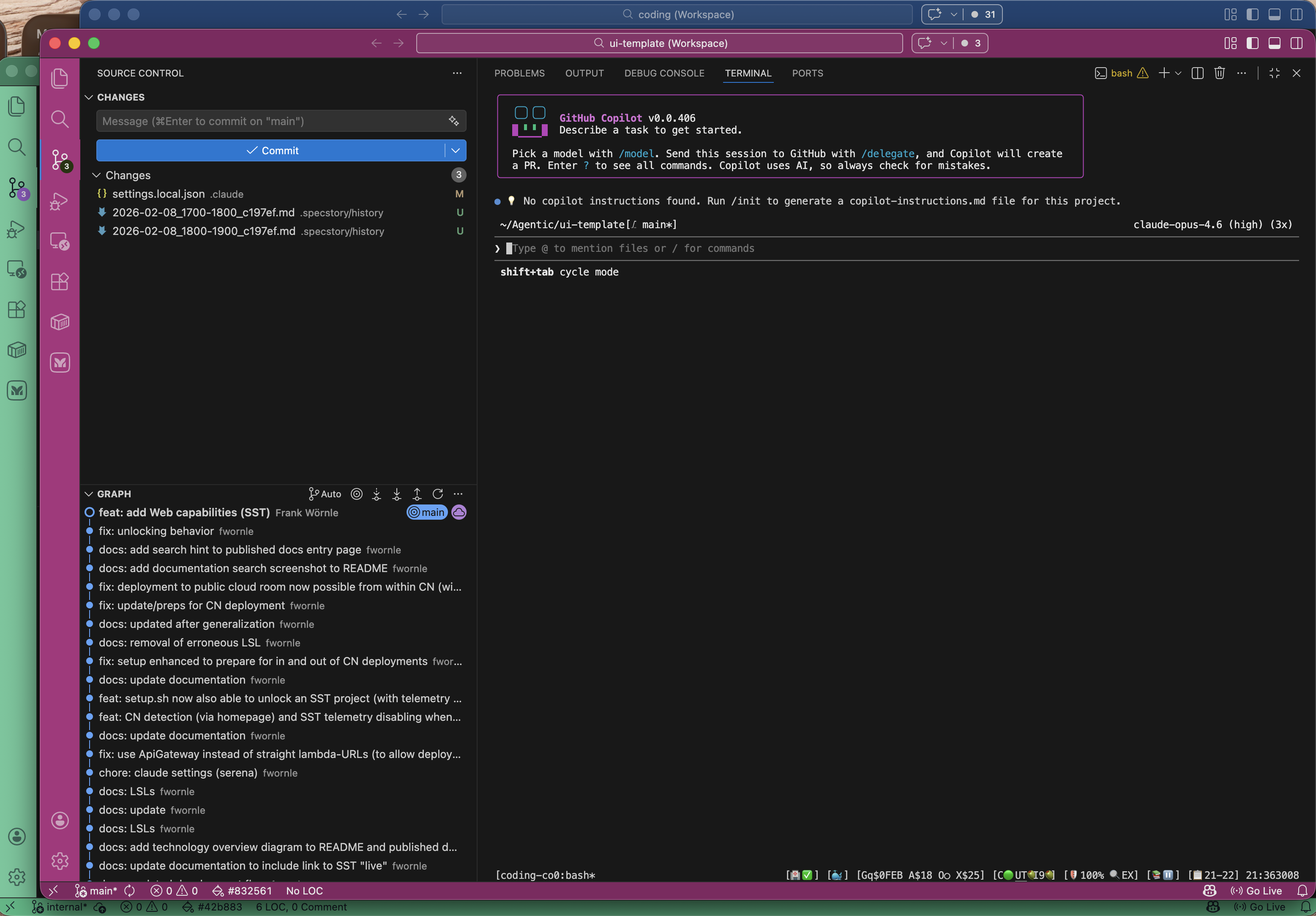
OpenCode (config/agents/opencode.sh)
- 25-line config file, zero shared code changes
- Demonstrates the minimum integration:
AGENT_NAME+AGENT_COMMAND+agent_check_requirements() - Native LSL support: The transcript monitor reads directly from OpenCode's SQLite database (
~/.local/share/opencode/opencode.db) — no pipe-pane capture needed for session logging
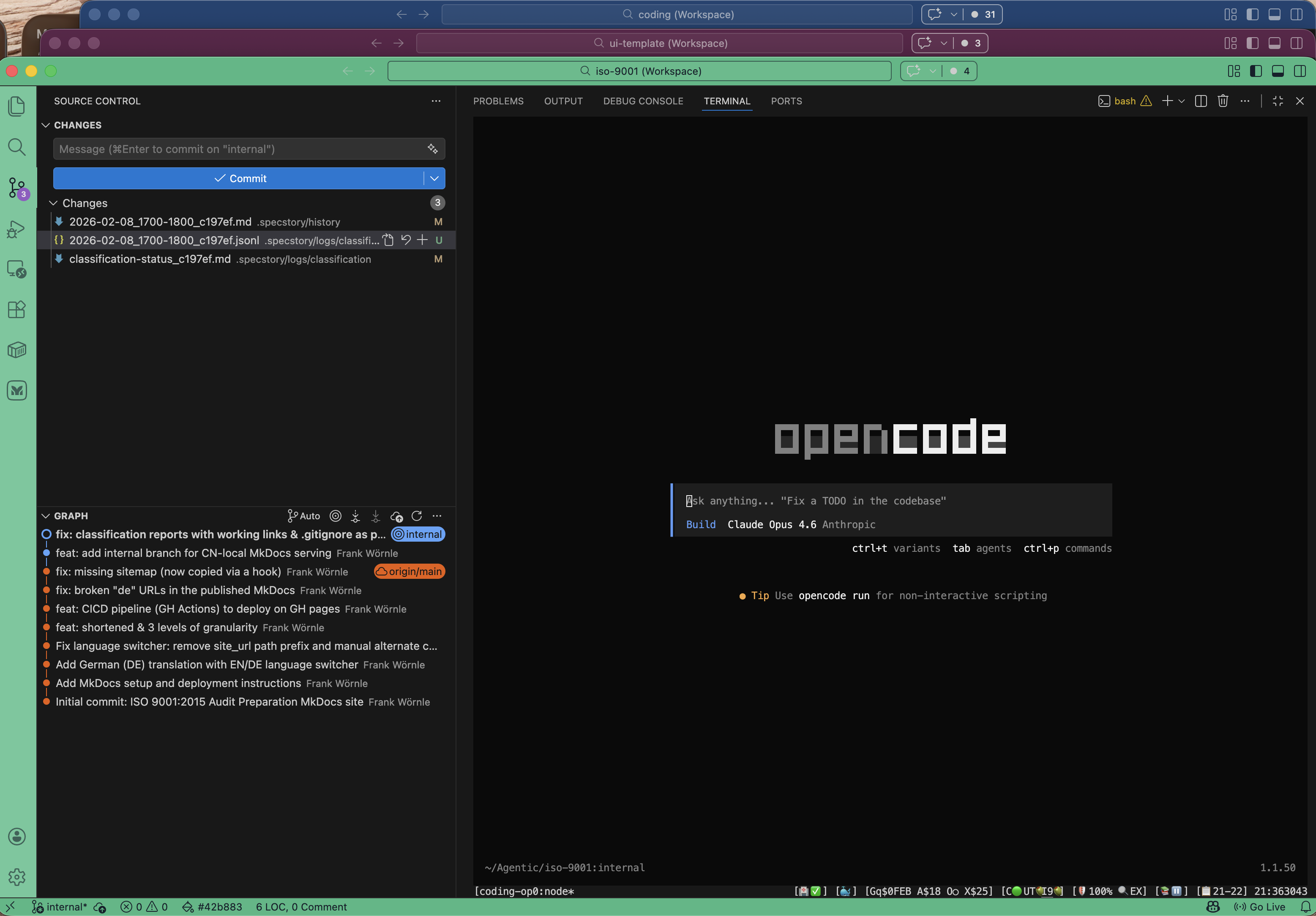
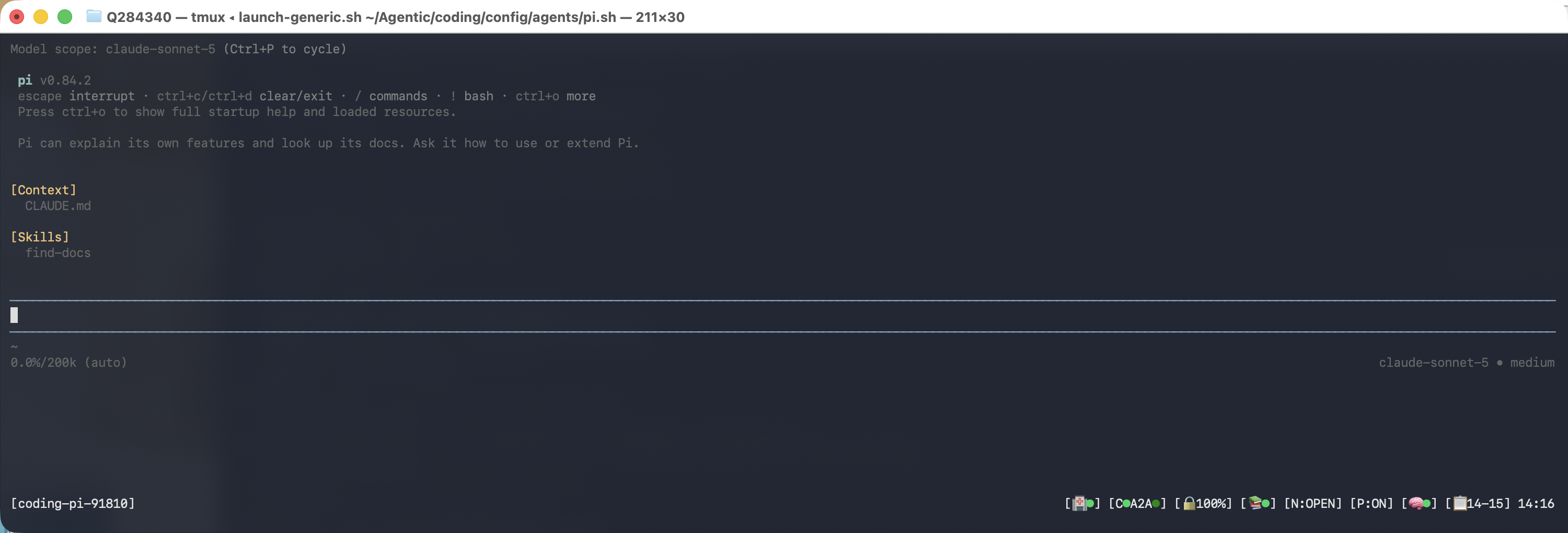
Pi (config/agents/pi.sh)
AGENT_COMMAND="pi"— launches standalone pi TUIAGENT_ENABLE_PIPE_CAPTURE=false— pi writes its own session JSONL, so there is nothing for the terminal-scraping path to addAGENT_INSTALL_COMMAND="npm install -g --ignore-scripts @earendil-works/pi-coding-agent"— auto-installs on first launchagent_pre_launch()— handles first-run OAuth setup, network-adaptive model selection, hooks config- Transcript capture via
PiSessionReader, reading pi's NATIVE session JSONL from the directorypi.shpins viaPI_CODING_AGENT_SESSION_DIR(no hooks to install) - Observational memory via km-core
GraphKMStoreat.data/knowledge-graph/(legacy LibSQL/SQLite.observations/observations.dbarchived 2026-06-05 under Phase 44 Plan 18)
Troubleshooting
Agent Not Detected
- Does
config/agents/<name>.shexist? - Is
AGENT_REQUIRES_COMMANDSset to the correct binary name? - Is the binary in PATH? (
which <binary>)
Dry-Run Fails
- Check
config/agents/<name>.shdefinesAGENT_NAMEandAGENT_COMMAND - Check for syntax errors:
bash -n config/agents/<name>.sh
Services Not Starting
- Are required ports available (8080, etc.)?
- Is Docker running?
- Does
start-services.shcomplete successfully?
Pipe-Pane Capture Not Working
- Is
AGENT_ENABLE_PIPE_CAPTURE=trueset in config? - Is
AGENT_PROMPT_REGEXa valid regex? - Check capture file exists:
ls $CODING_REPO/.logs/capture/ - Check capture-monitor.js logs