Installation
Prerequisites, the install itself, and what it puts on your machine.
Install
git clone --recurse-submodules https://github.com/fwornle/coding ~/Agentic/coding
cd ~/Agentic/coding && ./install.sh
source ~/.zshrc          # or ~/.bashrc
cd ~/my-project && coding
--recurse-submodules is not optional — several integrations are submodules and the install fails confusingly without them.
The two questions
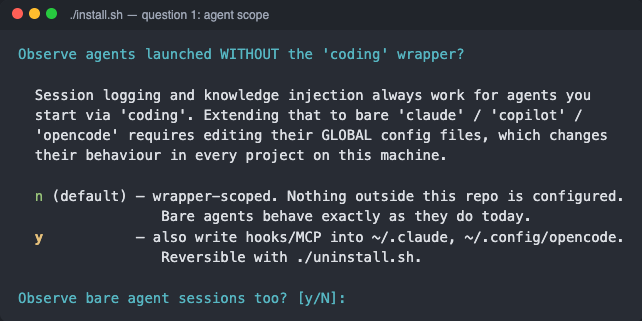
1 — agent scope. Enter (n) keeps your global agent configs untouched: only sessions started through coding are logged and get knowledge injected.
2 — tier. Each tier is a superset of the one before. Enter installs harness.
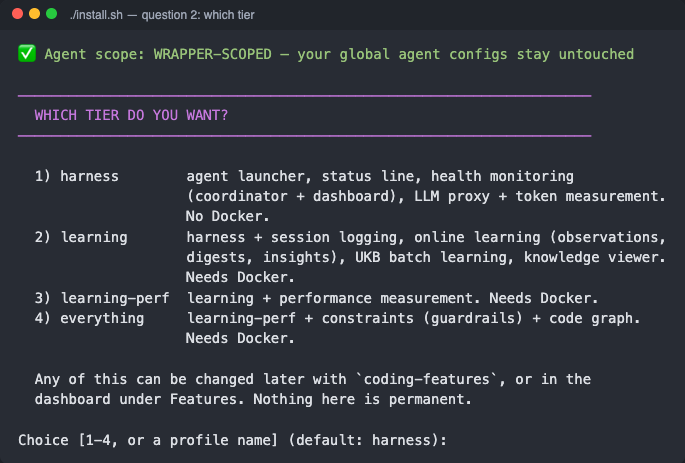
| Tier | Adds | Docker |
|---|---|---|
harness | agent launcher, status line, health monitoring (coordinator + dashboard), LLM proxy + token measurement | no |
learning | session logging, online learning (observations → digests → insights), UKB batch learning, knowledge viewer | yes |
learning-perf | performance measurement | yes |
everything | constraints (guardrails) + code graph | yes |
Change it any time: coding-features profile <tier>, or Dashboard → Features.
The first launch in each repo
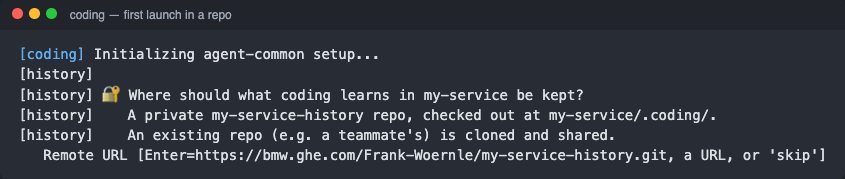
With a learning tier, the first coding in a repo asks where its learned data goes — Enter creates a private <repo>-history, a teammate's URL shares theirs, skip keeps it local. See Per-Repo Tenancy.
What you need
Node.js 22 LTS or newer, plus git, jq and tmux. Docker (running, not just installed) only for learning and up.
On Windows, install inside WSL (with systemd enabled in /etc/wsl.conf); there is no native Windows installer.
What it does to your machine
Prompts before any system-level change, backs up your shell config with a timestamp, and supports --skip-all to decline every system change. Its own state stays in the checkout.
If it fails
Most first-run failures are Docker not running, or a shell not reloaded since the install. Verify & Repair works through the rest.
Before you start
| Tool | Why |
|---|---|
| Docker | learning tiers and up: the knowledge services are containers — it must be running, not merely installed. harness needs none |
| Node.js 22 LTS+ | The host-side launcher; 18 and 20 are EOL |
| Git | Clone the repository and its submodules |
jq | JSON handling throughout the scripts |
tmux | Session wrapping and the shared status bar |
Installing
git clone --recurse-submodules https://github.com/fwornle/coding ~/Agentic/coding
cd ~/Agentic/coding && ./install.sh
source ~/.zshrc
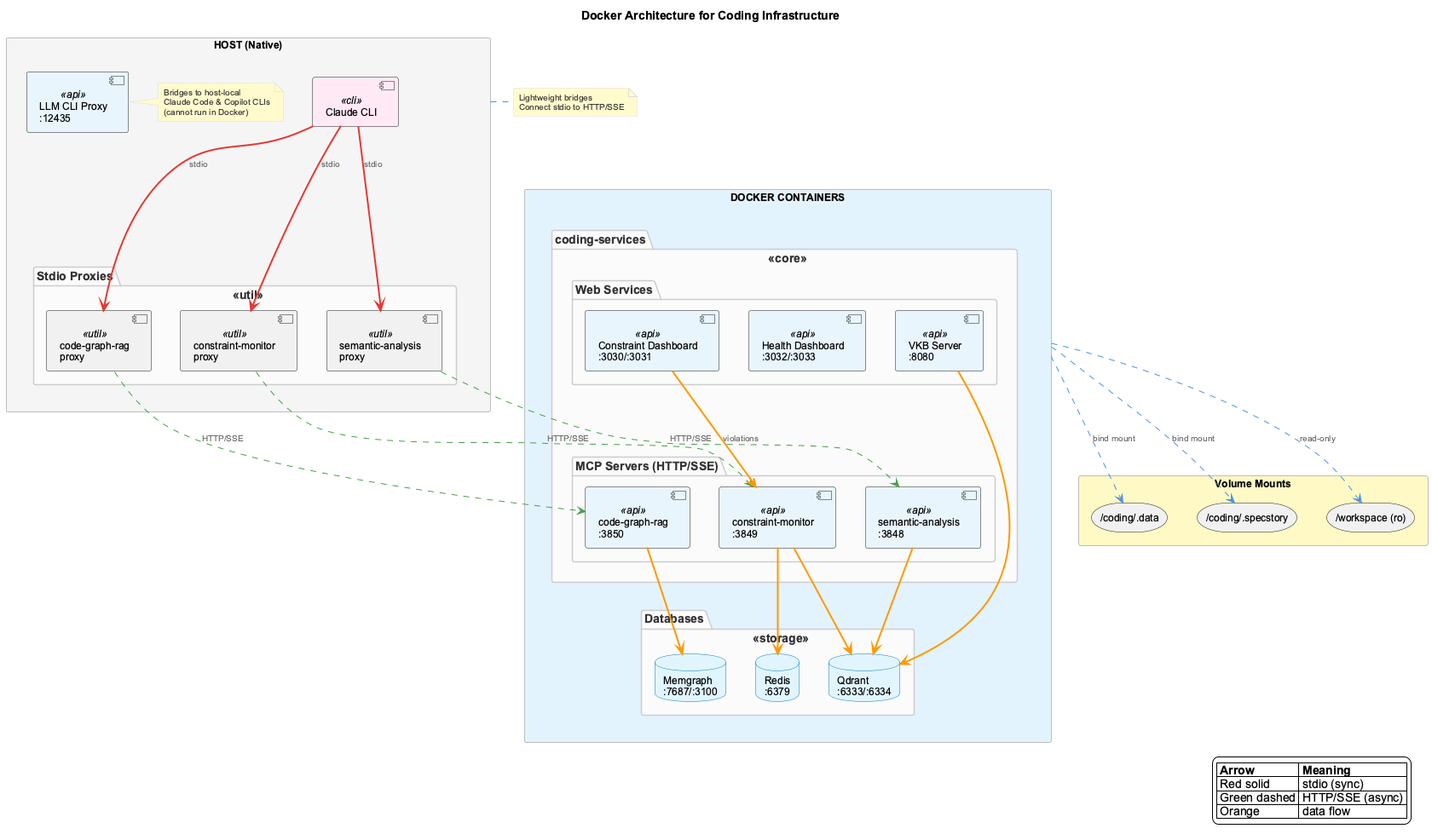
The services run as Docker containers with only the agent CLI native on the host, talking to them through stdio proxies. That is what keeps the install contained and makes removal a matter of stopping containers.
What the installer asks, in order
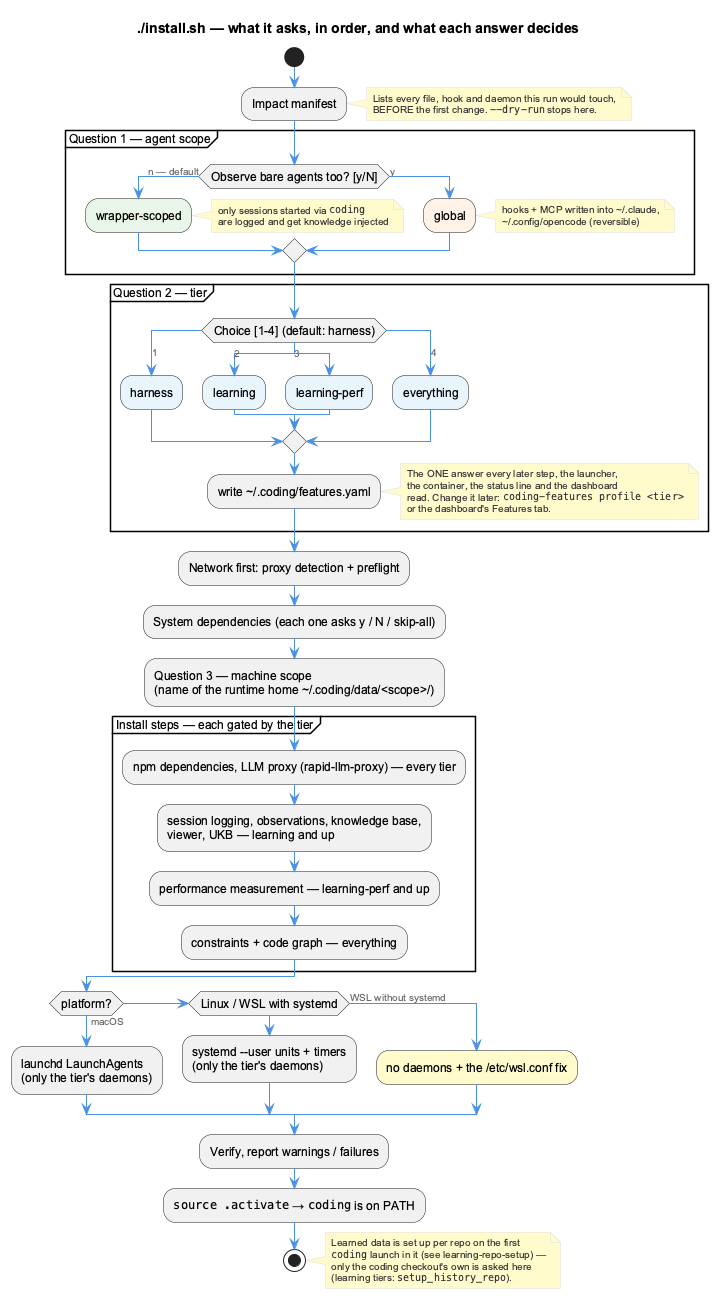
- Impact manifest — every file, hook and background service this run would touch, shown before the first change.
./install.sh --dry-runstops here. - Agent scope — wrapper-scoped (default) or also observe bare
claude/copilot/opencodeby writing their global configs. - Tier —
harness·learning·learning-perf·everything, written to~/.coding/features.yaml. Every later step, the launcher, the container, the status line and the dashboard read that one file. - System dependencies — each missing one asks
y/N/skip-all. - Machine scope — the name of this machine's runtime home
~/.coding/data/<scope>/(caches only; what is shared lives in each repo, see Per-Repo Tenancy).
Unattended: ./install.sh --yes --features=learning (default tier harness). A re-run asks again with your current tier as the default, so changing tier is just re-running it.
Background services are installed per platform — launchd on macOS, systemd user units on Linux and WSL — and only for the features of the chosen tier. WSL without systemd gets no services and the /etc/wsl.conf fix printed instead.
What the installer is careful about
It is deliberately non-intrusive, and each of these is a decision rather than an accident: it prompts before any system-level change, writes a timestamped backup of your shell config before touching it, honours --skip-all to decline every system change, and keeps its data inside the checkout rather than scattering it through your home directory.
What you end up with
| Component | Does |
|---|---|
coding | Launches an agent with every enabled integration attached |
coding-features | Shows and changes the installed tier |
coding sync | Commits, pulls and pushes each repo's learning repo |
semantic | Knowledge-base workflows and ontology management (learning+) |
vkb | Opens the knowledge viewer (learning+) |
| Dashboard | localhost:3032 — health, sessions, insights, tokens, teams, features |
| Session logging | Automatic transcript capture into each repo's .coding/history/ (learning+) |
When it does not work
Work in this order, because the failures nest:
- Is Docker running? (
learningtiers and up) Not installed — running. This is the most common first-run failure. - Has the shell been reloaded?
source ~/.zshrc, or open a new terminal. - Did the submodules come down?
git submodule update --init --recursiveif the clone omitted--recurse-submodules. - Then the dashboard at localhost:3032,
coding-features status, and Verify & Repair for anything remaining.
Step-by-step guide to install coding on your system.
Prerequisites
Before installing, ensure you have these tools:
- Install WSL2 and enable systemd in the distribution (
/etc/wsl.conf:[boot]/systemd=true) — the host services run as systemd user units - Learning tiers: install Docker Desktop with WSL integration
- In WSL2:
Version Requirements
Required — the install aborts without these:
| Tool | Minimum Version | Check Command |
|---|---|---|
| Git | 2.0+ | git --version |
| Node.js | 22 LTS+ | node --version |
| npm | any | npm --version |
| Python | 3.x | python3 --version |
| curl | any | curl --version |
| Docker | 20+, running — learning tiers and up only | docker info |
Optional — reported, never fatal:
| Tool | Minimum Version | Consequence if absent |
|---|---|---|
| jq | 1.6+ | none — every use has a fallback |
| plantuml | any | installed later in the run, and skippable (a repo-local JAR is used instead) |
| tmux | 3.0+ | install completes fine; needed at launch time for status-bar rendering, not by the installer |
Installation
From the learning tier up, the knowledge services (semantic analysis, constraint monitor, code graph, dashboard) run as containers; the launcher, the agent CLI, the health coordinator, the LLM proxy and obs-api run on the host. The harness tier runs no containers at all.
Step 1: Clone Repository
git clone --recurse-submodules https://github.com/fwornle/coding ~/Agentic/coding
cd ~/Agentic/coding
Step 2: Run Installer
The installer will:
- Print the impact manifest — everything it may touch
- Ask the agent scope (default: only
codinglaunches are observed) -
Ask the tier and write
~/.coding/features.yaml -
Check network reachability (DNS, TCP, TLS) and configure a proxy for the install if it finds one
- Install the tier's parts — the LLM proxy always; Docker images, knowledge store and viewer from
learningup - Install the tier's host services (launchd on macOS, systemd user units on Linux / WSL)
- Add
coding,coding-features,semanticand friends to your PATH - With a learning tier: set up the coding checkout's own learning repo (
.coding/)
Step 2a: See what it will change first
This prints every path the installer may touch, grouped by scope, then exits without changing anything at all. It is the authoritative list — this page deliberately does not reproduce it, so it cannot go stale.
Bare agents are not affected by default
Installing this project does not change how bare claude, copilot or opencode behave. Hooks, MCP servers and slash commands are supplied per launch by bin/coding; your shared config files are read, never written.
The installer asks once whether you want them configured globally too — the default is no, recorded in .env as CODING_AGENT_SCOPE=wrapper. Opt in with --global-agents.
--yes does not mean 'yes to everything'
--yes auto-approves system changes but deliberately does not select global agent scope, and does not install the login-persistent LLM proxy service. Those need CODING_INSTALL_GLOBAL_AGENTS=1 and CODING_INSTALL_SYSTEM_SERVICES=1. An unattended run must never silently reconfigure agents outside this project.
Backups
Files the installer modifies are backed up once, as <file>.coding-orig, from before the installer first touched them. ./uninstall.sh reports these rather than deleting them. Run ./install.sh --help for the full flag and environment-variable list.
Step 3: Reload Shell
Step 4: Verify Installation
coding-features status            # the installed tier, feature by feature
curl -s localhost:3034/health     # the health coordinator
Then open the dashboard at localhost:3032: it should read Healthy.

Step 5: Start Coding
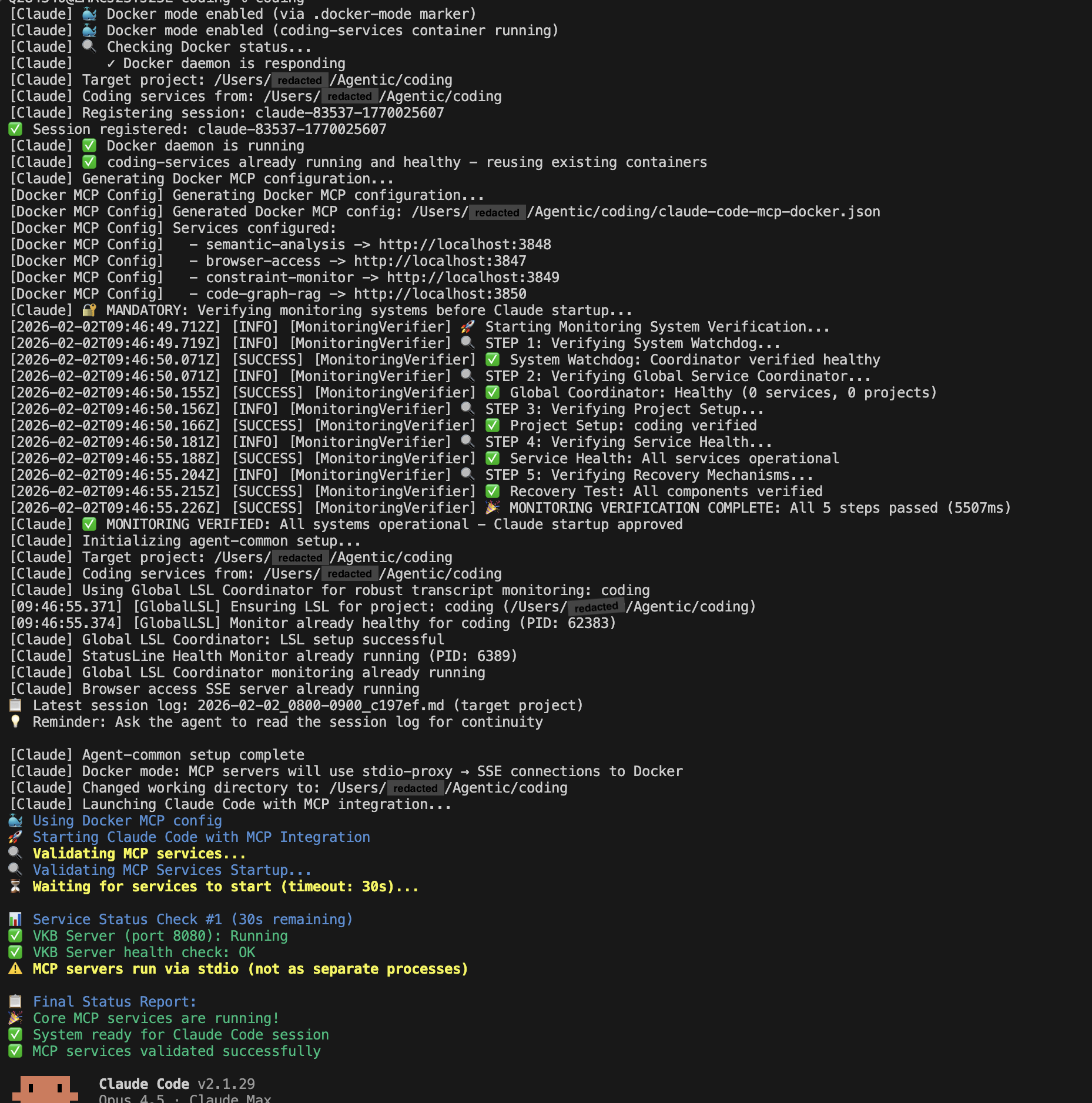
With a learning tier, the first launch in a repo asks where its learned data goes:
What Gets Installed
| Component | Location | Purpose |
|---|---|---|
coding command | ~/Agentic/coding/bin/ | Launch an agent with every enabled integration |
coding-features | ~/Agentic/coding/bin/ | Show / change the installed tier and features |
coding sync | (part of coding) | Commit, pull and push the per-repo learning repos |
semantic | ~/Agentic/coding/bin/ | Knowledge-base workflows (UKB) and ontology |
vkb | ~/Agentic/coding/bin/ | Open the knowledge viewer (learning+) |
| Host services | launchd / systemd user units | health coordinator, LLM proxy, obs-api, session capture — only the tier's |
Containers (learning+) | Docker | semantic analysis, constraints, code graph, dashboard, Qdrant, Redis |
| Agent hooks + MCP | supplied per launch by bin/coding | written globally only with --global-agents |
| Live knowledge store | ~/.coding/data/<scope>/var/ | LevelDB + caches, machine-local |
| Learned data per repo | <repo>/.coding/ | session logs, observations, insights, KB slice, usage — see Per-Repo Tenancy |
Configuration Files Created
| File | Purpose |
|---|---|
~/.coding/features.yaml | the chosen tier / features |
~/.coding/repos.yaml | per repo: its learning repo remote, or skip (written on first launch) |
~/.coding/teams.yaml | your teams (written by Dashboard → Teams) |
.env | API keys and settings |
.env.ports | Port configuration |
Troubleshooting Installation
Docker Not Found
# Verify Docker is installed
docker --version

# Verify Docker daemon is running
docker info

# On macOS, ensure Docker Desktop is running
Permission Denied
# Fix Docker socket permissions (Linux)
sudo usermod -aG docker $USER
# Log out and back in

# Fix directory permissions
chmod -R 755 ~/Agentic/coding
Submodules Missing
Port Conflicts
# Check what's using a port (obs-api shown)
lsof -i :12436

# Change ports in .env.ports
cat .env.ports
Reinstallation
To completely reinstall:
cd ~/Agentic/coding

# Stop all services
docker compose -f docker/docker-compose.yml down 2>/dev/null
pkill -f "coding"

# Clean state (preserves knowledge base)
rm -f .transition-in-progress

# Reinstall
./install.sh
Next Steps
- Verify Installation - Detailed verification and repair
- Configuration - API keys and provider setup
- First Usage - Start using coding
Related Documentation
- Troubleshooting - Common issues and solutions